EasyManua.ls Logo

ZOLL PD 2000 - Page 21

ZOLL PD 2000
93 pages
Print Icon
To Next Page IconTo Next Page
To Previous Page IconTo Previous Page
Loading...
CHECKOUT
PROCEDURES
4.2
TEST
PROCEDURE
+
Turn
unit
to
MONITOR
ON.
It
should
not
turn
on.
e
Turn
off
unit.
e
Adjust
power
supply
voltage
to
9.3V.
+
Turn
unit
on.
It
should
now
turn
on.
Mark
the
Checkout
Procedure
Data
Sheet.
4.3
SHUT
DOWN
VOLTAGE
TEST
e
Set
voltage
to
9.3V.
"LOW
BATTERY"
should
be
displayed
within
30
seconds.
+
“Set
voltage
to
8.75V.
Unit
should
shut
off
within
30
seconds.
+
Turn
off
unit.
Mark
the
Checkout
Procedure
Data
Sheet.
44
TEST
SETUP
*
Remove
red
lead
from
power
supply
and
connect
to
0.10)
resistor.
e
Connect
other
end
of
resistor
to
"+"
terminal
of
power
supply.
e
Connect
multimeter
across
the
resistor.
e
Set
voltage
scale
(if
DVM
is
not
autoranging)
to
200
mV.
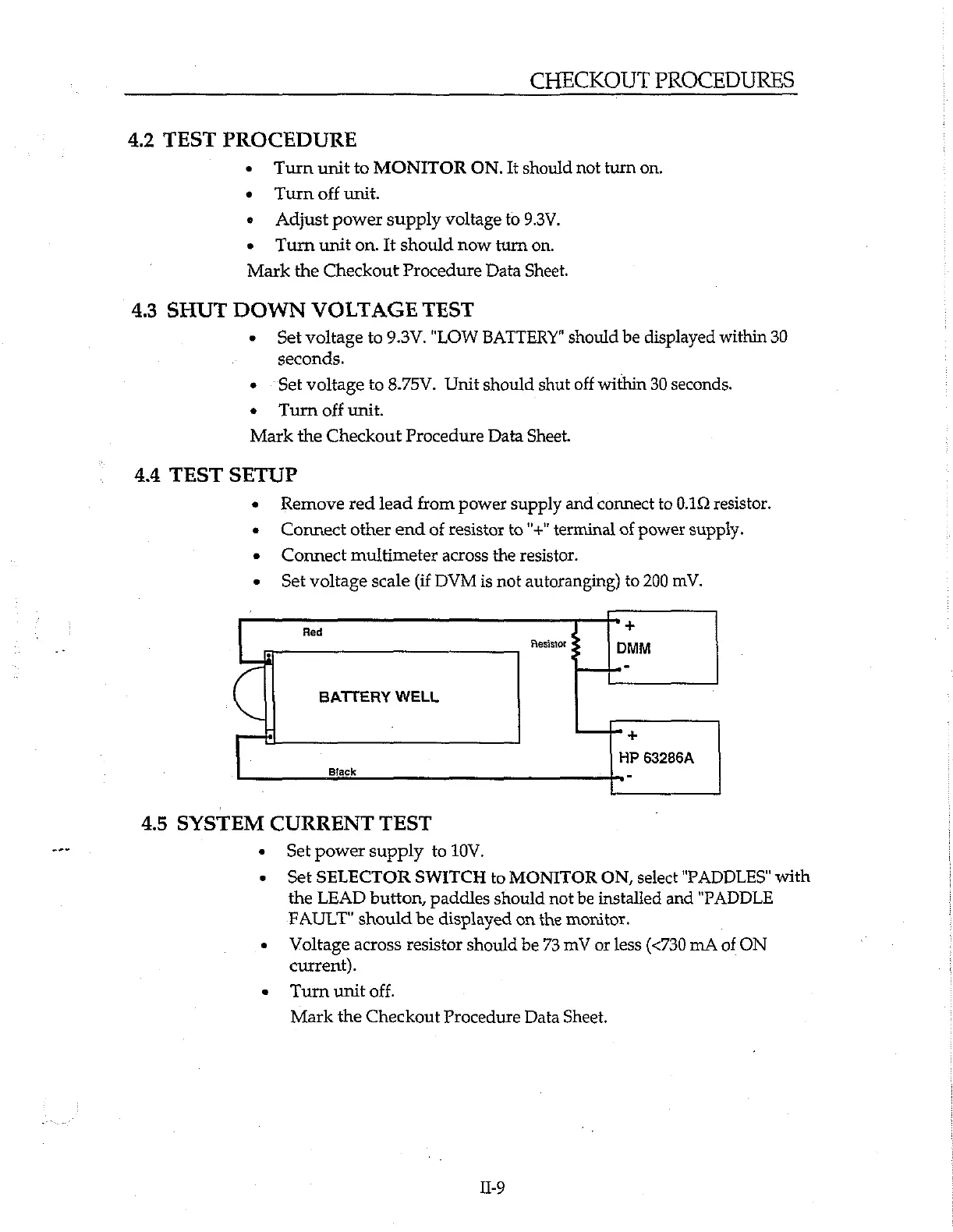
Red
4
+
Resistor
2
DMM
G
BATTERY
WELL
+
HP
63286A
Black
4.5
SYSTEM
CURRENT
TEST
e
_
Set
power
supply
to
10V.
*
Set
SELECTOR
SWITCH
to
MONITOR
ON,
select
"PADDLES"
with
the
LEAD
button,
paddles
should
not
be
installed
and
"PADDLE
FAULT"
should
be
displayed
on
the
monitor.
«
Voltage
across
resistor
should
be
73
mV
or
less
(<730
mA
of
ON
current).
+
Turn
unit
off.
Mark
the
Checkout
Procedure
Data
Sheet.
IL-9

Related product manuals