Section
11:
Play
Mode
Abschnitt
11:
Spiel-Betriebsart
The functions of the Play mode are fully explained in this
section.
In
diescm Abschnitt werden die Funktionen der Spiel-
Betriebsart erkliirt.
Functions
of
the Play mode
Funktionen der Spiel-Betriebsart
The Play mode
is
the basic mode of the 9050
in
which Patches arc
selected and played The following operations can
be
done in the
Play mode:
Die Spiel-Betriebsart ist die grundlegende Betriebsart des 9050,
in
der Patch-Rograrnrne gewiihlt und gcspielt werden. Die folgenden
Funktionen sind in der Spiel-Betriebsart moglich
Selecting Patches
Bypassing all effects
Manually changing the master volume
Auto
tuner
function
ZNR
auto
adjust
Wiihlen von Patch-Programmen
Umgehen aller Effekte
Manuelle Einstellung des Masterpegels
Auto-Stimm-Funktion
ZNR
Auto-Einstellung
Setting
the
9050 to the Play Mode Aktivieren der Spiel-Betriebsart
When 9050 is in another mode, press the
EXIT
key repeatedly until
the Play mode is selected. You
can
also
turn
the power off and back
on
again; when the power is turned on, the 9050 is automatically set
to
the Play mode.
Wcnn sich der 9050 in einer anderen Retriebsart befindet, driicken
Sie die
EXIT
Taste mehrmals, bis dic Spiel- Beuiebsart aktiviert ist.
Sie k6nnen auch das Gerat aus- und wieder einschalten, da
beirn
Einschalten automatisch die Spiel-Betriebsart aktiviert wird.
Display
of
the
Play mode Anzeige in der Spiel-Betriebsart
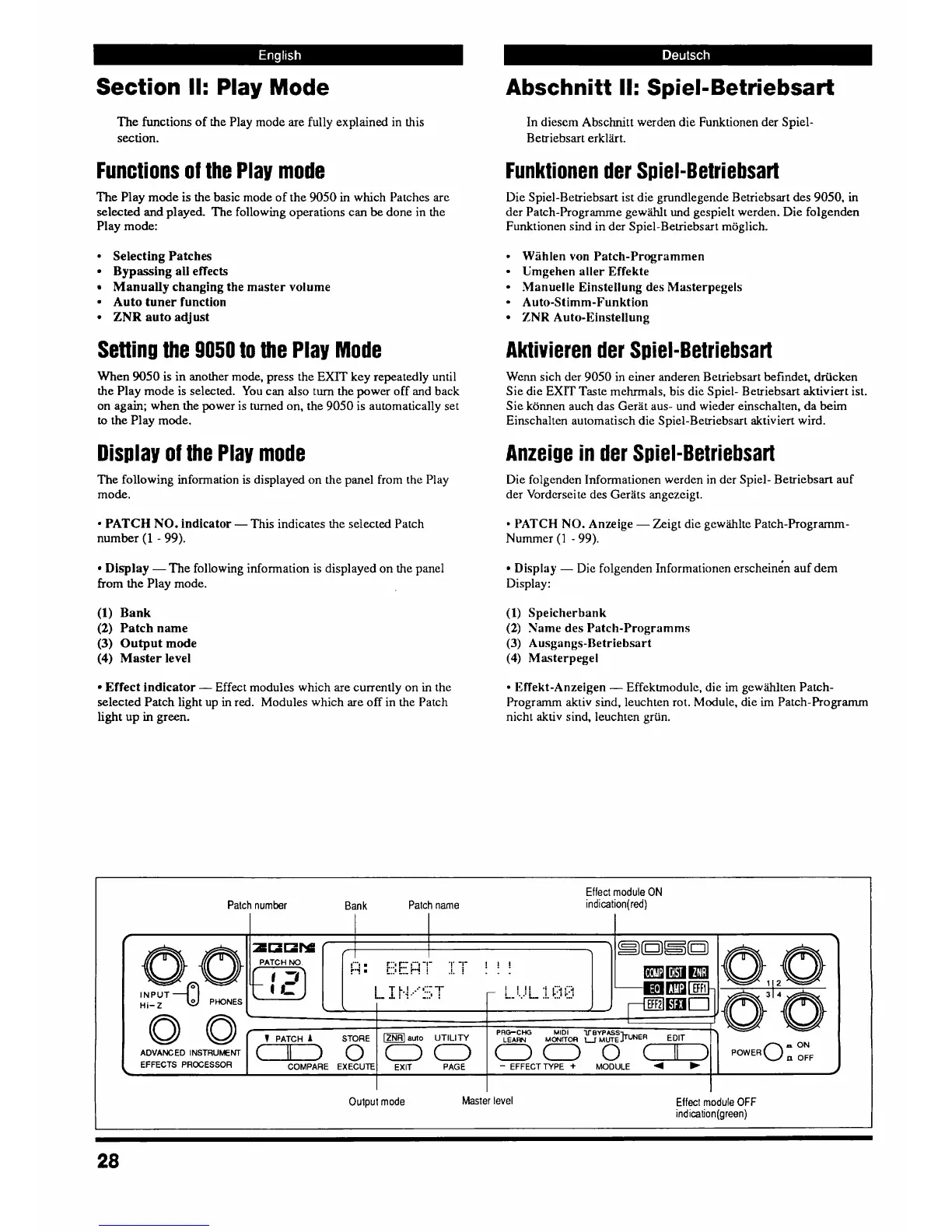
The following information
is
displayed on the panel from the Play
mode.
Die folgenden Informationen werden in der Spiel- Betriebsart auf
der Vordcrscite des Gerats angezcigt.
PATCH
NO.
indicator
-
This indicates the selected Patch
number
(1
-
99).
PATCH NO.
Anzeige
-
Zeigt die gewihlte Patch-Prograrnrn-
Nummer
(l
-
99).
Display
-
Die
folgenden Informationen erscheine'n auf dem
Display:
Display
-
The following information is displayed on the panel
from the Play mode.
(1)
Bank
(2)
Patch name
(3)
Output mode
(4)
Master level
(1)
Speicherbank
(2)
Same des Patch-Programms
(3)
Ausgangs-Betriebsart
(4)
Ma5terpegel
Effect indicator
-
Effect modules which are currently on in the
selected
Patch
light up
in
red. Modules which are off
in
the Patch
light up in
green.
Effekt-Anzeigen
-
Effektmodule, die
im
gewwten Patch-
Prograrnrn aktiv sind, leuchten rot. Module, die
irn
Patch-Programrn
nicht
aktiv
sind, leuchten griin.
Effect module ON
indication(red)
Patch number
Bank
Patch name
lNPUT-
Hi-
Z
PHONES
0
0
ADVANCED
INSTRUMENT
EFFECTS PROCESSOR
Output mode Master level
Effect
module
OFF
indication(green)



 To Next Page