Display
of the Edit Mode
Anzeige in der Edilier-Betriebsart
In
the
Edit
mode, up to four parameters arc displayed on one page.
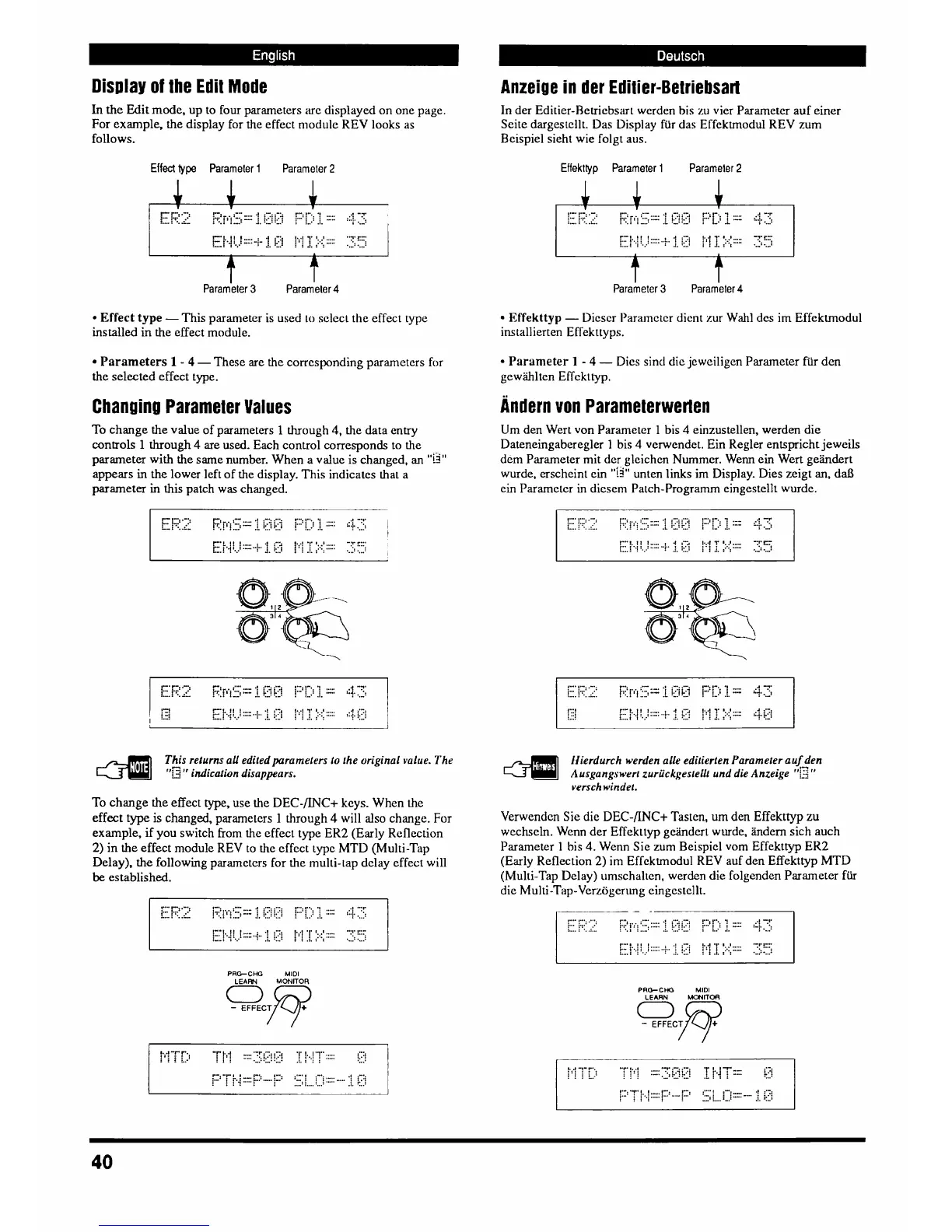
For example, the display for the effect module REV looks as
follows.
In der
Editier-Retriebsart werden bis zu vier Parameter auf einer
Seite dargestcllt. Das Display far das Effektmodul REV mm
Bcispiel sieht wie folgt aus.
Effect
type Parameter
l
Parameter
2
Effekttyp Parameter
l
Parameler
2
Parameter
3
parameter
4
Effect type
-This
parameter is uscd
10
sclcc~ the effect type
installed
in
the effect module.
Effekttyp
-
Dicscr Paramctcr dient zur
Wahl
des im Effektmodul
ins tallierten Effekttyps.
Parameters
1
-
4
-
These are the corresponding parameters
for
the selected effect type.
Parameter
1
-
4
-
Dies sind die jeweiligen Parameter
fiir
den
gewiihlten Effekttyp.
Andern von Parameterwerlen
Chanuinu Parameter Values
To change the value of parameters
1
through 4, the data entry
controls
1
through 4
are
used. Each control corresponds to the
parameter with the same number. When a value is changed,
an
"U"
appears in the lower left of the display. This
indicates
hat a
parameter
in
this
patch
was
changed.
Um den Wert von Parameler
1
bis
4
einzustellen, werden die
Dateneingaberegler
1
bis
4
verwendet. Ein Regler entspricht jewcils
dem Parameter mit der glcichcn Nurnmer. Wenn ein Wert gekdert
wurde, erscheint ein
"ii"
unten links im Display. Dies zeigt
an,
da13
ein Parameter
in
dicsem Patch-Programm eingestellt wurde.
This returns all editedparamelers to the original value. The
4
''Gtr
indicolion disappears.
ffierdurch werden aUe editierten Parameter auf den
4
Ausgangswerl zuriiekges~elk und die Anzeige
"C"
versch windel.
To change the effect type, use the DEC-/INC+ keys. When the
effect type
is
changed,
paramelcrs
1
bough
4
will
also
change.
For
example,
if
you switch from the effect type ER2 (Early Reflection
2)
in the effect module REV to the effect type MTD (Multi-Tap
Delay), the following parameters for the multi-tap delay effect will
be
established.
Verwendcn Sie die
DEC-mC+
Tasten,
urn
den Effekttyp
zu
wechseln. Wenn der Effekttyp ge2nder~ wurde, hdem sich auch
Parameter
1
his
4.
Wcnn Sic zum Beispicl vom Effekttyp ER2
(Early Reflection 2) im Effektmodul REV auf den Effekttyp MTD
(Multi-Tap Delay) umschalren, werden die folgenden Parameter
fiir
die Multi-Tap-Verz6gerlmg eingcstcllt.
PRG-CHG
MlDl
ocp
PRO-Cffi
MlDl



 To Next Page