Rear
Panel
Riickseite
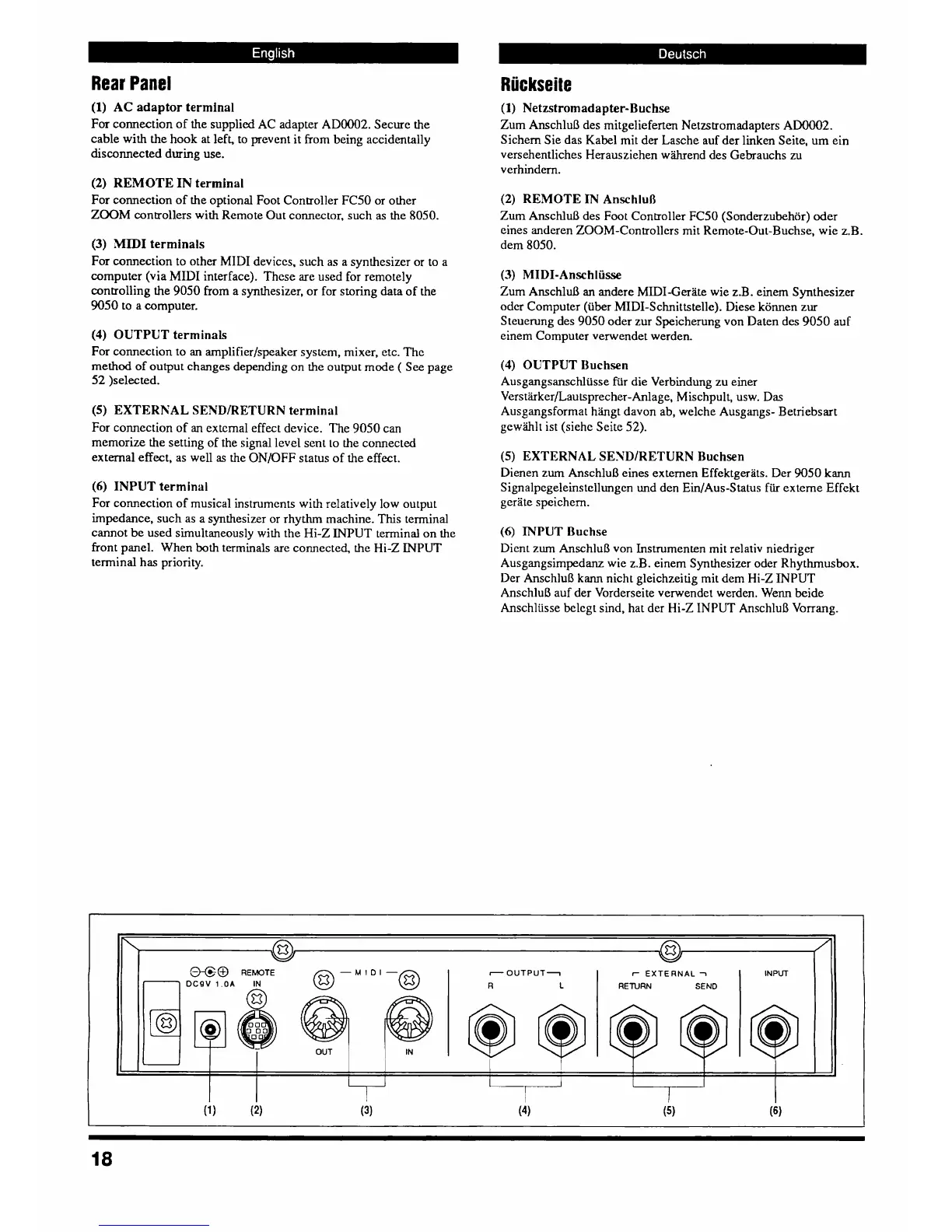
(1)
AC
adaptor terminal
For connection of the supplied AC adapter AD0002. Secure the
cable with the hook at left, to prevent it From being accidentally
disconnected during use.
(2)
REMOTE
IN
terminal
For connection of the optional Foot Controller FC50 or other
ZOOM
controllers with Remote Out connector, such
as
the 8050.
(3)
;MIDI
terminals
For connection to other MIDI devices. such as a synthesizer or to a
computer (via MIDI interface). These are used for remotely
controlling the 9050 from a synthesizer, or for storing data of the
9050 to
a
computer.
(4)
OUTPUT terminals
For connection to
an
amplifier/speaker system, mixer, etc. Thc
method of output changes depending on the output mode
(
See page
52 )selected.
(5)
EXTERNAL SEND/RETURN terminal
For connection of an extcmal effect device. The 9050 can
memorize the setting of the signal level sent to the connected
external effect, as well
as
the ONjOFF status of the effect.
(6)
INPUT terminal
For connection of musical instruments with relatively low output
impedance, such as a synthesizer or rhythm machine. This terminal
cannot be used simultaneously with the Hi-Z
INPUT
terminal on the
front panel. When both terminals are connected, the Hi-Z
INPUT
terminal
has
priority.
(1)
Netzstromadapter-Buchse
Zum AnschluB des mitgelieferten Netzstromadapters AD0002.
Sichem Sie das Kabel mit der Lasche auf der linken Seite,
urn
ein
versehentliches Herauszichen wihrend des Gebrauchs
zu
verhindern.
(2)
REMOTE
IN
AnschluR
Zurn
Anschlul3 des Foot Controller FC50 (Sonderzubehor) oder
eines anderen ZOOM-Controllers mit Remote-Out-Ruchse, wie z.B.
dem 8050.
(3)
MIDI-Anschliisse
Zum Anschlul3
an
andere MIDI-Gerate wie z.B
.
einern Synthesizer
odcr Computer (iiber MIDI-Schnittstelle). Diese komen zur
Steuerung des 9050 oder zur Speicherung von Daten des 9050 auf
einem Computer verwendet
werden
(4)
OUTPUT 13uch.sen
Ausgang sanschliisse fir die Verbindung zu einer
VerstkirkerlLautsprecher-Adage, Mischpult, usw. Das
Ausgangsformat hkgt davon ab, welche Ausgangs- Betriebsart
gew3hlt ist (siehe Seite
52).
(5)
EXTERNAL SEXINRETURN Buchsen
Dienen zurn AnschluB eines externen Effektgerats. Der
9050
km
Signalpegeleinstellungcn
und den EinIAus-Status fiir externe Effekt
gerate speichern.
(6)
INPUT Buchse
Dicnt zum AnschluB von Instrumenten mit relativ niedrigcr
Ausgangsirnpedanz wic z.B. einem Synthesizer oder Rhythmusbox.
Der
AnschluB kann nicht gleichzeitig mit dem Hi-Z
INPUT
AnschluR auf der Vorderseite verwendet werden. Wenn beide
Anschliisse belegt
sind,
hat der Hi-Z
INPUT
AnschluB Vorrang.
7
OUTPUT1
r
EXTERNAL
i



 To Next Page