Section
V:
Remote Control and
Real
-
time Modulation
This chapter explains the procedure for remote control and
real-time modulation of the 9050, using the optional Foot
Controller
FC50.
With
the FC50 foot controller, you can switch among the Patches of
the 9050 and bypass specific effect modules
by
using your foot.
You can also control effect parameters of
the
9050 in real timc by
connecting the FP01 expression pedal to the FC50.
Connections
and
9050
Setup
1.
Connect the
FC50
and the
9050.
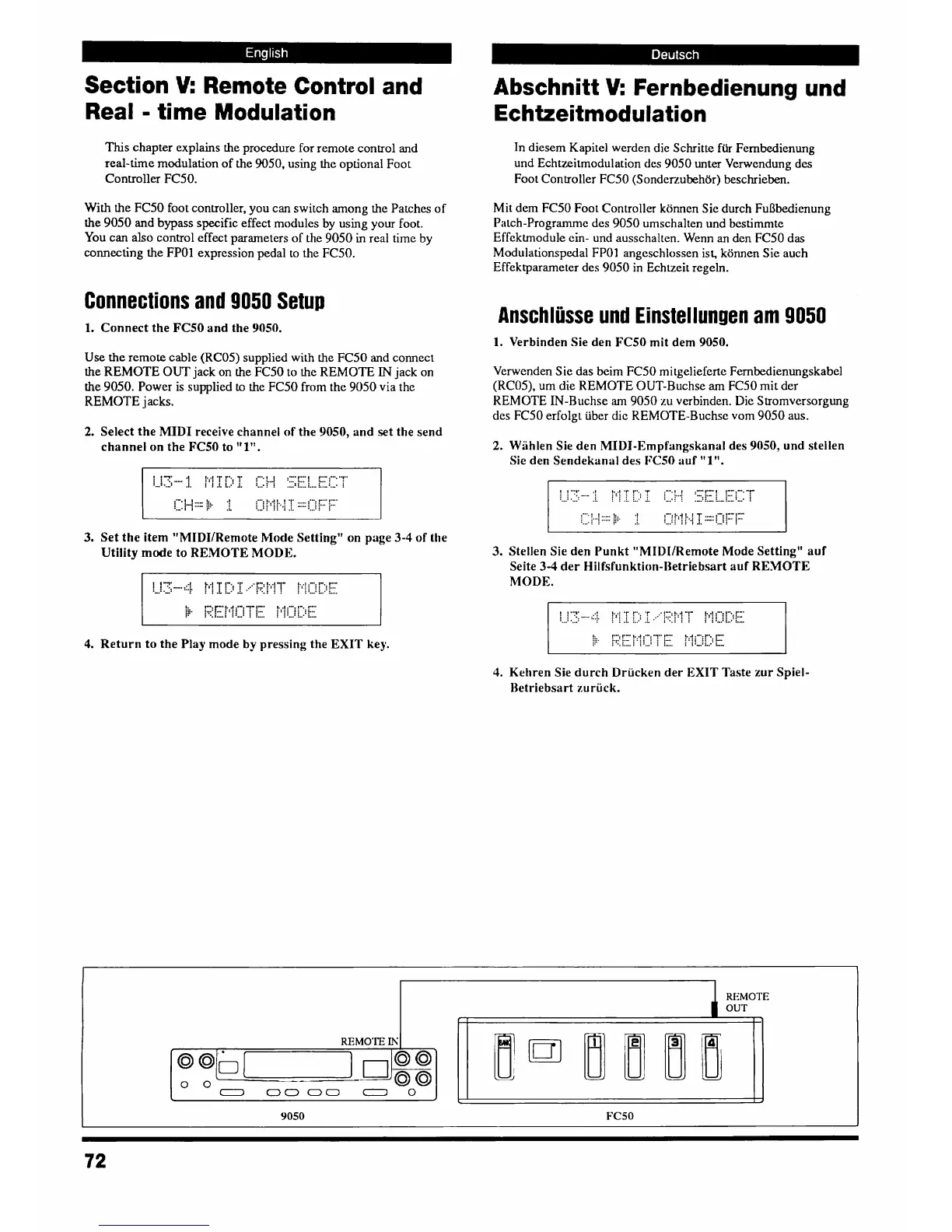
Use
the remote cable (RC05) supplied with the FC50 and connect
the
REMOTE
OUT
jack on the FC50 to the REMOTE
IN
jack on
the 9050. Power is supplied
to
the FC50 from the 9050 via the
REMOTE
j
acks.
2.
Select the MIDI receive channel of the
9050,
and set the send
channel on the
FC50
to
"1".
3.
Set the item "MIDI/Remote Mode Setting" on page
3-4
of the
Utility mode to REMOTE MODE.
4.
Return to the
Play
mode
by
pressing the EXIT key.
Abschnitt
V:
Fernbedienung und
Echtzeitmodulation
In diesem Kapitel werden die Schritte
fiir
Fernbedienung
und Echtzeitmodulation des 9050 unter Verwendung des
Foot Controller FC50
(Sonder-ubehor) beschrieben.
Mit dem FC50 Foot Controller komen Sie durch FuBbedienung
Patch-Programme des 9050 umschalten und bestimmte
Effektrnodule ein- und ausschalten. Wenn an dcn FC50 das
Modulationspedal FP01 angcschlossen ist, komen Sie auch
Effektparameter des 9050 in Echtzeit regeln.
Anschliisse
und
Einstellun~en
am
9050
1.
Verbinden Sie den
FC50
mit dem
9050.
Verwenden Sie das beim FC50 mitgeliefcrte Fernbedienungskabel
(RC05). um die REMOTE OUT-Ruchse am FC50 mit der
REMOTE IN-Buchse
am
9050 zu verbinden. Die Stromversorgung
des FC50 erfolg~ iiber dic REMOTE-Buchse vom 9050 aus.
Wiihlen Sie den MIDI-Empfangskanal des
9050,
und stellen
Sie den Sendekanal des
K50
auf
"
1".
Stellen
Sie
den Punkt "MII)I/Remote Mode Setting" auf
Seite
3-4
der
Hilfsfunktion-lletriebsart
auf REMOTE
MODE.
Kehren Sie durch Driicken der
EXIT
Taste zur Spiel-
REMOTE
OUT
fi
I
l1



 To Next Page