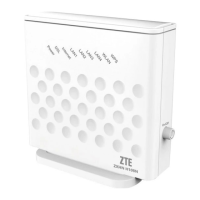
ZTE H108N V.2.1 Configuration manual
Page i ZTE Proprietary and Confidential
Contents
1 Accessing the Device ...................................................................................... 3
2 Setup section ................................................................................................... 4
2.1 Wizard ................................................................................................. 4
2.2 Internet Setup...................................................................................... 9
2.2.1 Configuration for multi-device with dynamic IP ..................... 9
2.2.2 Configuration for multi-device with static IP........................ 11
2.2.3 Configuration for standalone device with dynamic IP ......... 13
2.2.4 Configuration for standalone device with static IP .............. 14
2.2.5 Configuration for standalone device (generic) .................... 16
2.2.6 Generic Configuration ........................................................ 17
2.3 Wireless ............................................................................................ 21
2.3.1 Wireless Basics ................................................................. 22
2.3.2 Wireless Security ............................................................... 24
2.4 Local Network ................................................................................... 28
2.5 Local IPv6 Network ........................................................................... 32
2.6 Time and Date ................................................................................... 35
2.7 Logout ............................................................................................... 36
3 Advanced section .......................................................................................... 37
3.1 Advanced Wireless............................................................................ 37
3.1.1 Advanced Settings............................................................. 38
3.1.2 MAC Filtering..................................................................... 40
3.1.3 Security Settings ............................................................... 41
3.1.4 WPS Settings .................................................................... 42
3.2 SAMBA file share .............................................................................. 45
3.3 Port opening ...................................................................................... 47
3.3.1 Automatic uPnP ................................................................. 47
3.3.2 Port forwarding .................................................................. 48
3.3.3 Port filtering ....................................................................... 50
3.4 Other options..................................................................................... 51

 To Next Page
 Loading...