Service Manual FireCR
+
Computed Radiography Scanner
10 Calibration | FireCR
+
Calibration Procedure
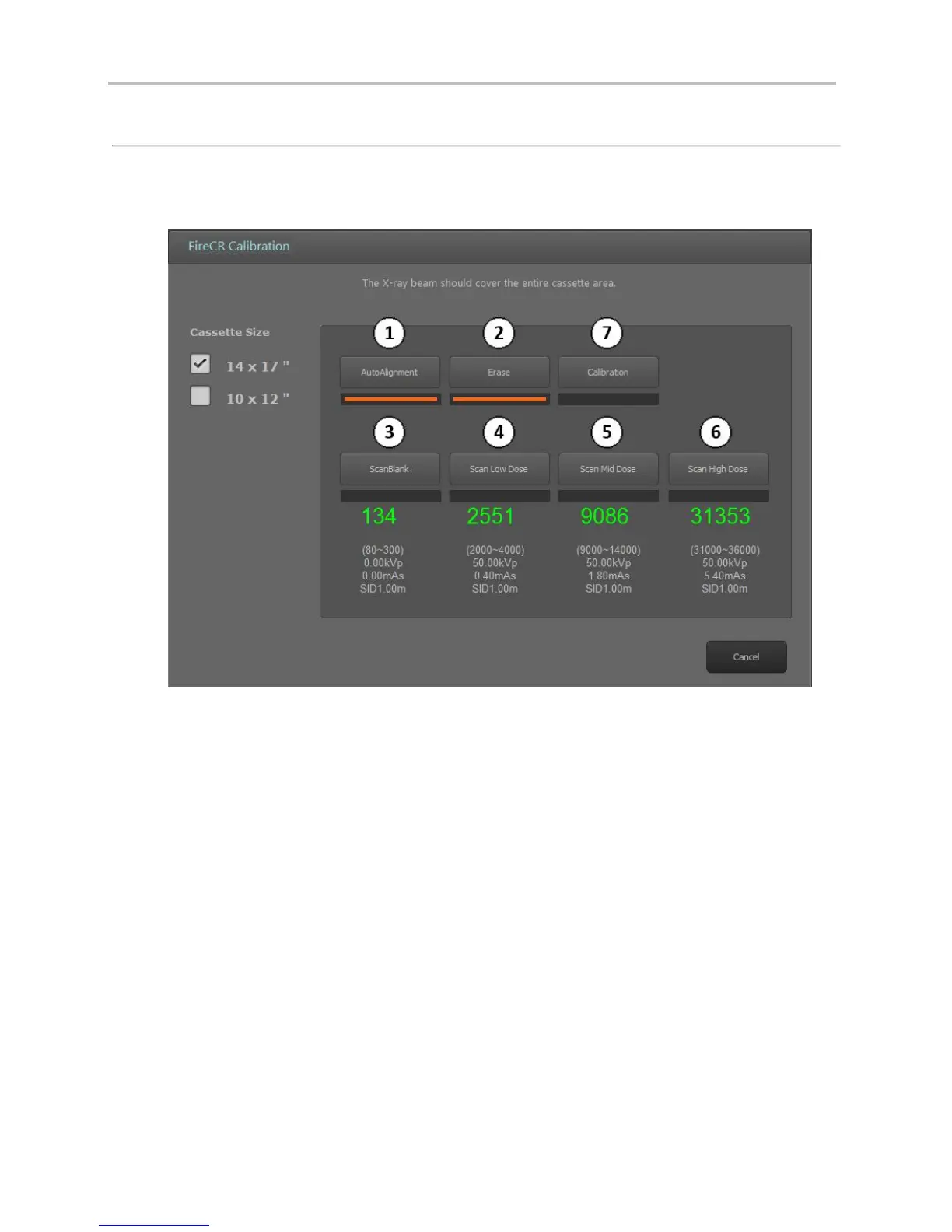
This screen will appear:
Step 1: Auto alignment
Step 2: Erase
Run an erase cycle to remove any residual radiation that may be left on the phosphor.
Step 3: Scan Blank
Without exposing the cassette, insert it into the reader and press the “Scan Blank” button. Note:
Use the same cassette for the entire calibration.
Step 4, 5, & 6: Scan Low, Medium, & High Dose
Expose the entire cassette at the recommended values and if the value is out of range adjust mAs
until the numbers are green. Note: mAs and calibration values are directly proportional, so a
5% increase in mAs will equal a 5% increase in calibration value, etc.
Step 7: Calibration!
Press and wait until the software confirms that the calibration was successful. Note: Cancelling
the calibration before completion will force you to start over.


 To Next Page