26
8.4.
Storing Weighing Units
It is possible to store the weighing units that will actually be used from the units
available. For the units available, refer to “5.3. Units”.
Select and store the weighing units as described below:
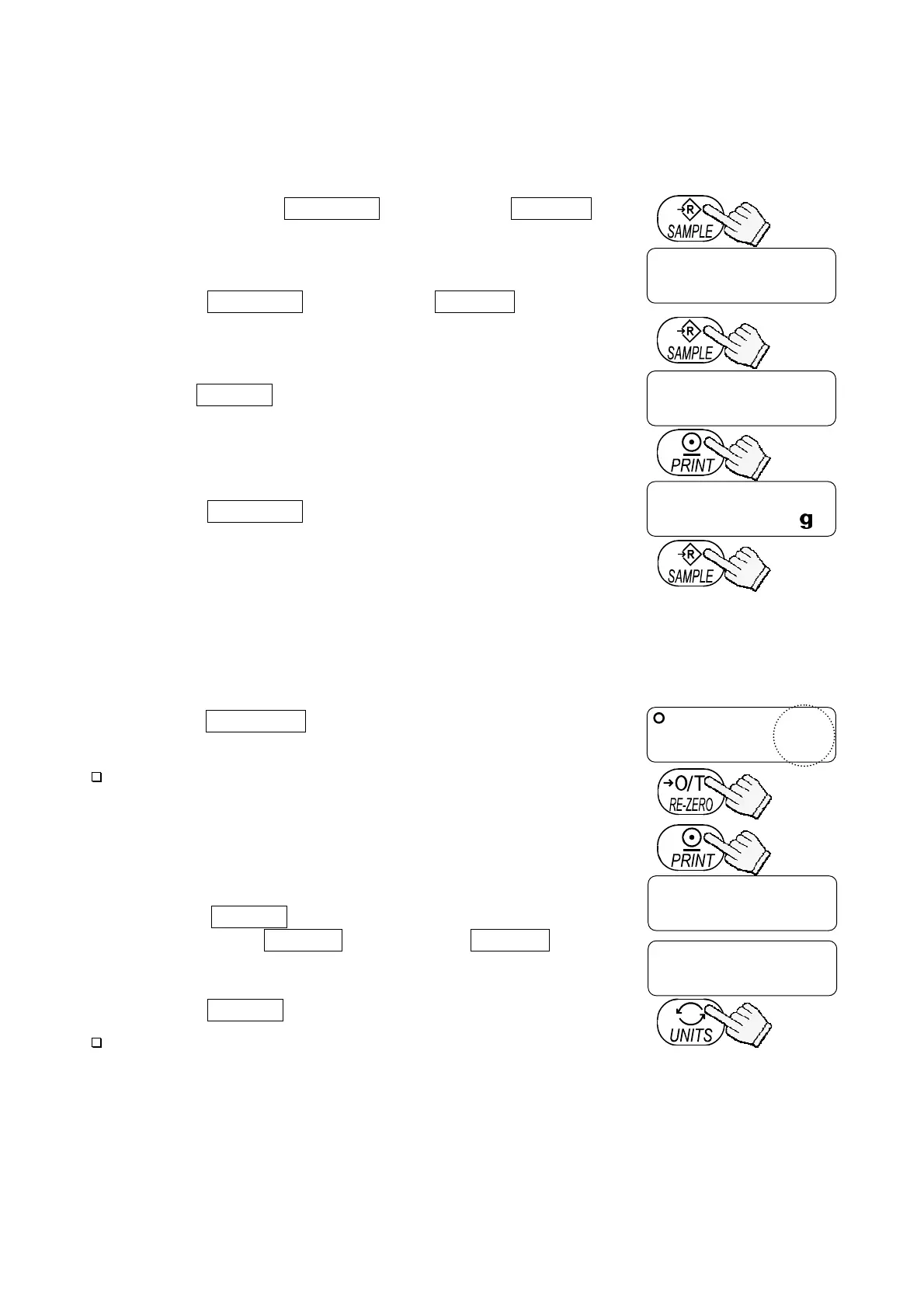
1. Press and hold the SAMPLE key to display func .
2. Press the SAMPLE key to display Unit .
3. Press the PRINT key.
4. Press the SAMPLE key to display a weighing unit to be
stored.
5. Press the RE-ZERO key to select the weighing unit. The
selected weighing unit is shown with the STABLE indicator.
At this stage, the weighing unit is not stored in memory.
6. Repeat steps 4. and 5. to select all weighing units to be used.
7. Press the PRINT key to store the selected weighing
units in memory. id appears after end .
8. Press the UNITS key to turn the balance off.
Note
When the balance is turned ON, it starts with the unit that was
selected first in step 5.
func
Unit
Unit
Press and hold
Unit
end
id
The balance turns off.
To select
To store
Each pressing switches
the units available
in the order described
in “5.3.Units”.



 To Next Page