37
10.2.
GLP Report
To output the GLP report to the AD-8127 printer, set the function to “info 1” and
set the printing mode of the printer to DUMP.
To output the GLP report to the AD-8121B printer, set the function to “info 1”
and set the printer to MODE 3.
To output the GLP report to a personal computer, set the function to “info 2” and
“pU5e 0” .
Calibration Report
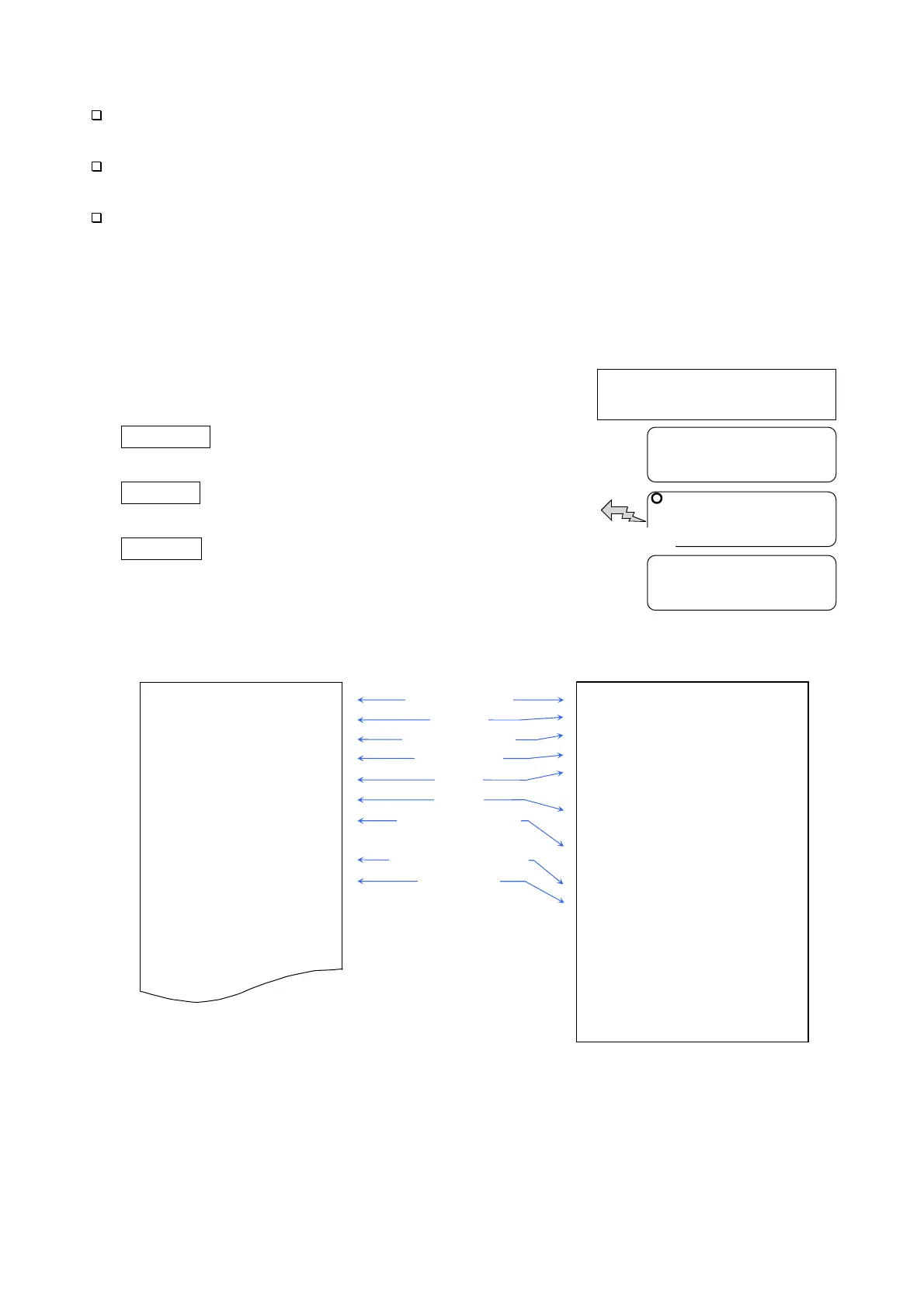
Perform calibration using a weight. Then the balance will output a calibration report.
1. Perform calibration according to “7.1. Calibration
Using a Weight”.
2. end appears when the calibration has
been completed.
3. glp appears and the calibration report is
output.
4. end appears again. Remove the weight.
The balance turns off.
AD-8127/AD-8121B format “info 1” General format “info 2”
~ : Space, ASCII 20h
CR
: Carriage return, ASCII 0Dh
LF
: Line feed, ASCII 04Ah
___________A_&_D
MODEL_____EJ-123
S/N____Q12345678
ID________ABCDEF
DATE__2013/11/14
TIME____02:53:21
CALIBRATED(EXT.)
CAL.WEIGHT
_____+100.000__g
SIGNATURE
-_-_-_-_-_-_-_-_
~~~~~~~~~~~
A
~
&
~
D
<CRLF>
MODEL~~~~~EJ-123
<CRLF>
S/N~~~~Q12345678
<CRLF>
ID~~~~~~~~ABCDEF
<CRLF>
DATE
<CRLF>
<CRLF>
TIME
<CRLF>
<CRLF>
CALIBRATED(EXT.)
<CRLF>
CAL.WEIGHT
<CRLF>
~~~~~+100.000~~g
<CRLF>
SIGNATURE
<CRLF>
<CRLF>
<CRLF>
----------------
<CRLF>
<CRLF>
<CRLF>
Manufacturer
Model
Serial number
ID number
Date
Time
Calibration type
Calibration weight
Signature
end
glp
Calibration
(Refer to “7.CALIBRATION”)
end
GLP output
The balance turns off.



 To Next Page