38
Calibration Test Report
The calibration test mode is used to compare a calibration test weight with the
calibration test data weighed by the balance.
This test does not perform calibration and this mode is available even after sealing the
calibration (CAL) switch.
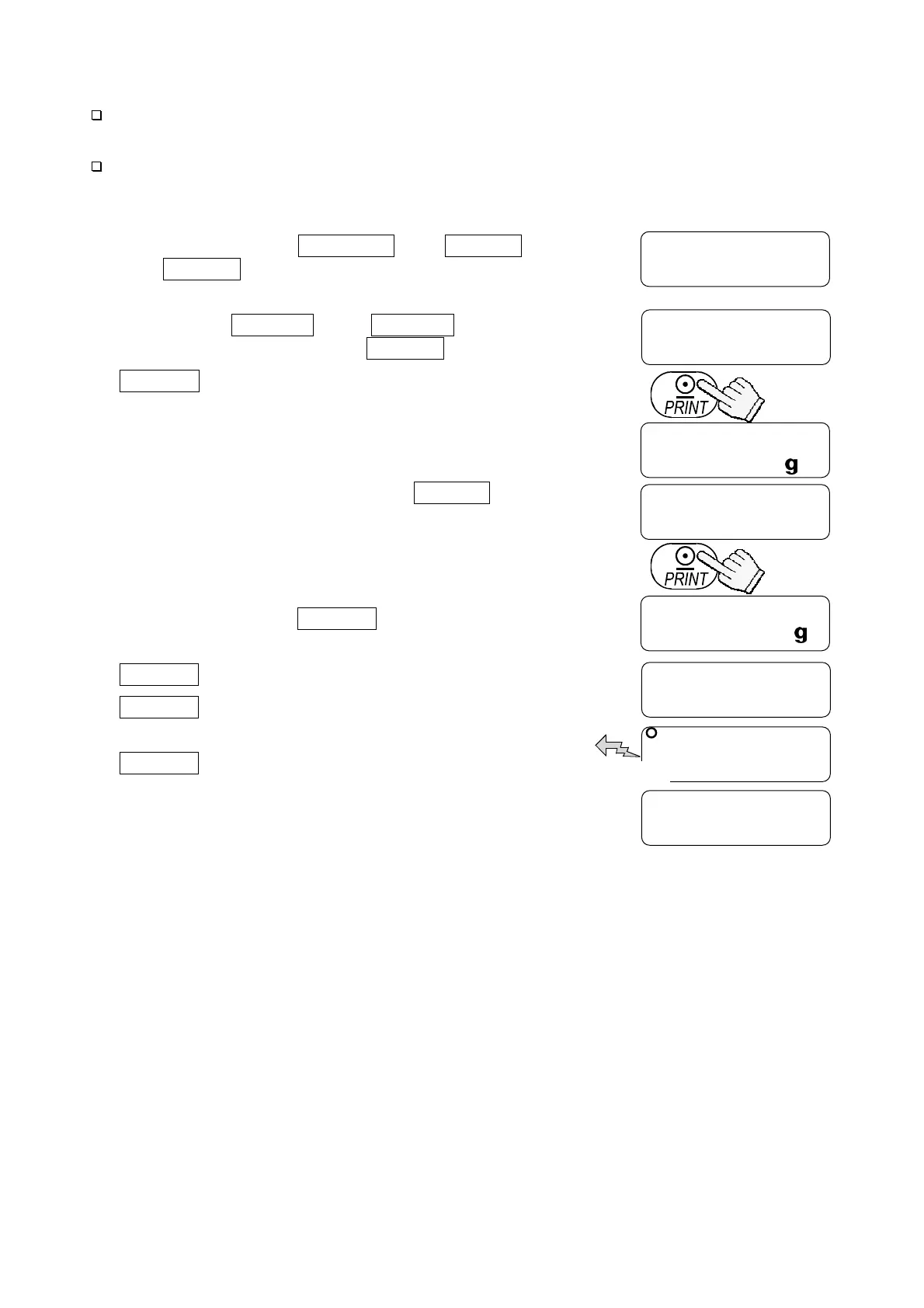
1. Press and hold the SAMPLE and PRINT keys
until CC appears, and release both keys.
Pressing and holding the calibration (CAL) switch will
also display CC after Cal . Immediately
release the CAL switch while CC is displayed.
2. CC 0 appears.
3. If necessary, change the value of the calibration test
weight according to step 4 of “7.1. Calibration Using
a Weight”.
4. With nothing on the pan, press the PRINT key. The
zero point is measured and the weight value is
displayed for a few seconds. Then, the display shows
the value of the calibration test weight.
5. Place a weight of the same value as displayed on the
pan and press the PRINT key to weigh it. The
weight value is displayed for a few seconds.
6. end appears.
7. glp appears and the calibration test
report is output.
8. end appears again.
Remove the weight.
The balance turns off.
The balance turns off.
CC
CC 0
Press and hold both keys.
Release both keys.
0.000
100.000
100.001
To weigh
end
glp
end
To output calibration test repor



 To Next Page