30
9.2.
EJ-03 RS-232C Serial Interface
The EJ-03 allows an EJ-123, EJ-303, EJ-1202, EJ-3002 or EJ-54D2 balance to be
connected to a printer or a personal computer using the RS-232C serial interface.
The RS-232C serial interface has the following four modes:
Stream mode
...................
Outputs data continuously.
Key mode
..........................
Outputs data when the PRINT key is pressed.
Auto-print mode
.............
Outputs data which meets the conditions of auto-print.
Command mode
............
Controls the balance using commands from a personal
computer.
Set the parameters of the data format (bp5 and btpr) and data output mode (prt),
as necessary.
Use a D-Sub 9-pin cable (straight type) to connect the balance to a personal
computer.
Optional cable: AX-KO2466-200 D-Sub 9-pin - D-Sub 9-pin cable (2 m)
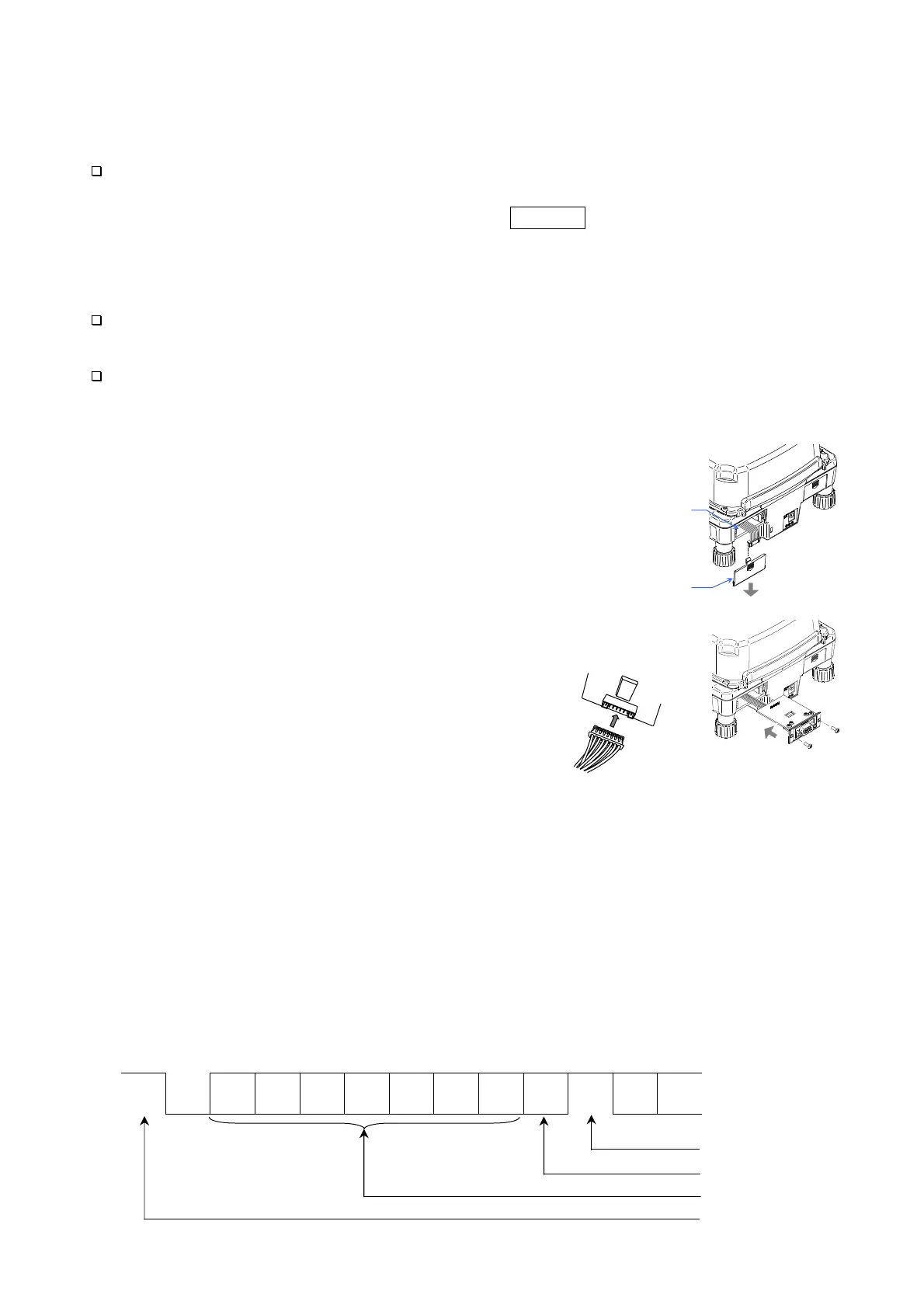
Installing the EJ-03
1. Turn the balance off and disconnect the AC
adapter if used.
2. Remove the cover of the option slot on the rear
by pressing and lowering it down.
3. Connect the connector in the slot to the EJ-03
unit and insert it into the slot.
4. Secure the EJ-03 with the screws supplied with
the option.
Interface Specifications (Connector type:D-Sub 9-pin[male])
Transmission system EIA RS-232C
Transmission form Asynchronous, bidirectional, half-duplex
Data format Baud rate: 1200, 2400, 4800, 9600 bps
Data: 7 bits + parity 1bit (even or odd) or 8 bits (non-parity)
Start bit: 1 bit
Stop bit: 1 bit
Code: ASCII
Terminator: C
R
L
F
(C
R
: 0Dh, L
F
: 0Ah)
LSB
0
1
2
3
4
5
MSB
6
Stop bit
Parity bit
Data bit
Start bit
1 (-15V ~ -5V)
0 (+5V ~ +15V)
Step 2
Step 3
EJ-03
Connector inside
the option slot
EJ-03
Push down and
remove the cove
Option slot for
EJ-02 / EJ-03



 To Next Page