AMT/PTD/PBX/0020/2/4/EN 01/2007 Page 149
The use of "Master" or "Slave" mode is automatically configured by the BCSI board (if a clock is
detected on the primary port, slave mode is used).
The secondary port of the master or N slave is connected to the primary port of the first slave or
slave N+1.
Note:
the maximum connection cable length from one port to the other is 600 m.
7.5.2 Configuration
The default (factory) configuration of the switches on the BCSI board is as follows:
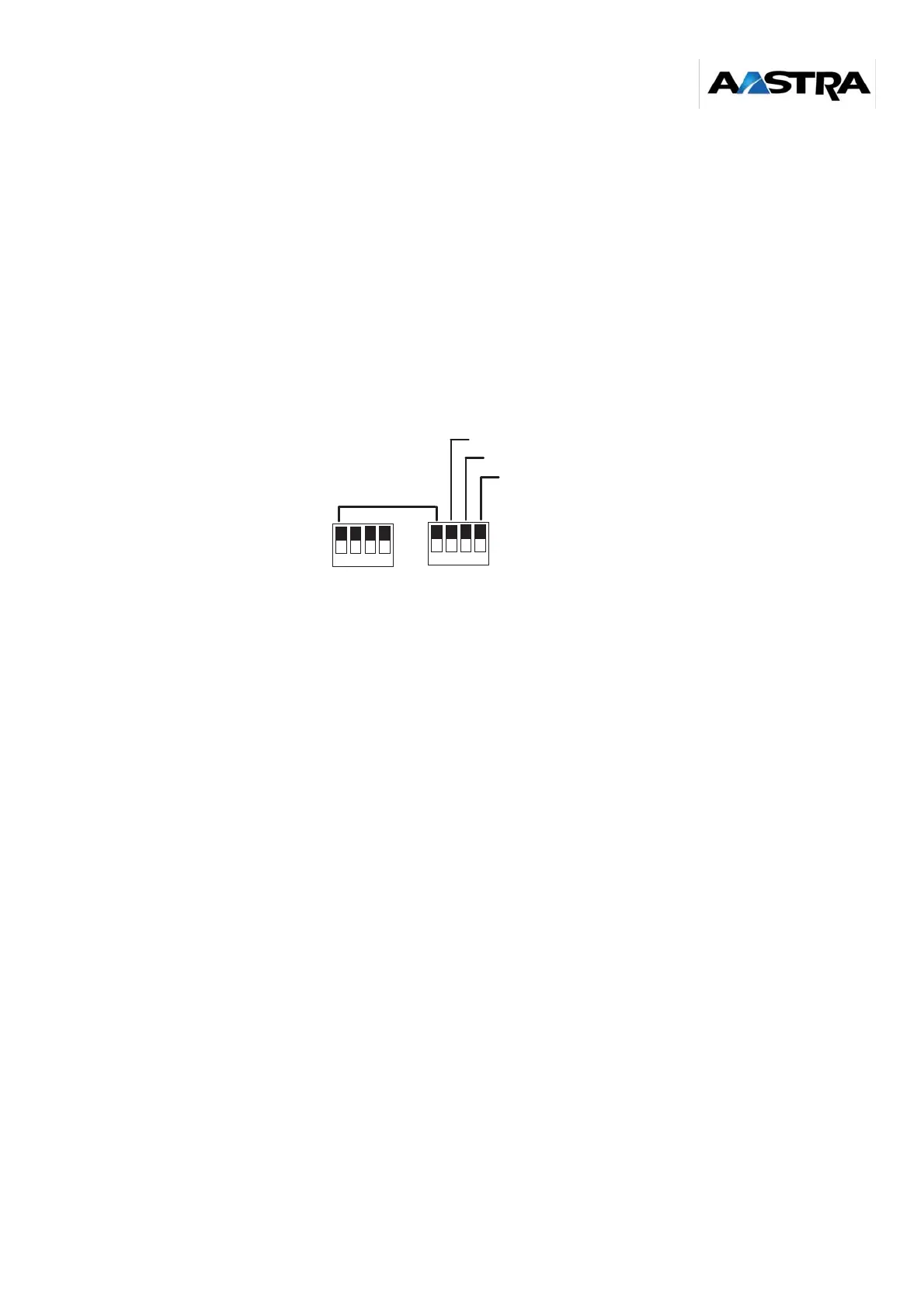
CA1 and CA2 = ON
Binary value: ON = 0 ; OFF = 1
Figure 6-14: Default configuration (factory configuration) of switches CA1, and CA2 on the BCSI board
Configuration on "Master" PBX:
• The type of PBX downstream of the "Master" must be indicated (F1/F6 or F4, manual
configuration). A switch (screen printing: GAVF1/6) on the BCSI is used to define the type of
PBX downstream:
• GAVF1/6 set to ON: defines an F1/F6 PBX downstream
• GAVF1/6 set to OFF: defines an F4 PBX downstream
• Check the configuration of switches CA1, CA3 and CA4 on the CSI card. Their configuration
must be the same as the factory configuration (see mono-site synchronization, Section 5.4).
• Check the configuration of switches CA1, CA2 and CA3 on the RMH cards for all clusters
(see mono-site synchronization).
Configuration on a "Slave" PBX:
• The types of PBX downstream and upstream of the "Slave" must be indicated (F1/F6 or F4,
manual configuration). A switch (screen printing: GAVF1/6) on the BCSI is used to define the
type of PBX downstream:
• GAVF1/6 set to ON: defines an F1/F6 PBX downstream
• GAVF1/6 set to OFF: defines an F4 PBX downstream
A second switch (screen printing: GAMF1/6) on the BCSI is used to define the type of PBX
upstream:
• GAMF1/6 set to ON: defines an F1/F6 PBX upstream
• GAMF1/6 set to OFF: defines an F4 PBX upstream
CA1
ON
1 2
4
3
CA2
ON
RET4
RET0
GAV F1/6
1 2
4
3
GAM F1/6
VAL (always ON)



 To Next Page