10
edortcelEHp
epyTmetsyS
citamotuA
erutarepmeT
noitasnepmoC
launaM
erutarepmeT
noitasnepmoC
seireS0067246-2130.ontraP013-0719.ontraP
smetsySpiD7682elbacilppatoN003-0719.ontraP
smetsySwolF0767elbacilppatoN003-0719.ontraP
metsySnoisremmI1982246-2130.ontraP013-0719.ontraP
Retransmission
output
TBA
Relay 1
Relay 2
1
2
3
4
5
6
7
8
9
E
N
L
1
2
3
4
5
6
7
8
9
10
11
12
+
–
Normally Closed
Common
Normally Open
Normally Closed
Common
Normally Open
Neutral
Live
Earth
Mains supply
0V
Rx–
Rx+
Tx–
Tx+
Red
Red
White
Reference (black)
Glass (inner core)
Coax Screen
TBB
RS422/RS485
Serial
Interface
(if fitted)
Temperature
Compensator
Electrode System
1
2
3
4
5
6
7
8
9
10
11
12
1
2
3
4
5
6
7
8
9
E
N
L
Earth Stud
Earth Stud (on case)
Earth Stud (on case)
1
2
2
nd
Retrans output
(if fitted)
4 –ve
5 +ve
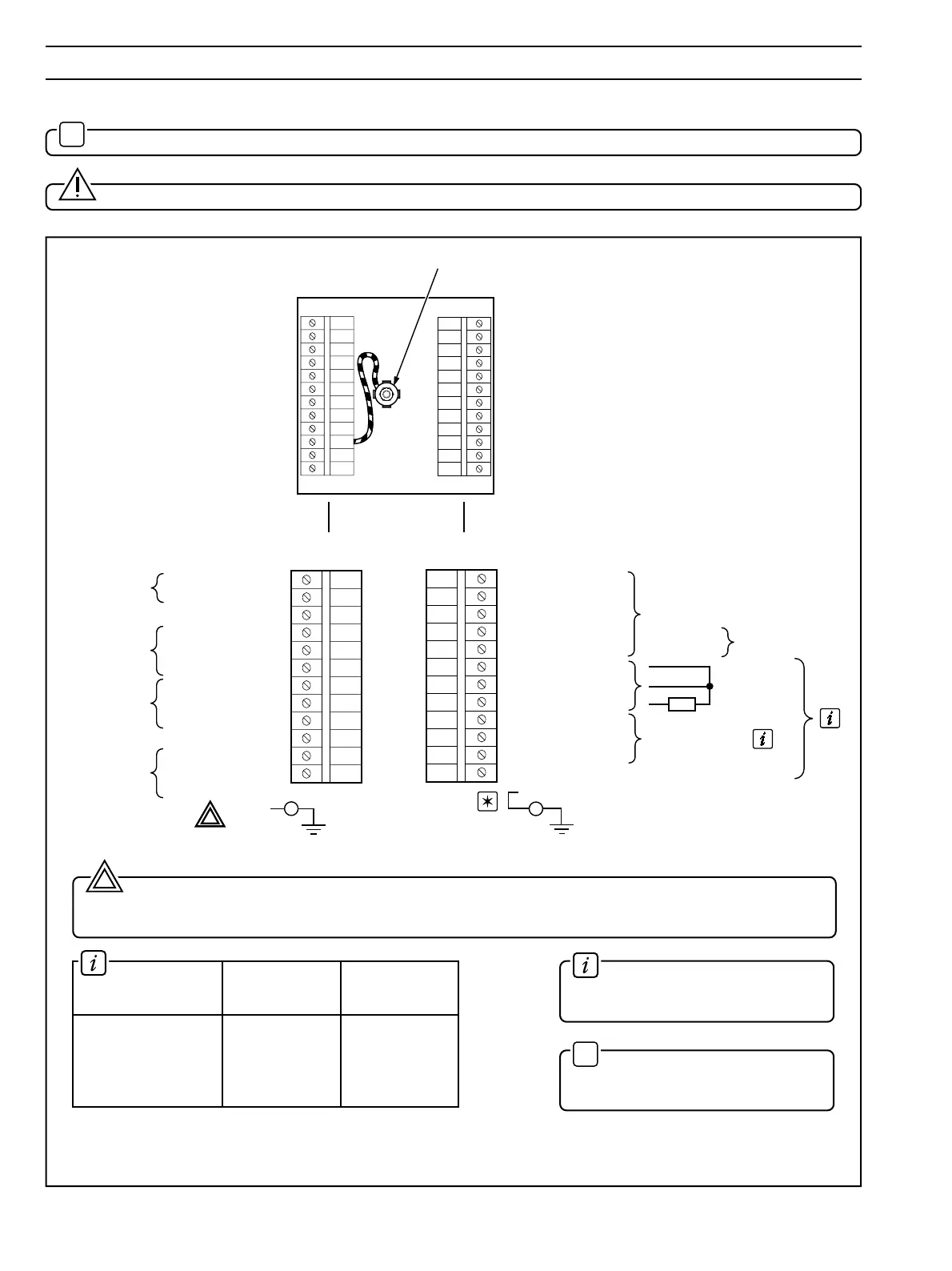
…4 ELECTRICAL CONNECTIONS
Warning. The power supply earth (ground) must be connected to ensure safety to personnel, reduction of
the effects of RFI interference and correct operation of the power supply interference filter. Connect the earth lead
directly to the case earth stud and not to the 'E' terminal.
2
Information. The colours relate
to the multicore cable from the
electrode system – see Table 4.1.
✶
Note. When using 2867 Dip
Systems or Redox cartridge systems,
the screen is connected to terminal 9.
Refer also to Table 4.1 for connection details on different electrode types.
Fig. 4.5 Connections – Panel-mounted Instruments
4.4 Connections – Panel-mounted Instruments – Fig. 4.5
✶
Note. Refer to Fig. 4.1 for Access to Terminals.
Caution. Slacken terminal screws fully before making connections.
1


 To Next Page