11
230
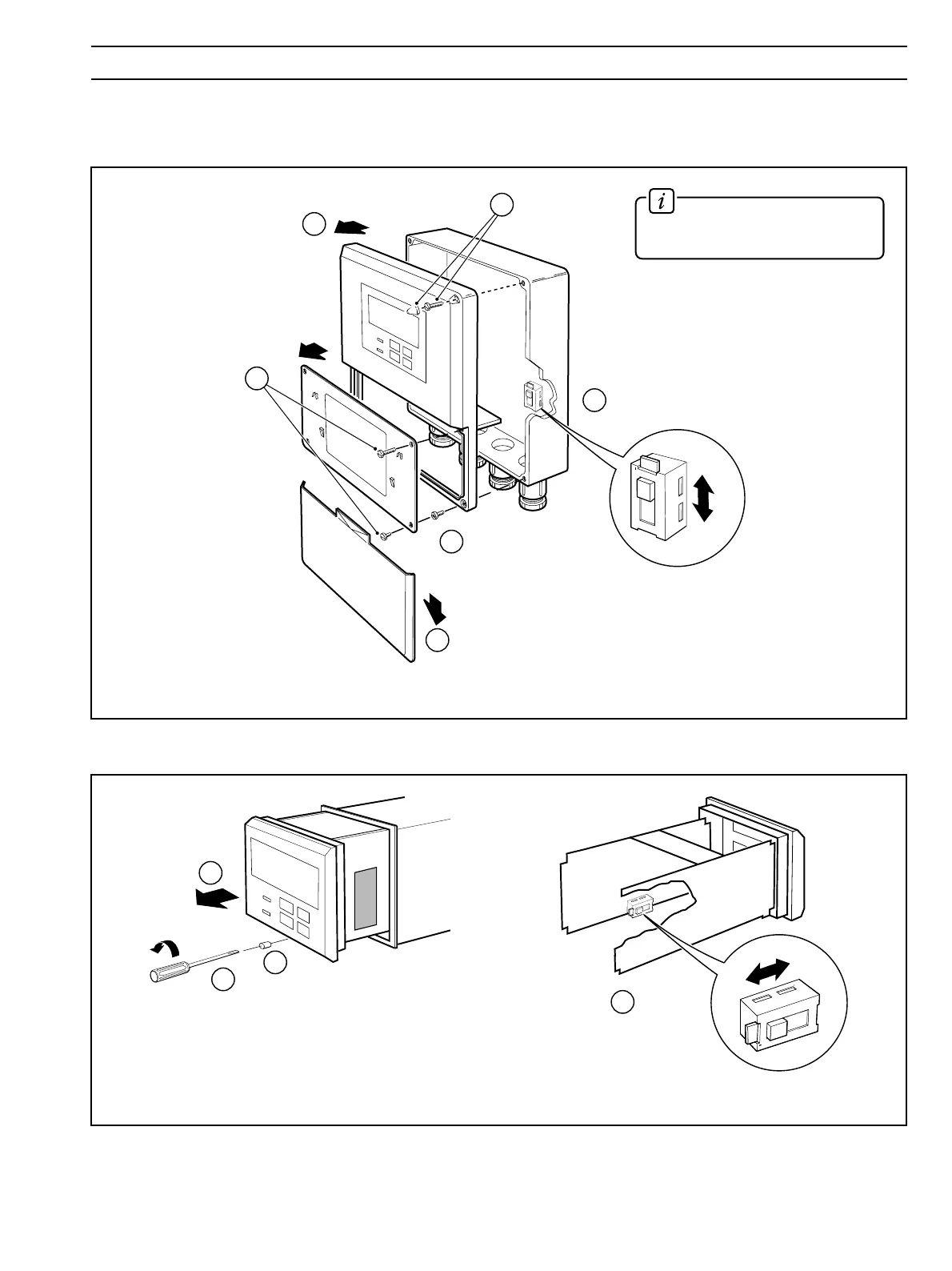
Remove cover (see Fig. 4.1)
Slacken captive screws
and remove
protection cover
Remove front
panel screws
Remove front
panel
Remove cap
and screw
230
230V
115V
1
2
3
4
3
Select the mains
voltage required
5
Select
the mains
voltage
required
1
1
5
115
115V
230V
115
4
Slide instrument
out of case
Undo captive
screw
Remove plug
(if fitted)
1
2
3
4 ELECTRICAL CONNECTIONS
Information. Use a small,
flat-bladed screwdriver to remove
the screw cap from the case.
Fig. 4.6 Selecting the Mains Voltage – Wall-/Pipe-mounted Instruments
Fig. 4.7 Selecting the Mains Voltage – Panel-mounted Instruments
4.5 Selecting the Mains Voltage
4.5.1 Wall-/Pipe-mounted Instruments – Fig. 4.6
4.5.2 Panel-mounted Instruments – Fig. 4.7


 To Next Page