19
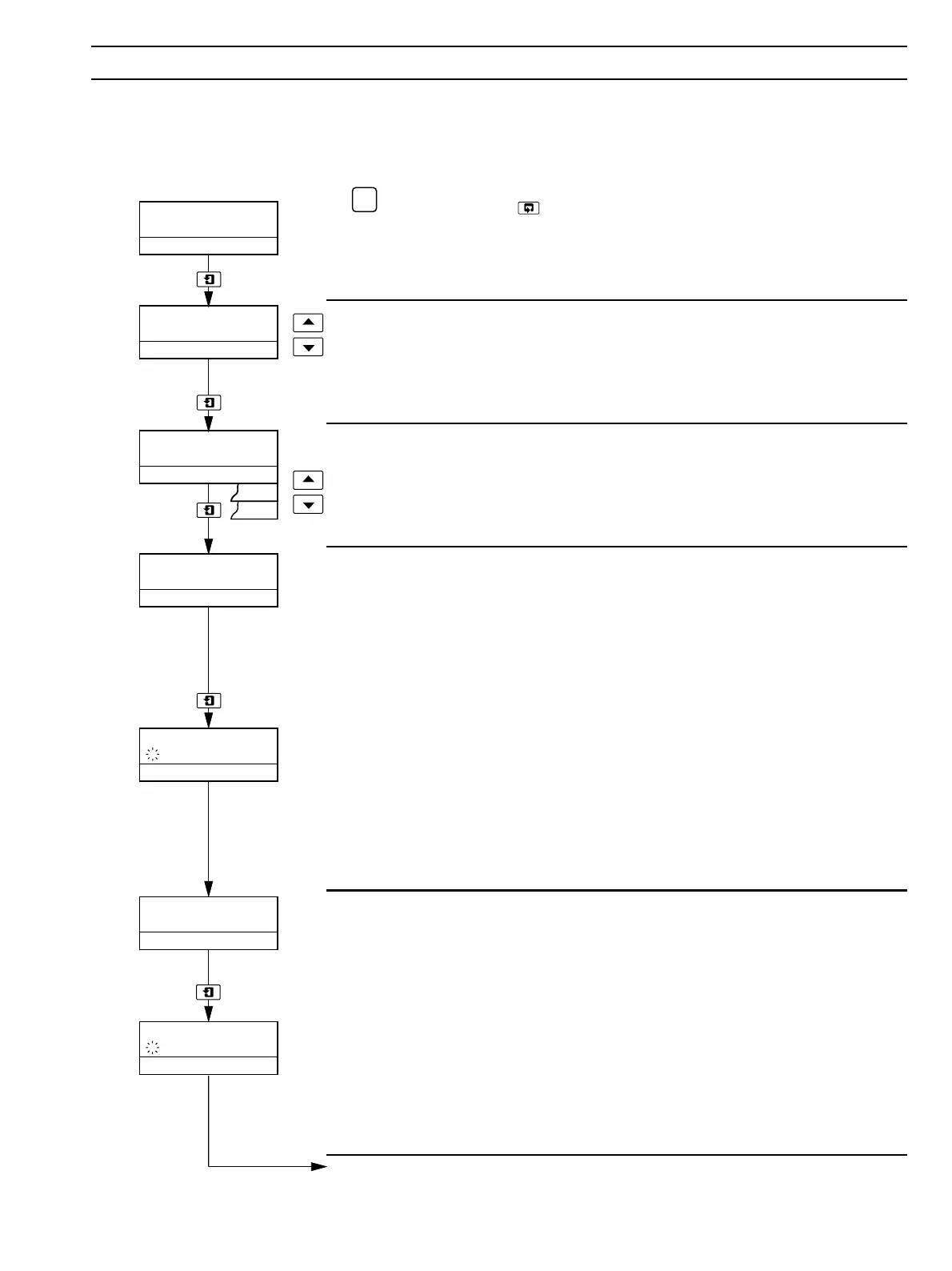
pH CALIBRATION
–––––
00000
Cal. User Code
Buffering 1 Pt
–––––
Immerse Buffer 1
l75
Calibrating Buf1
Immerse Buffer 2
–l29
Calibrating Buf2
Auto
Man
.
.
922
.
400
.
6 OPERATION…
6.2.4 Two-point pH Calibration (Manual Mode)
A manual pH calibration involves standardizing the instrument and the electrode system using any two suitable buffer solutions
which give a reasonable span and encompass the anticipated measuring range. Before starting pH calibration, check the Temp
Comp setting in the
Set Up Parameters Page – see Section 7.3. Refer to Table 6.1 on Page 13 for an overview of the calibration
procedure.
✶
Note. Pressing the key at any point during the calibration sequence prior to
the pH Check Value parameter aborts calibration and returns the display to the top of the
Operating Page.
Advance to next parameter.
Calibration Access
Enter the required calibration code number, between 00000 and 19999. If an incorrect
value is entered, access to pH calibration is prevented and the display returns to the top
of the
pH Calibration Page.
Advance to next parameter.
Buffering Calibration Type
Select manual buffering (Man).
Advance to next parameter.
Buffer 1 Calibration
Ensure the Preset Temp parameter in the Set Up Parameters Page is set to the
temperature of the buffer solutions to be used – see Section 7.3.
Immerse the electrode in the first buffer solution. Set the upper display line to the
temperature-corrected pH value of the buffer solution – refer to the datasheet
accompanying the solution.
Advance to initiate calibration. A flashing dot indicates that calibration is in progress.
The upper display line shows the sensor e.m.f.
• When a stable e.m.f. is detected and calibration is successful, the instrument
automatically advances to the next parameter.
• If a stable e.m.f. is not detected, the instrument automatically advances to the
Calibration Message parameter and the message Slow Response is displayed.
• If calibration is not successful, the instrument automatically advances to the
Calibration Message parameter and the appropriate message is displayed.
Buffer 2 Calibration
Immerse the electrode in the second buffer solution. Set the upper display line to the
temperature-corrected pH value of the buffer solution – refer to the datasheet
accompanying the solution.
Advance to initiate calibration. A flashing dot indicates that calibration is in progress.
The upper display line shows the sensor e.m.f.
• When a stable e.m.f. is detected, the instrument automatically advances to the next
parameter and the calibration message appropriate to the result of the calibration is
displayed.
• If a stable e.m.f. is not detected, the calibration message Slow Response is
displayed.
Continued on next page.


 To Next Page