31
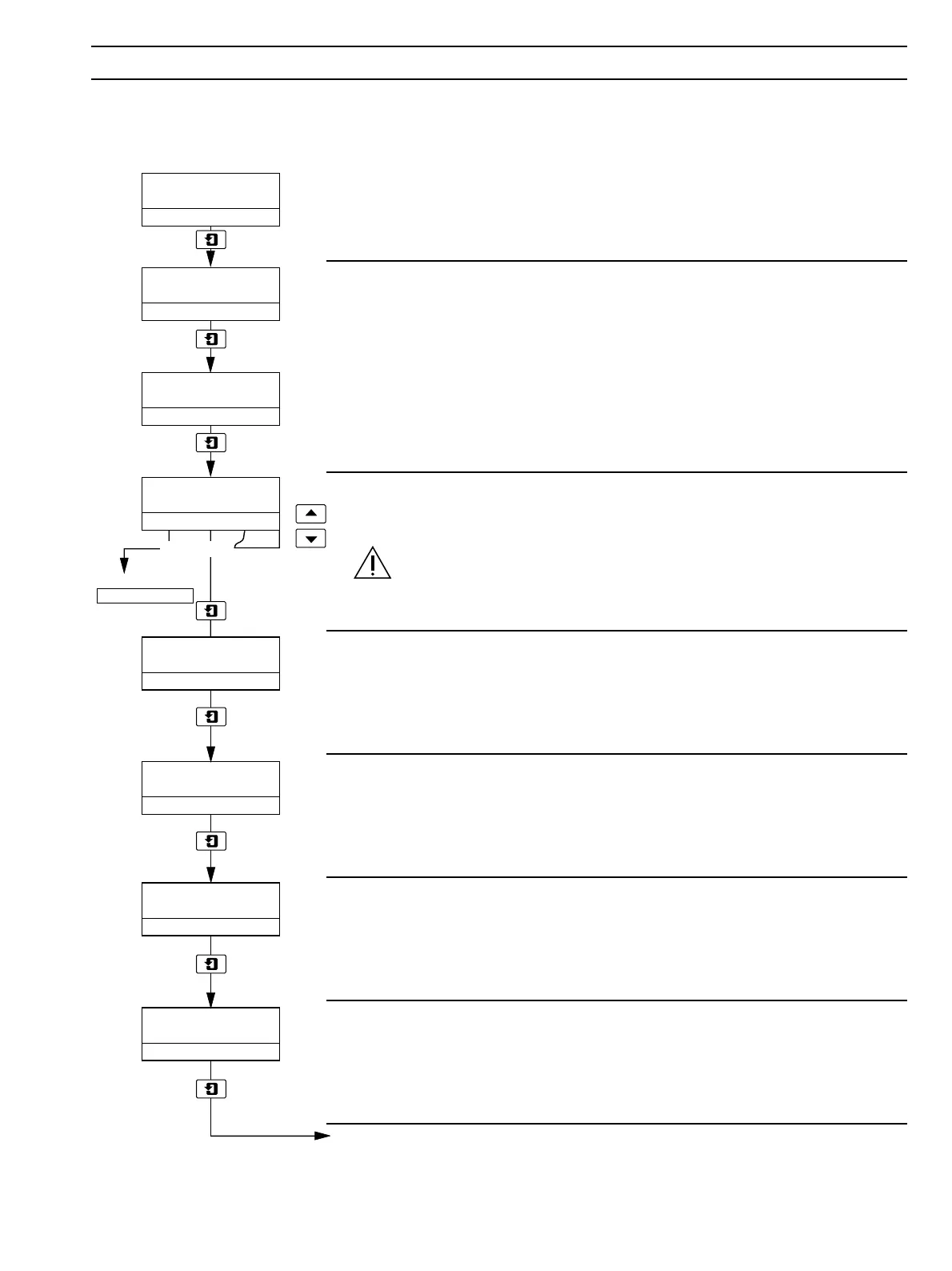
Temp Zero (100R)
xxxxx
Temp Span (150R)
xxxxx
mV Zero (0mV)
xxxxx
mV Span (1000mV)
xxxxx
ELECTRICAL CAL
–––––
Calibrate Yes
–––––
No
Advance to
Adjust RTX Zero
FACTORY SETTINGS
–––––
FACTORY SET CODE
00000
YesNo
8 CALIBRATION…
8.3 Factory Settings Page
When carrying out the electrical calibration procedure, the actual values denoted by xxxxx are unimportant and are used
only to determine display reading stability.
Factory Settings Access Code
Enter the required code number, between 00000 and 19999, to gain access to the
factory settings. If an incorrect value is entered, access to subsequent parameters is
prevented and the display reverts to the top of the
Factory Settings Page.
Electrical Calibration
Select Yes to access the electrical calibration sequence. Select No to advance to Adjust
Retransmission Zero – see next page.
Caution. Do not select Yes unless instrument calibration is required.
Advance to next parameter.
Millivolt Zero
Set the millivolt source to 0mV and allow the instrument display to stabilize.
Advance to next parameter.
Millivolt Span
Set the millivolt source to +1000mV and allow the instrument display to stabilize.
Advance to next parameter.
Calibrate Temperature Zero
Set the temperature simulator resistance box to 100Ω and allow the instrument display
to stabilize.
Advance to next parameter.
Calibrate Temperature Span
Set the temperature simulator resistance box to 150Ω and allow the instrument display
to stabilize.
Advance to next parameter.
Continued on next page.


 To Next Page