24
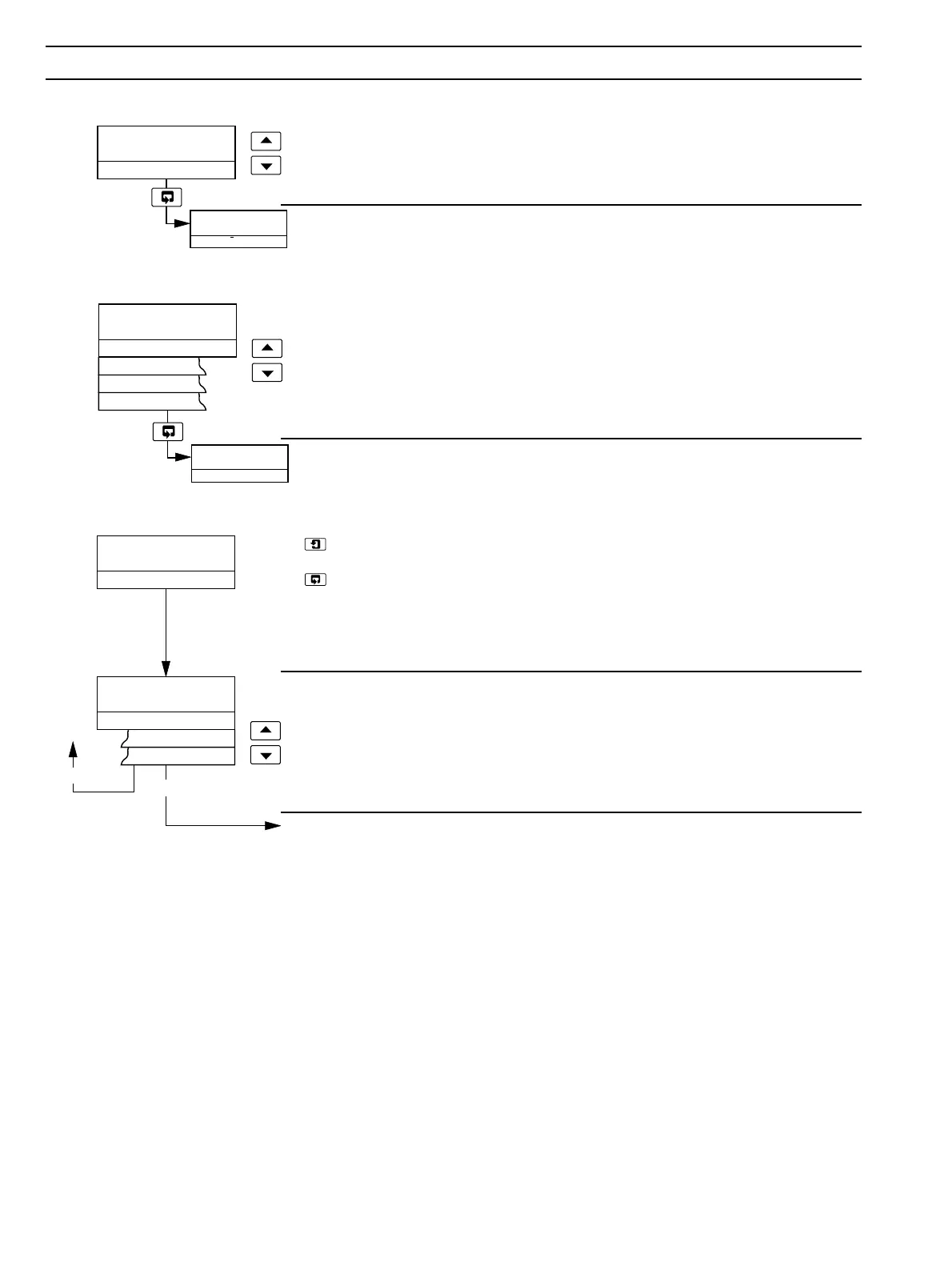
SECURITY CODE
00000
Espanol
–––––
_____
SET UP PARAMETER
–––––
English
Deutsch
Francais
Espanol
˜
SET UP PARAMETER
–––––
Type pH Antimony
–––––
pH Glass
Redox (ORP)
Redox
pH
…7 PROGRAMMING
7.1 Access to Secure Parameters
Security Code
Enter the required code number, between 00000 and 19999, to gain access to the
secure parameters. If an incorrect value is entered, access to subsequent programming
pages is prevented and the display reverts to the
Operating Page.
Advance to Language Page.
7.2 Language Page
Language Page
Select the language to be displayed on all subsequent pages.
Advance to Set Up Parameters Page.
7.3 Set Up Parameters Page
– press to advance to next parameter
or
– press to advance to next page.
These two keys are used to advance to all subsequent parameters and pages. If a
parameter is changed it is automatically stored on operation of either key.
Probe Type
Select pH Antimony/pH Glass for pH display or Redox (ORP) for millivolt display.
Select the required probe type.
Continued on next page.


 To Next Page