5
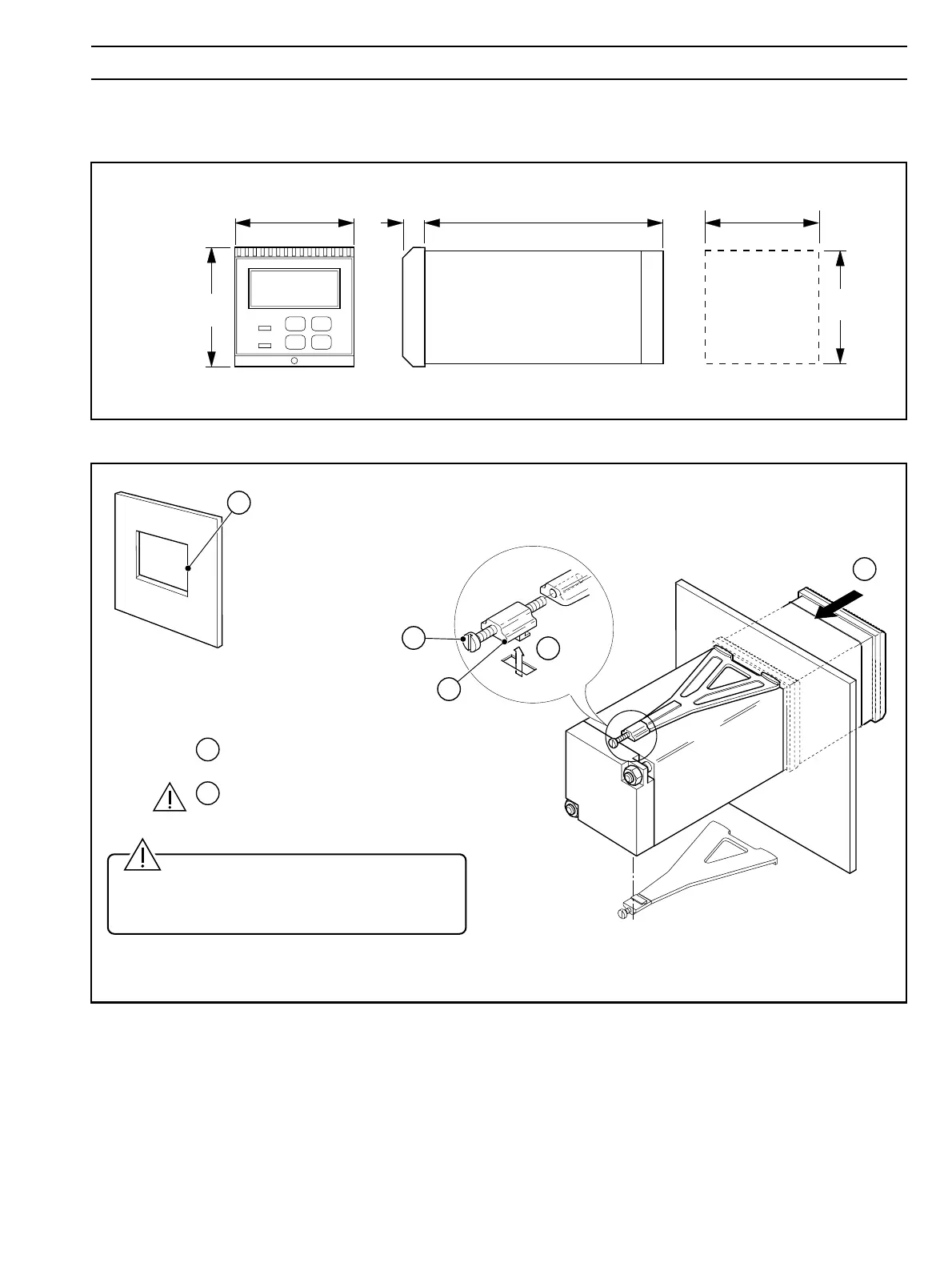
191 (7.52)12 (0.47)
Panel Cut-out
96 (3.78)
96
(3.78)
+0.8
–0
92
(3.62 )
+0.03
–0
+0.8
–0
92
(3.62 )
+0.03
–0
Dimensions in mm (in)
Cut a hole in the panel (see Fig. 3.4 for dimensions).
Instruments may be close stacked to DIN 43835.
Insert the instrument
into the panel cut-out.
Refit the panel clamps to the case, ensuring that
the panel clamp anchors are located correctly in their slot.
Secure the instrument by tightening the
panel clamp retaining screws.
Loosen the retaining
screw on each panel clamp.
Remove the panel clamp and
anchors from the instrument case.
4
5
6
1
3
2
3
3 MECHANICAL INSTALLATION
Fig. 3.4 Overall Dimensions
Caution. The clamp must fit flat on the
instrument casing. If the clamp is bowed, the
securing screw is overtight and sealing problems
may occur.
Fig. 3.5 Panel Mounting
…3.2 Mounting
3.2.2 Panel-mounted Instruments – Figs. 3.4 and 3.5


 To Next Page