Commissioning
32 TZIDC, TZIDC-110, TZIDC-120 42/18-84-EN
7.1.1 Operating modes
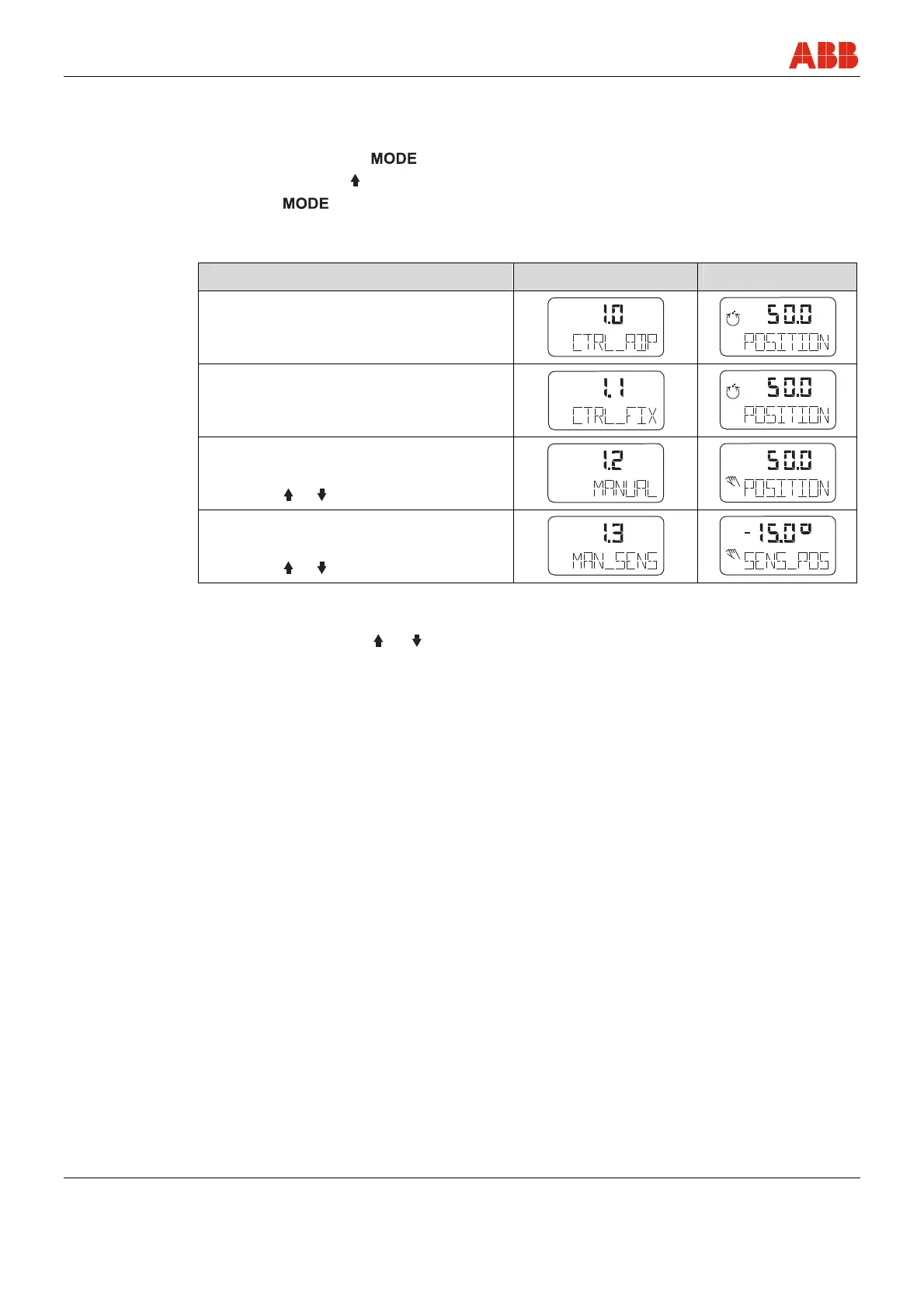
Selection from the operating level:
• Press and hold down
.
• Press and release
rapidly as often as required. The selected operating mode is displayed.
• Release
.
• The position is displayed in % or as a rotation angle.
Operating mode Mode indicator Position indicator
1.0
Control mode
1)
with adaptation (the control parameter)
conf
mA
%
C
°
conf
mA
%
C
°
1.1
Control mode
1)
without adaptation (the control parameter)
conf
mA
%
C
°
conf
mA
%
C
°
1.2
Manual adjustment
2)
in the operating range.
Adjust with
or
3)
conf
mA
%
C
°
conf
mA
%
C
°
1.3
Manual adjustment
2)
in the sensor range.
Adjust with
or
3)
conf
mA
%
C
°
conf
mA
%
C
°
1) Since self-optimization in operating mode 1.0 is subject to several factors during control operation with adaptation,
incorrect adjustments could be made over an extended period.
2) Position not active
3) For high-speed mode: Press
and simultaneously



 To Next Page