21060 26M N AA | X SER IE S
G5
| 85
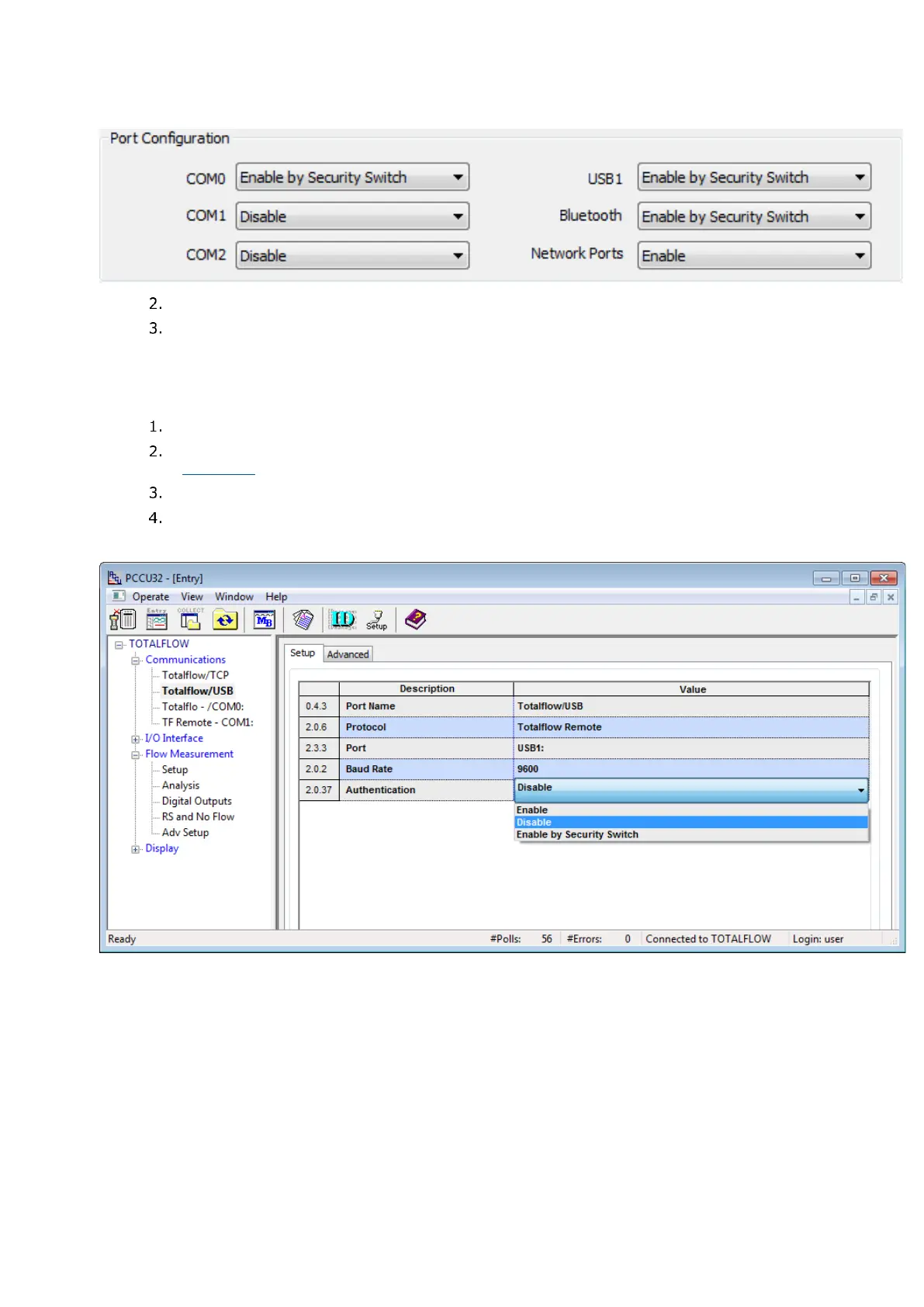
Figure 9-7: Enable port authentication from RBAC security editor
Click Save As… to save changes to the security control file.
Type the password for the security control file for the Current Password and click OK.
9.6.5.2 Enable authentication from the Entry mode
Enabling RBCA authentication from the Entry mode requires enabling one port at a time.
To use entry mode (in Advanced or Expert view) to configure or override communication port security:
In PCCU32 Entry mode, click the communication port to secure.
Set the Authentication value to Enabled or Enable by Security Switch in the Setup tab
(Figure 9-8).
Click Send.
Repeat steps 1-3 for each of the communication ports.
Figure 9-8: Enabling communication port authentication - Entry mode
9.6.6 Use default RBAC credentials
Each time PCCU connects to a flow computer via an RBAC-enabled port, a login screen requests the
User name and Password for access. The PCCU connection request is granted when the correct
credentials are provided.








 To Next Page