XIO USER MANUAL | 2106424MNAB | 53
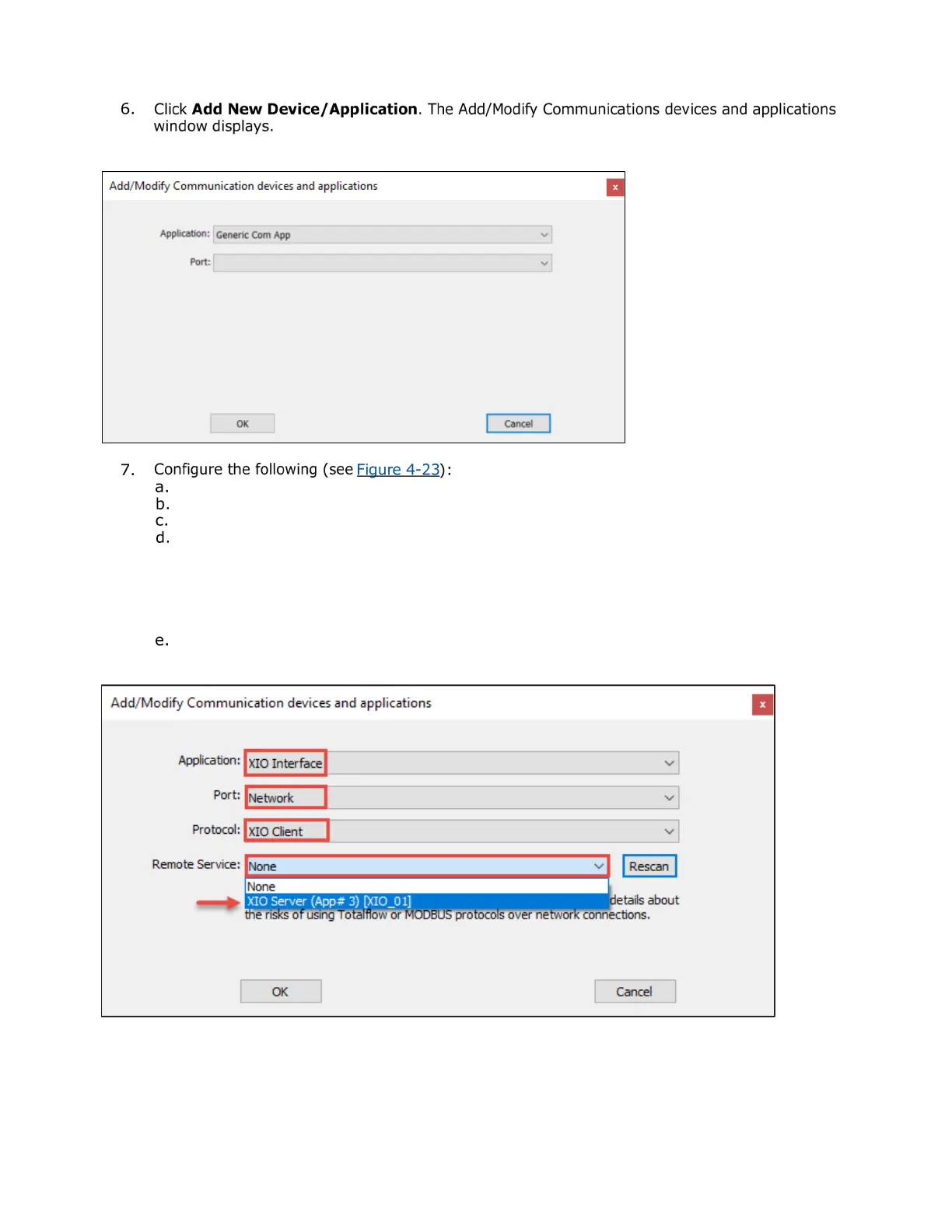
Figure 4-22: Add/Modify Communications devices and application
Select XIO Interface from the Application drop-down list.
Select Network from the Port drop-down list.
Leave the XIO Client (default) on the Protocol drop-down list.
Click the Remote Service drop-down list. The list of detected XIOs in the field network
displays: The XIO Server application displays with each associated XIO ID. In the example, a
single XIO is identified as XIO Server [XIO_01]. Identify the correct XIO when multiple XIOs
display. The App# assigned to the XIO Server application on the XIO also displays. It helps
identify the specific instance when the application names are the same. In the example shown
the App# is 3 which is the slot number the XIO Server is instantiated at.
Locate and select the XIO on the list. The selected XIO displays in the Remote Service field.
Figure 4-23: Add XIO Interface for detected XIO (shown in Remote Service field)


 To Next Page