Installation – Connecting the E3BWLAN |
23
Proceed as follows:
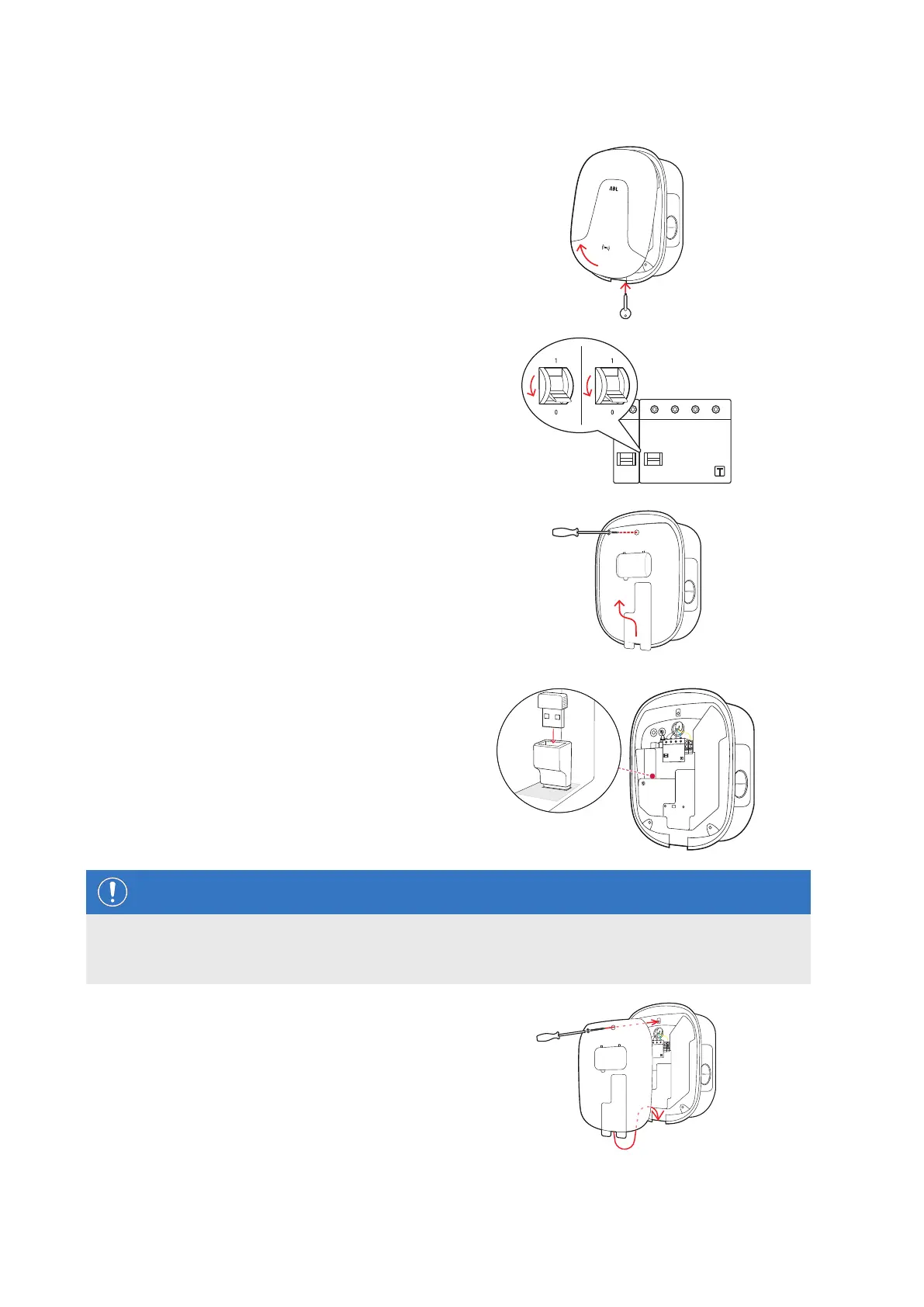
1 Open the housing cover of the wallbox with the
housing cover key and put it aside.
2 Disconnect the wallbox from the electricity supply
via the integrated RCCB and MCB.
3 Loosen the screw holding the internal electronic
components cover in place using the screwdriver
(Torx) and put it aside.
y Keep the screw in a safe place.
4 Locate the 5V USB switch in the left hand central
connections area on the inside of the housing cover
of the wallbox and insert the E3BWLAN into the
Type A socket of the switch.
y If the 5V USB switch is already occupied by
another device (e.g. an LTE USB stick), unplug
this device in order to be able to plug in the WiFi
dongle.
NOTE
Setting up communication via the WiFi dongle
Setting up the E3BWLAN for use with your wallbox is described from section "Setting up data communication"
on page34 onwards.
5 Replace the electronic components cover onto the
housing base and fix it into place with the screw
you removed in Step3.


 To Next Page