No. Symbols Description
11 Lock function
12 SHEILD Shield functions (Button operation, temperature setting, On/Off operation,Mode setting are disabled by the
remote monitoring system.)
13 TURBO Turbo function state
14 MEMORY Memory function (The indoor unit resumes the original setting after power failure and power recovery)
15 It blinks while on
16 SAVE Energy-saving function
17 Ambient/setting temperature value
18 E-HEATER Electric auxiliary heating function
19 BLOW Blow function
20 Time value
21 QUIET Quiet function (two types: quiet and auto quiet)
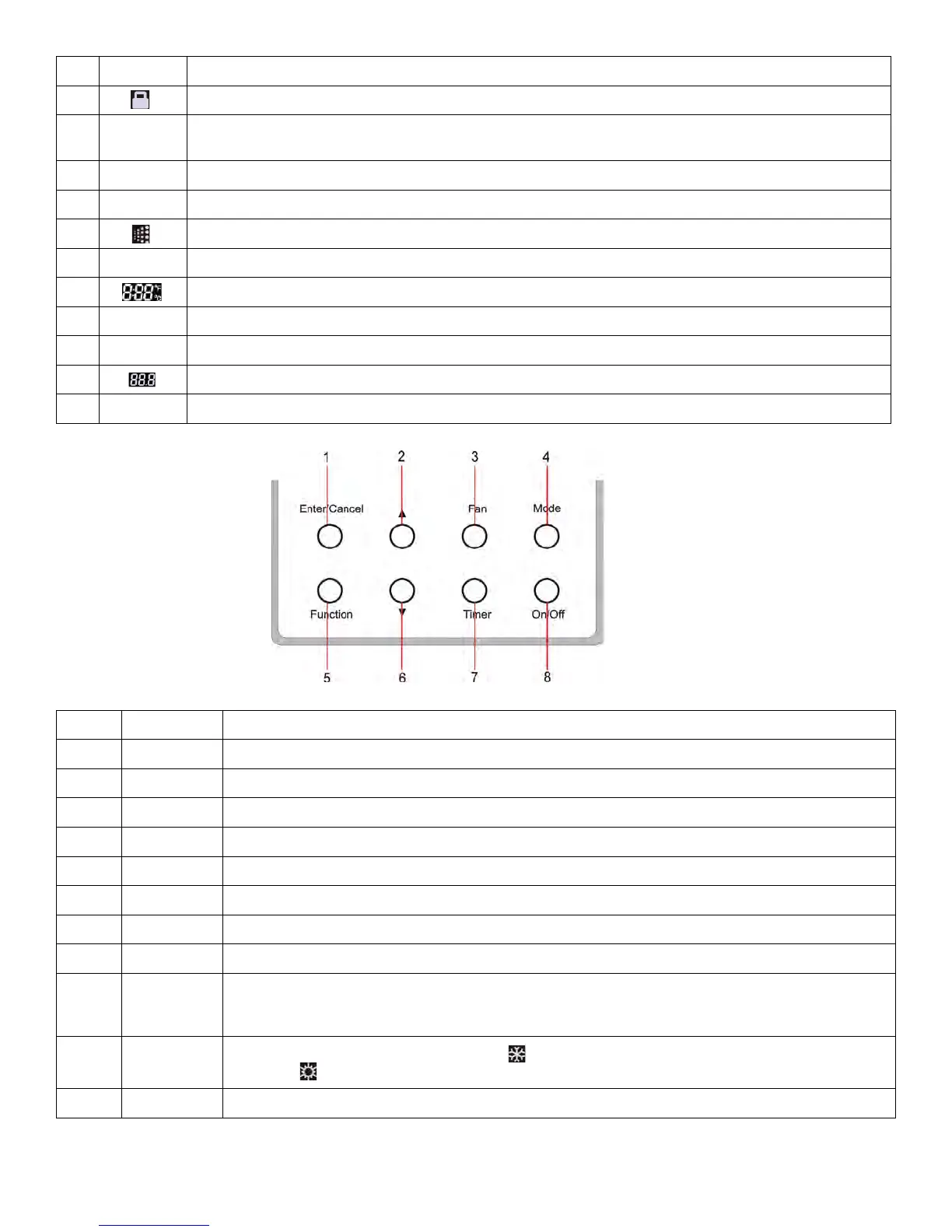
2 Buttons
2.1 Layout of Buttons
No. Name Description
1 Enter/Cancel Function selection and cancellation.
2
Running temperature setting of the indoor unit, range:16~30°C
6
Timer setting, range:0.5-24 hr.
3 Fan Setting of the high/middle/low/auto fan speed.
4 Mode Setting of the Cooling/Heating/Fan/Dry/Auto mode of the indoor unit.
6 Function Switchover among the functions of Turbo/Save/E-heater/Blow etc.
7 Timer Timer setting.
8 On/Off Turn on/off the indoor unit.
4+2
+Mode
Press for 5s under to enter/cancel the Memory function(If memory is set, indoor unit power failure and
power recovery will resume in the original setting state. If not, the indoor unit is defaulted to off after power
recovery. Memory off is default before delivery.).
3+6
Fan+
By pressing them at the same time while off, will be displayed on the wired controller for the cooling only
unit, while will be displayed on the wired controller for the cooling and heating unit.
2+6
+
Upon startup, press them at the same time for 5s to enter the lock state. Repress them for 5s to quit.
61
Installation and Maintenance
Service Manual
2 Buttons
2.1 Layout of Buttons
2.2 Functions of Buttons
11 Lock function
12 SHIELD
Shield functions (Button operation, temperature setting, On/Off operation,Mode setting are
disabled by the remote monitoring system.)
13 TURBO Turbo function state
14 MEMORY
Memory function (The indoor unit resumes the original setting state after power failure and
then power recovery)
15 It blinks under on state of the unit without operation of any button
16 SAVE Energy-saving function
17 Ambient/setting temperature value
18 E-HEATER Electric auxiliary heating function(this function is yet unavailable for this unit)
19 BLOW Blow function
20 Timing value
21 QUIET Quiet function (two types: quiet and auto quiet)(this function is yet unavailable for this unit).
No.
Name
Function
1 Enter/Cancel Function selection and cancellation.
2 ▲
①
Running temperature setting of the indoor unit, range:16~30°C.
②
Timer setting, range:0.5-24 hr.
6 ▼
3 Fan Setting of the high/middle/low/auto fan speed.
4 Mode Setting of the Cooling/Heating/Fan/Dry/Auto mode of the indoor unit.
6 Function Switchover among the functions of Turbo/Save/E-heater/Blow etc.
7 Timer Timer setting.
8 On/Off Turn on/off the indoor unit.
4+2 ▲+Mode
Press them for 5s under off state of the unit to enter/cancel the Memory function(If memory
is set, indoor unit after power failure and then power recovery will resume the original
setting state. If not, the indoor unit is defaulted to be off after power recovery. Memory off is
default before delivery.).
3+6 Fan+▼
By pressing them at the same time under off state of the unit, will be displayed on the
wired controller for the cooling only unit, while will be displayed on the wired controller
for the cooling and heating unit.
2+6 ▲+▼
Upon startup of the unit without malfunction or under off state of the unit,press them at the
same time for 5s to enter the lock state, in which case,any other buttons wont respond the
press. Repress them for 5s to quit this state.
60
Installation and Maintenance
Service Manual
8.9 Wired Controller
If the product you bought is equipped with wired controller, please refer to the following introductions of wired controller.
1.Displaying Part
Fig1.1.1 Outline of wired controller
Fig.1.1.2 LCD display
1.1 LCD Display of Wired Controller
1.2 Instruction to LCD Display
No.
Symbols
Description
1 Swing function
2 Air exchange function (this function is yet unavailable for this unit)
3 Sleep function (Only sleep 1)
4 Each kind of running mode of indoor unit (auto mode)
5
Cooling mode
6 Dry mode
7 Fan mode
8 Heating mode
9 Defrosting function for the outdoor unit
10 Gate-control function (this function is yet unavailable for this unit)
60
Installation and Maintenance
Service Manual
8.9 Wired Controller
If the product you bought is equipped with wired controller, please refer to the following introductions of wired controller.
1.Displaying Part
Fig1.1.1 Outline of wired controller
Fig.1.1.2 LCD display
1.1 LCD Display of Wired Controller
1.2 Instruction to LCD Display
No.
Symbols
Description
1 Swing function
2 Air exchange function (this function is yet unavailable for this unit)
3 Sleep function (Only sleep 1)
4 Each kind of running mode of indoor unit (auto mode)
5 Cooling mode
6 Dry mode
7 Fan mode
8
Heating mode
9 Defrosting function for the outdoor unit
10 Gate-control function (this function is yet unavailable for this unit)
61
Installation and Maintenance
Service Manual
2 Buttons
2.1 Layout of Buttons
2.2 Functions of Buttons
11 Lock function
12 SHIELD
Shield functions (Button operation, temperature setting, On/Off operation,Mode setting are
disabled by the remote monitoring system.)
13 TURBO Turbo function state
14 MEMORY
Memory function (The indoor unit resumes the original setting state after power failure and
then power recovery)
15 It blinks under on state of the unit without operation of any button
16 SAVE Energy-saving function
17 Ambient/setting temperature value
18 E-HEATER Electric auxiliary heating function(this function is yet unavailable for this unit)
19 BLOW Blow function
20 Timing value
21 QUIET Quiet function (two types: quiet and auto quiet)(this function is yet unavailable for this unit).
No.
Name
Function
1 Enter/Cancel Function selection and cancellation.
2 ▲
①
Running temperature setting of the indoor unit, range:16~30°C.
②
Timer setting, range:0.5-24 hr.
6 ▼
3 Fan Setting of the high/middle/low/auto fan speed.
4 Mode Setting of the Cooling/Heating/Fan/Dry/Auto mode of the indoor unit.
6 Function Switchover among the functions of Turbo/Save/E-heater/Blow etc.
7 Timer Timer setting.
8 On/Off Turn on/off the indoor unit.
4+2 ▲+Mode
Press them for 5s under off state of the unit to enter/cancel the Memory function(If memory
is set, indoor unit after power failure and then power recovery will resume the original
setting state. If not, the indoor unit is defaulted to be off after power recovery. Memory off is
default before delivery.).
3+6 Fan+▼
By pressing them at the same time under off state of the unit, will be displayed on the
wired controller for the cooling only unit, while will be displayed on the wired controller
for the cooling and heating unit.
2+6 ▲+▼
Upon startup of the unit without malfunction or under off state of the unit,press them at the
same time for 5s to enter the lock state, in which case,any other buttons wont respond the
press. Repress them for 5s to quit this state.
61
Installation and Maintenance
Service Manual
2 Buttons
2.1 Layout of Buttons
2.2 Functions of Buttons
11 Lock function
12 SHIELD
Shield functions (Button operation, temperature setting, On/Off operation,Mode setting are
disabled by the remote monitoring system.)
13 TURBO Turbo function state
14 MEMORY
Memory function (The indoor unit resumes the original setting state after power failure and
then power recovery)
15
It blinks under on state of the unit without operation of any button
16 SAVE Energy-saving function
17 Ambient/setting temperature value
18 E-HEATER Electric auxiliary heating function(this function is yet unavailable for this unit)
19 BLOW Blow function
20 Timing value
21 QUIET Quiet function (two types: quiet and auto quiet)(this function is yet unavailable for this unit).
No.
Name
Function
1 Enter/Cancel Function selection and cancellation.
2 ▲
①
Running temperature setting of the indoor unit, range:16~30°C.
②
Timer setting, range:0.5-24 hr.
6 ▼
3 Fan Setting of the high/middle/low/auto fan speed.
4 Mode Setting of the Cooling/Heating/Fan/Dry/Auto mode of the indoor unit.
6 Function Switchover among the functions of Turbo/Save/E-heater/Blow etc.
7 Timer Timer setting.
8 On/Off Turn on/off the indoor unit.
4+2 ▲+Mode
Press them for 5s under off state of the unit to enter/cancel the Memory function(If memory
is set, indoor unit after power failure and then power recovery will resume the original
setting state. If not, the indoor unit is defaulted to be off after power recovery. Memory off is
default before delivery.).
3+6 Fan+▼
By pressing them at the same time under off state of the unit, will be displayed on the
wired controller for the cooling only unit, while will be displayed on the wired controller
for the cooling and heating unit.
2+6 ▲+▼
Upon startup of the unit without malfunction or under off state of the unit,press them at the
same time for 5s to enter the lock state, in which case,any other buttons wont respond the
press. Repress them for 5s to quit this state.
61
Installation and Maintenance
Service Manual
2 Buttons
2.1 Layout of Buttons
2.2 Functions of Buttons
11 Lock function
12 SHIELD
Shield functions (Button operation, temperature setting, On/Off operation,Mode setting are
disabled by the remote monitoring system.)
13 TURBO Turbo function state
14 MEMORY
Memory function (The indoor unit resumes the original setting state after power failure and
then power recovery)
15 It blinks under on state of the unit without operation of any button
16 SAVE Energy-saving function
17
Ambient/setting temperature value
18 E-HEATER Electric auxiliary heating function(this function is yet unavailable for this unit)
19 BLOW Blow function
20 Timing value
21 QUIET Quiet function (two types: quiet and auto quiet)(this function is yet unavailable for this unit).
No.
Name
Function
1 Enter/Cancel Function selection and cancellation.
2 ▲
①
Running temperature setting of the indoor unit, range:16~30°C.
②
Timer setting, range:0.5-24 hr.
6 ▼
3 Fan Setting of the high/middle/low/auto fan speed.
4 Mode Setting of the Cooling/Heating/Fan/Dry/Auto mode of the indoor unit.
6 Function Switchover among the functions of Turbo/Save/E-heater/Blow etc.
7 Timer Timer setting.
8 On/Off Turn on/off the indoor unit.
4+2 ▲+Mode
Press them for 5s under off state of the unit to enter/cancel the Memory function(If memory
is set, indoor unit after power failure and then power recovery will resume the original
setting state. If not, the indoor unit is defaulted to be off after power recovery. Memory off is
default before delivery.).
3+6 Fan+▼
By pressing them at the same time under off state of the unit, will be displayed on the
wired controller for the cooling only unit, while will be displayed on the wired controller
for the cooling and heating unit.
2+6 ▲+▼
Upon startup of the unit without malfunction or under off state of the unit,press them at the
same time for 5s to enter the lock state, in which case,any other buttons wont respond the
press. Repress them for 5s to quit this state.
61
Installation and Maintenance
Service Manual
2 Buttons
2.1 Layout of Buttons
2.2 Functions of Buttons
11 Lock function
12 SHIELD
Shield functions (Button operation, temperature setting, On/Off operation,Mode setting are
disabled by the remote monitoring system.)
13 TURBO Turbo function state
14 MEMORY
Memory function (The indoor unit resumes the original setting state after power failure and
then power recovery)
15 It blinks under on state of the unit without operation of any button
16 SAVE Energy-saving function
17 Ambient/setting temperature value
18 E-HEATER Electric auxiliary heating function(this function is yet unavailable for this unit)
19 BLOW Blow function
20
Timing value
21 QUIET Quiet function (two types: quiet and auto quiet)(this function is yet unavailable for this unit).
No.
Name
Function
1 Enter/Cancel Function selection and cancellation.
2 ▲
①
Running temperature setting of the indoor unit, range:16~30°C.
②
Timer setting, range:0.5-24 hr.
6 ▼
3 Fan Setting of the high/middle/low/auto fan speed.
4 Mode Setting of the Cooling/Heating/Fan/Dry/Auto mode of the indoor unit.
6 Function Switchover among the functions of Turbo/Save/E-heater/Blow etc.
7 Timer Timer setting.
8 On/Off Turn on/off the indoor unit.
4+2 ▲+Mode
Press them for 5s under off state of the unit to enter/cancel the Memory function(If memory
is set, indoor unit after power failure and then power recovery will resume the original
setting state. If not, the indoor unit is defaulted to be off after power recovery. Memory off is
default before delivery.).
3+6 Fan+▼
By pressing them at the same time under off state of the unit, will be displayed on the
wired controller for the cooling only unit, while will be displayed on the wired controller
for the cooling and heating unit.
2+6 ▲+▼
Upon startup of the unit without malfunction or under off state of the unit,press them at the
same time for 5s to enter the lock state, in which case,any other buttons wont respond the
press. Repress them for 5s to quit this state.




 To Next Page