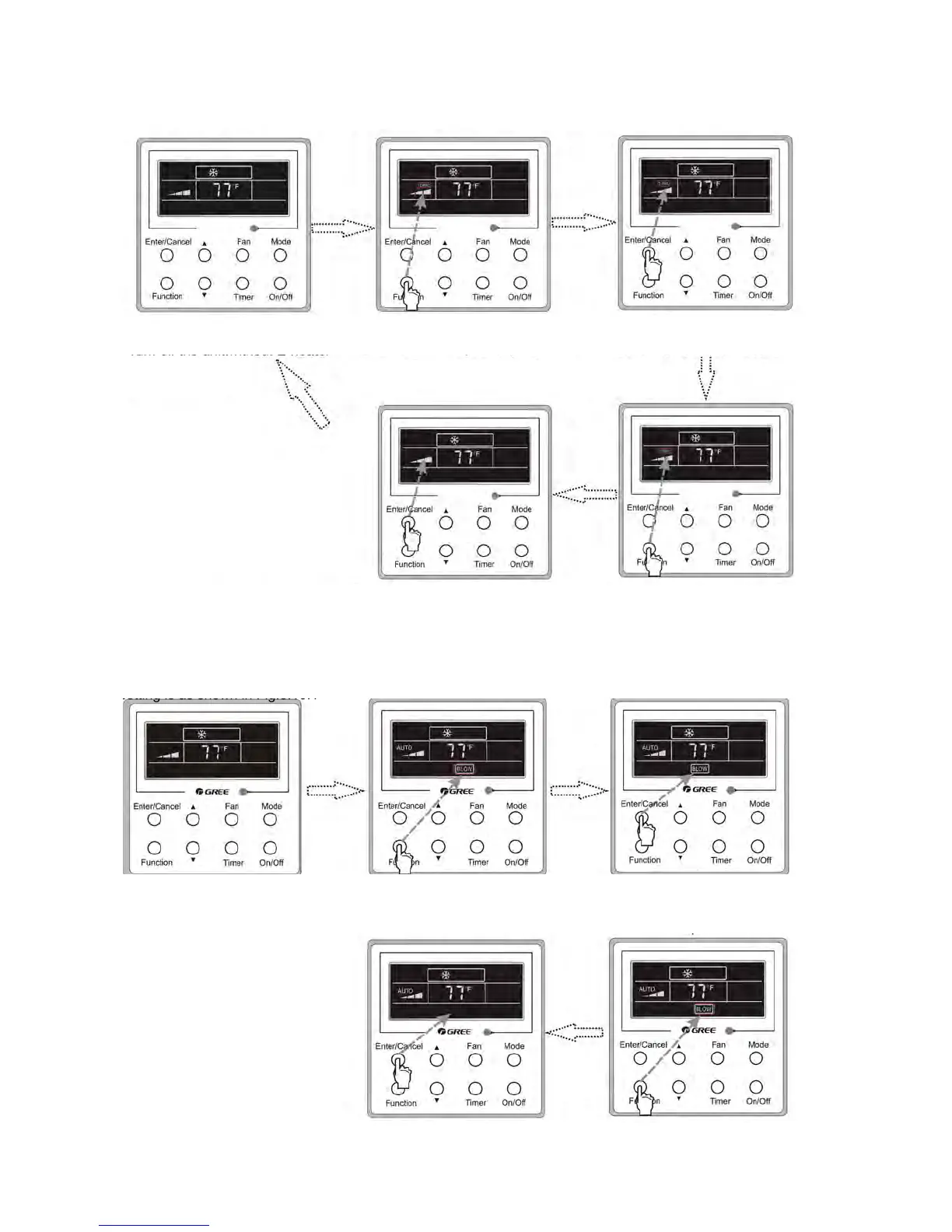
Turn off the unit,without
Blow function activated
Press Function repeatedly until
go to the Blow setting status
Press Enter/Cancel to activated
the Blow function
Press Enter/Cancel to cancel
this setting
Press Function repeatedly until go
to the Blow setting function again
3.9 E-heater Setting
E-heater (also known as auxiliary electric heating function).
• This setting improves the efficiency of the heater function.
• Press the Function button in heating mode to enter E-heater setting interface.
• Pressing ENTER/CANCEL to cancel out of this function.
Turn off the unit, without
E-heater function activated
Press Function repeatedly until
go to the E-heater setting status
Press Enter/Cancel to activated
the E-heater function
Press Enter/Cancel to
cancel this setting
Press Function repeatedly until go to
the E-heater setting function again
3.10 Blow Setting
When the unit is turned off, the water in the evaporator of the indoor unit will automatically be evaporated to avoid mildew.
• In COOL or DRY mode, press the function button until the unit enters the blow setting.
• Press ENTER /CANCEL to activate this function.
• Pressing ENTER/CANCEL to cancel out of this function.
68
Installation and Maintenance
Service Manual
3.9 E-heater Setting
E-heater (auxiliary electric heating function): In the Heating mode, E-heater is allowed to be turned on for improvement of effciency.
Once the wired controller or the remote controller enters the Heating mode, this function will be turned on automatically.
Press Function in the Heating mode to enter the E-heater setting interface and then press Enter/Cancel to cancel this function.
Press Function to enter the E-heater setting status, if the E-heater function is not activated, and then press Enter/Cancel to activate it.
The setting of this function is shown as Fig.3.9.1 below:
3.10 Blow Setting
Blow function: After the unit is turned off, the water in evaporator of indoor unit will be automatically evaporated to avoid mildew.
In the Cooling or Dry mode, press Function till the unit enters the Blow setting status and then press Enter/Cancel to active this function.
When the Blow function is activated, press Function to the Blow setting status and then press Enter/Cancel to cancel this function.
Blow function setting is as shown in Fig.3.10.1
Turn off the unit,without E-heater
function activated
Turn off the unit,without Blow
function activated
Press Function repeatedly unitll
go to the E-heater setting status
Press Function repeatedly unitll
go to the Blow setting status
Press Enter/Cancel to cancel this
setting
Press Enter/Cancel to cancel this
setting
Press Function repeatedly unitll go to
the E-heater setting function again
Press Function repeatedly unitll go to
the Blow setting function again
Fig.3.9.1 E-heater Setting
Fig.3.9.1 E-heater Setting
Press Enter/Cancel to activated the E-heater
function
Press Enter/Cancel to activated the Blow
function
68
Installation and Maintenance
Service Manual
3.9 E-heater Setting
E-heater (auxiliary electric heating function): In the Heating mode, E-heater is allowed to be turned on for improvement of effciency.
Once the wired controller or the remote controller enters the Heating mode, this function will be turned on automatically.
Press Function in the Heating mode to enter the E-heater setting interface and then press Enter/Cancel to cancel this function.
Press Function to enter the E-heater setting status, if the E-heater function is not activated, and then press Enter/Cancel to activate it.
The setting of this function is shown as Fig.3.9.1 below:
3.10 Blow Setting
Blow function: After the unit is turned off, the water in evaporator of indoor unit will be automatically evaporated to avoid mildew.
In the Cooling or Dry mode, press Function till the unit enters the Blow setting status and then press Enter/Cancel to active this function.
When the Blow function is activated, press Function to the Blow setting status and then press Enter/Cancel to cancel this function.
Blow function setting is as shown in Fig.3.10.1
Turn off the unit,without E-heater
function activated
Turn off the unit,without Blow
function activated
Press Function repeatedly unitll
go to the E-heater setting status
Press Function repeatedly unitll
go to the Blow setting status
Press Enter/Cancel to cancel this
setting
Press Enter/Cancel to cancel this
setting
Press Function repeatedly unitll go to
the E-heater setting function again
Press Function repeatedly unitll go to
the Blow setting function again
Fig.3.9.1 E-heater Setting
Fig.3.9.1 E-heater Setting
Press Enter/Cancel to activated the E-heater
function
Press Enter/Cancel to activated the Blow
function




 To Next Page