Timer range: 0.5-24hr. Press or to increase/decrease set time by 0.5hr. If either of them is pressed continuously, the set time will
increase/ decrease by 0.5hr every 0.5 seconds.
3.6 Swing Setting
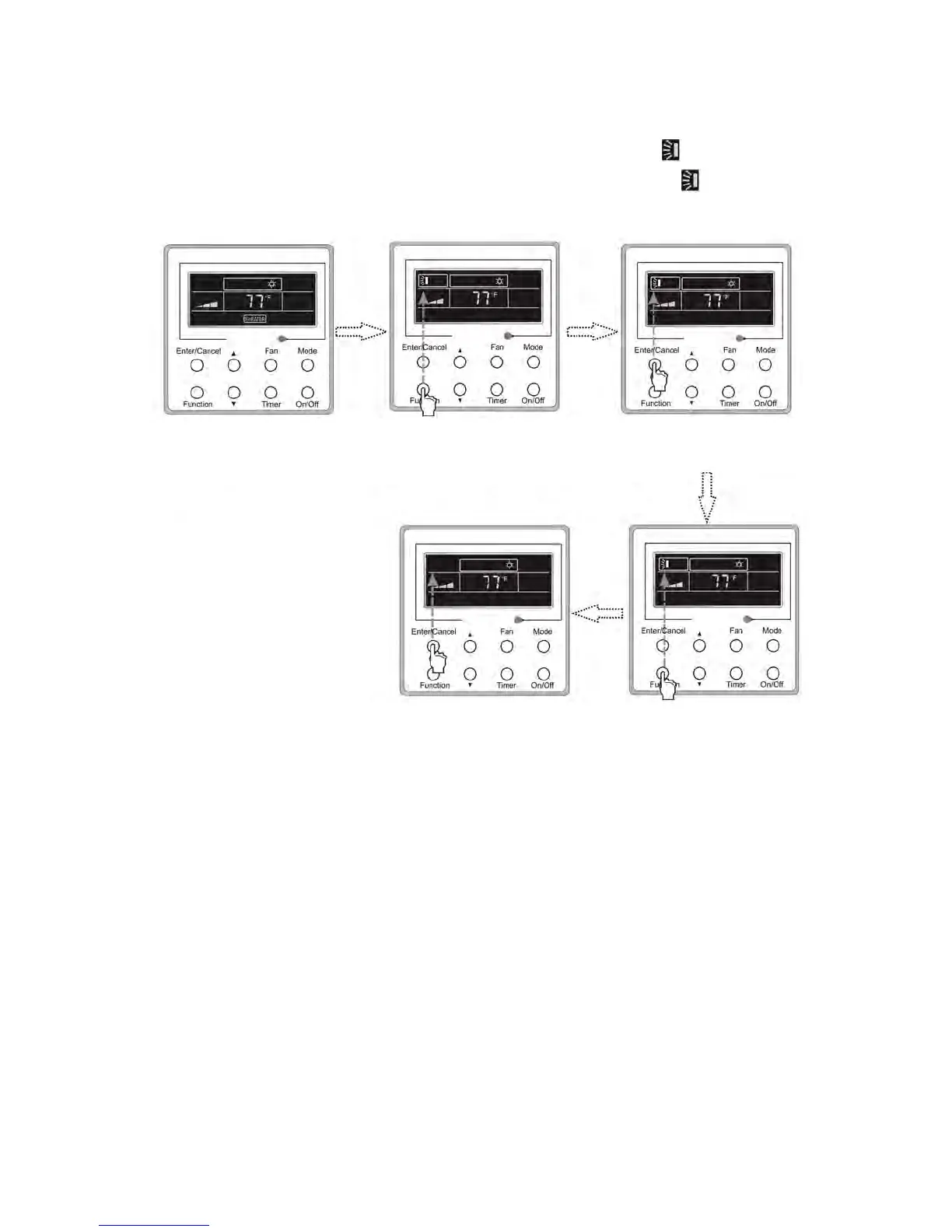
Press the SWING button to adjust the fan blowing angle as seen below.
• SWING ON: Press function to activate swinging of louvers. Press ENTER/CANCEL when the icon begins to blink to confirm
swing operation is desired.
• SWING OFF: Press function to deactivate swinging of louvers. Press ENTER/CANCEL when the icon appears cancel swing
operation.
Fig.3.6.1 Swing Setting
Notes:
SLEEP, TURBO and FAN settings are the same as the SWING setting
3.7 Sleep Setting
Under COOL, HEAT or DRY Mode, press this button to start the SLEEP function. Press ENTER/CANCEL to confirm setting.
• In COOL or DRY modes, the system will increase temperature by 1-2ºF each hour after SLEEP mode is enabled.
• In HEAT mode, the system will decrease temperature by 1-2ºF each hour after SLEEP mode is enabled.
Turn off the unit, without
Sleep function activated
Press Function repeatedly
until go to the Swing
setting status
Press Enter/Cancel
to activated the Turbo
function
Press Enter/Cancel to
cancel this setting
Press Function repeatedly
unitll go to the Swing
function again




 To Next Page