Step Procedure
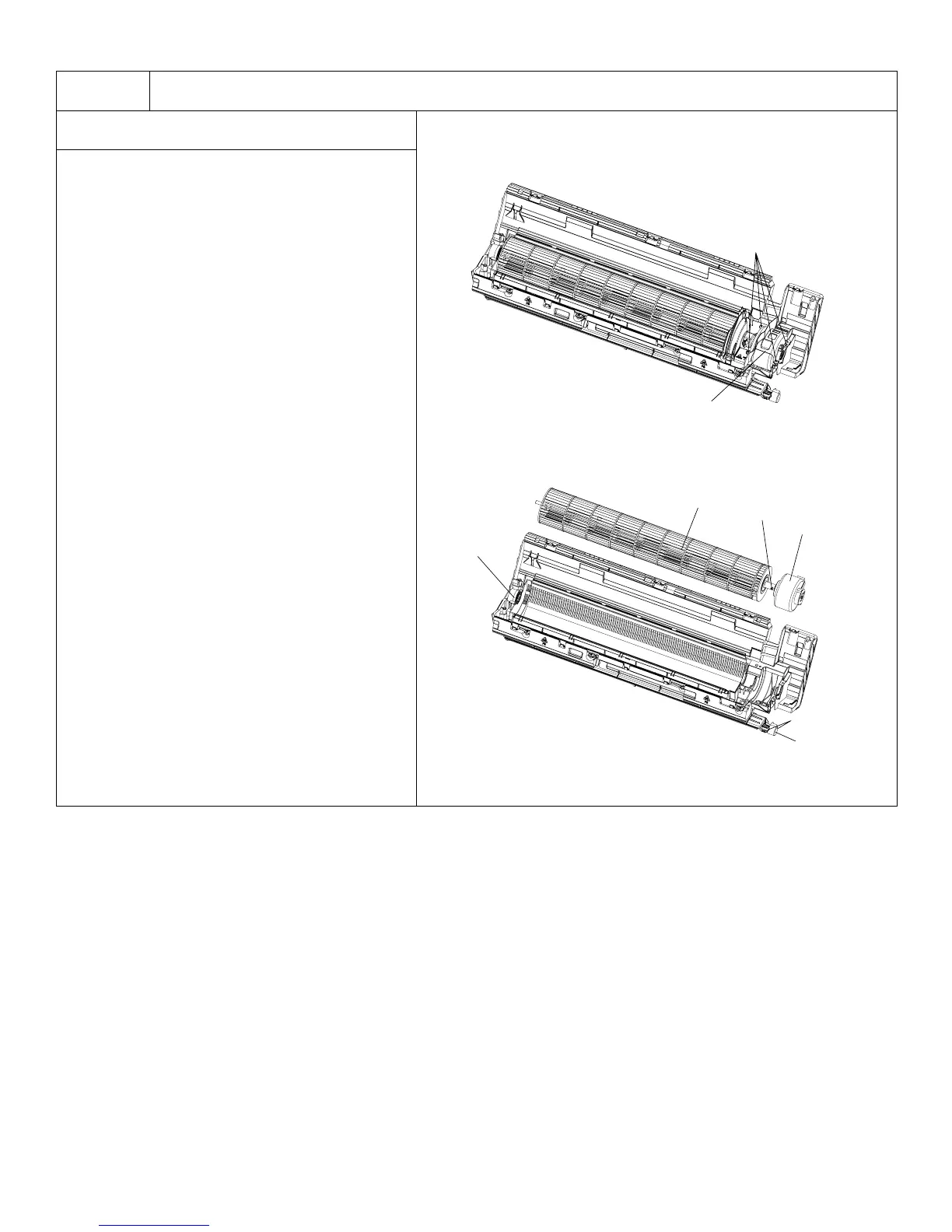
10. Remove motor and cross flow blade
a. Remove screws fixing motor clamp then
remove the motor clamp.
b. Remove screws at the connection place of
cross flow blade and motor; lift the motor
and cross flow blade upward to remove.
Remove bearing holder sub-assy.
Remove screw fixing step motor then
remove step motor.
95
Installation and Maintenance
Service Manual
ProcedureSteps
Remove the screws fixing motor clamp
and then remove the motor clamp.
Remove the screws at the connection
place of cross flow blade and motor; lift
the motor and cross flow blade upwards
to remove them.
Remove the bearing holder sub-assy.
Remove the screw xing step motor and
then remove the step motor.
Screws
Screw
Motor clamp
10. Remove motor and cross ow blade
Motor
Cross ow
Holder
sub-assy
Step motor
Screws




 To Next Page