Step Procedure
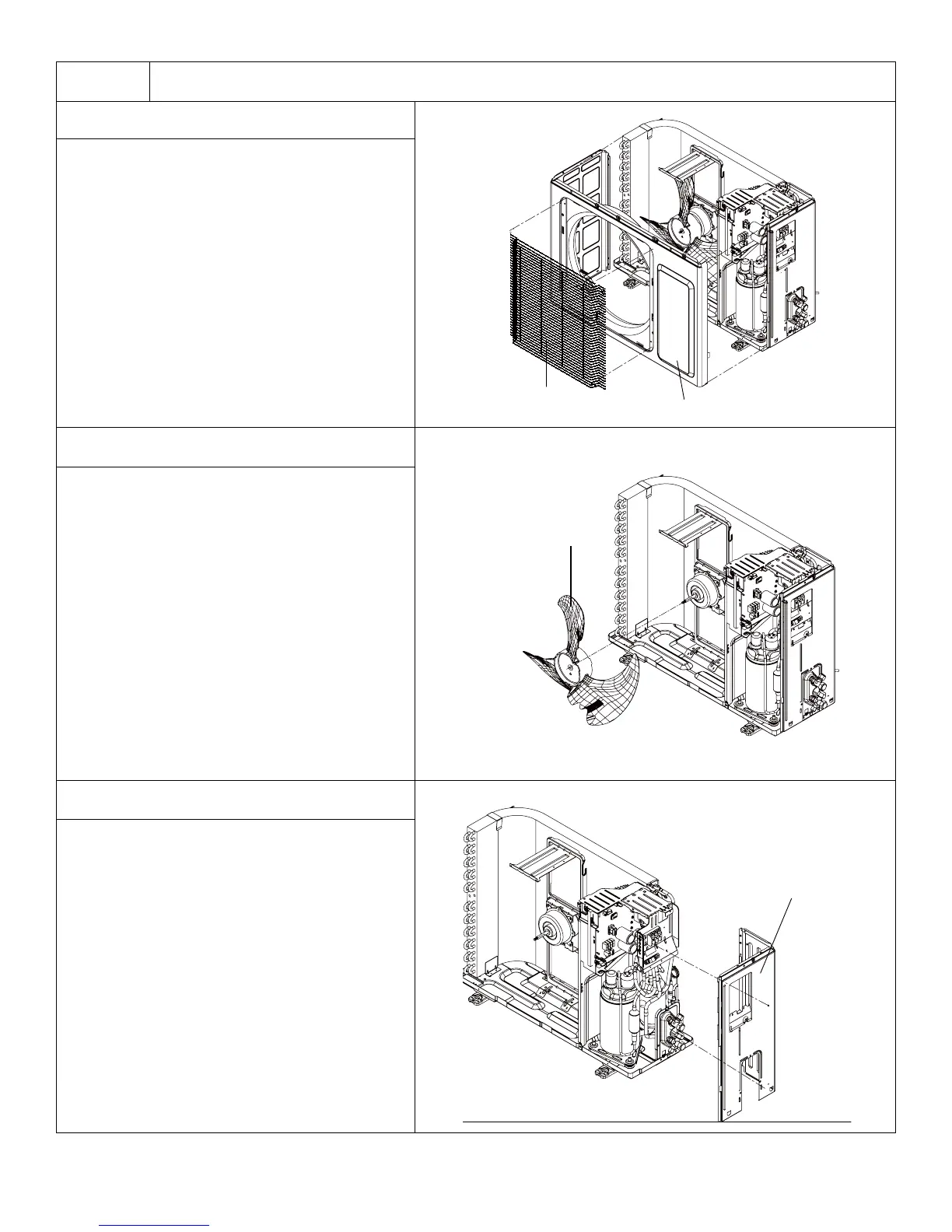
3. Remove Grille and Front Panel
Remove connection screws between the
front grille and the front panel. Then remove
the front grille.
Remove connection screws connecting the
front panel with the chassis and the motor
support, and then remove the front panel.
4. Remove Axial Flow Blade
Remove the nut fixing the blade and then
remove the axial flow blade.
5. Remove Right Side Plate
Remove connection screws connecting the
right bside plate with the valve support and
the electric box. Then remove the right side
plate.
133
Installation and Maintenance
Service Manual
3.Remove grille and front panel
4.Remove axial flow blade
5.Remove right side plate
Remove connection screws between the front grille
and the front panel. Then remove the front grille.
Remove connection screws connecting the front
panel with the chassis and the motor support, and
then remove the front panel.
Remove the nut fixing the blade and then
remove the axial flow blade.
Remove connection screws connecting the right
side plate with the valve support and the electric
box. Then remove the right side plate.
Grille
Panel
Axial flow blade
Right side plate
133
Installation and Maintenance
Service Manual
3.Remove grille and front panel
4.Remove axial flow blade
5.Remove right side plate
Remove connection screws between the front grille
and the front panel. Then remove the front grille.
Remove connection screws connecting the front
panel with the chassis and the motor support, and
then remove the front panel.
Remove the nut fixing the blade and then
remove the axial flow blade.
Remove connection screws connecting the right
side plate with the valve support and the electric
box. Then remove the right side plate.
Grille
Panel
Axial flow blade
133
Installation and Maintenance
Service Manual
3.Remove grille and front panel
4.Remove axial flow blade
5.Remove right side plate
Remove connection screws between the front grille
and the front panel. Then remove the front grille.
Remove connection screws connecting the front
panel with the chassis and the motor support, and
then remove the front panel.
Remove the nut fixing the blade and then
remove the axial flow blade.
Remove connection screws connecting the right
side plate with the valve support and the electric
box. Then remove the right side plate.
Grille
Panel
Axial flow blade
Right side plate




 To Next Page