Step Procedure
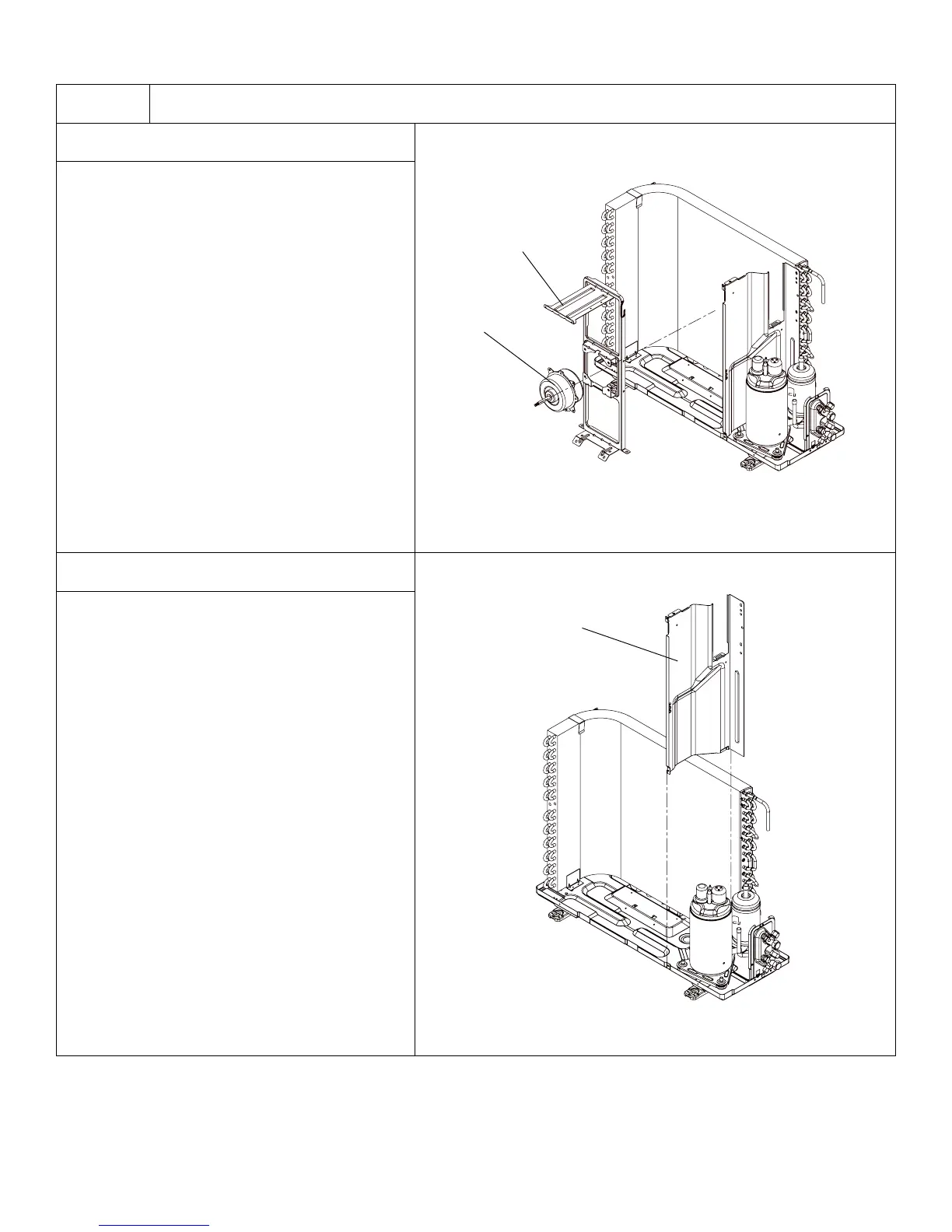
9. Remove Motor and Motor Support
Remove the 4 tapping screws fixing the
motor. Pull out the lead-out wire and remove
the motor. Remove the 2 tapping screws
fixing the motor support. Lift motor support
to remove it.
10. Remove Clapboard Sub-Assy
Loosen the screws of the Clapboard Sub-
Assy . The Clapboard Sub-Assy has a hook
on the lower side. Lift and pull the Clapboard
Sub-Assy to remove.
135
Installation and Maintenance
Service Manual
Remove the 4 tapping screws fixing the motor.
Pull out the lead-out wire and remove the
motor. Remove the 2 tapping screws fixing
the motor support. Lift motor support to re-
move it.
9.Remove motor and motor support
Motor
Motor support
10.Remove clapboard sub-assy
Loosen the screws of the Clapboard Sub-Assy .
The Clapboard Sub-Assy has a hook on the
lower side. Lift and pull the Clapboard Sub-Assy
to remove.
Clapboard Sub-Assy
135
Installation and Maintenance
Service Manual
Remove the 4 tapping screws fixing the motor.
Pull out the lead-out wire and remove the
motor. Remove the 2 tapping screws fixing
the motor support. Lift motor support to re-
move it.
9.Remove motor and motor support
Motor
Motor support
10.Remove clapboard sub-assy
Loosen the screws of the Clapboard Sub-Assy .
The Clapboard Sub-Assy has a hook on the
lower side. Lift and pull the Clapboard Sub-Assy
to remove.
Clapboard Sub-Assy




 To Next Page