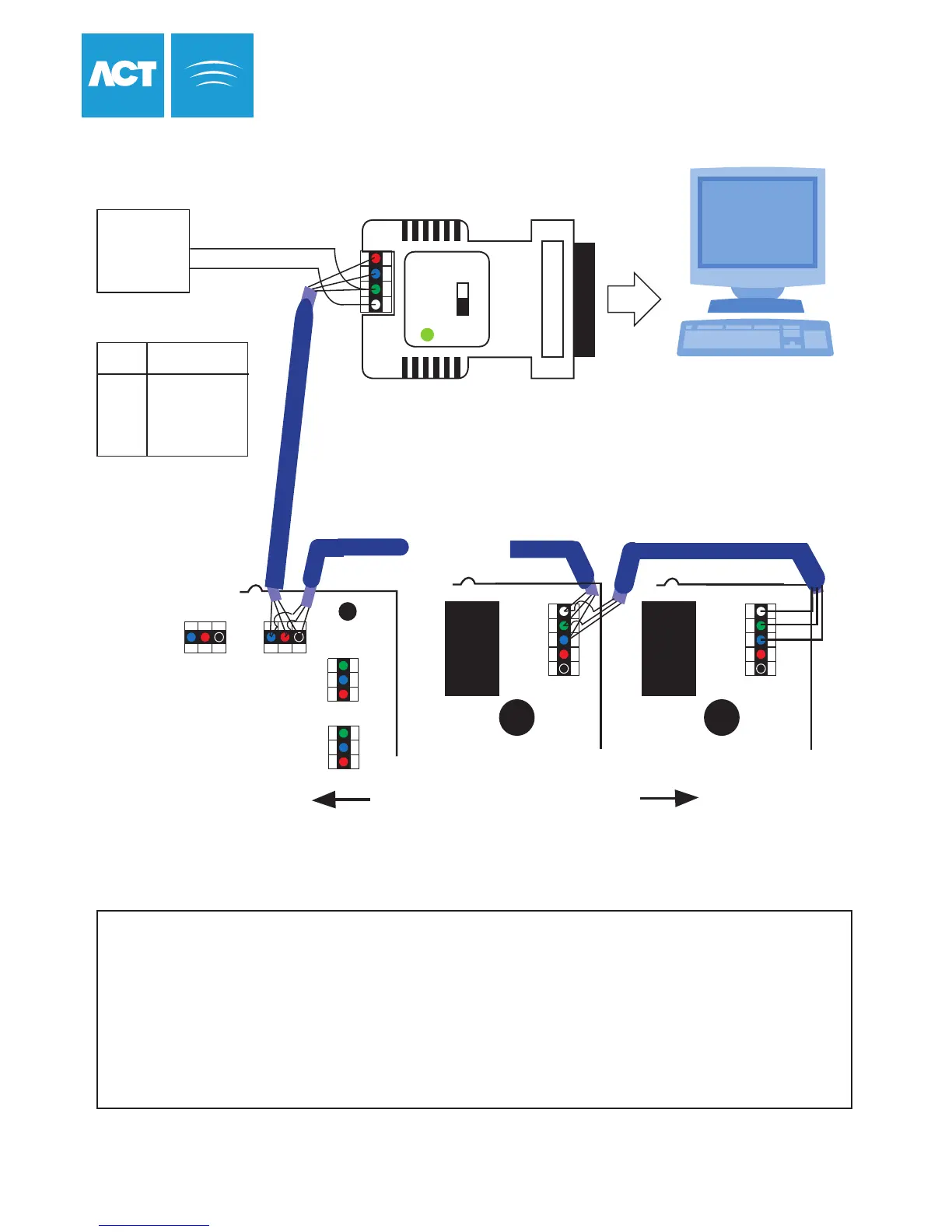
Setup for Network Operation
4 3 2 1
BAUDRATE SELECT
9600
19200
Network cable use either:
(1)Single shielded twisted pair: Belden 9501 or similar
(2)CAT5 Cable: A/B must share the same twisted pair.
ACTpro 4000
ACTpro 1000 ACTpro 1000
NETWORK PRINTER
Timekeeper
Lithium Battery
A
B
0V
TX
RX
Timekeeper
Lithium Battery
A
B
0V
TX
RX
RS485 line may be up to 1km in length
and connect up to 32 controllers
To next Controller
NETWORK 1
DOORS
SERIAL
RX
TX
0V
A
B
0V
Shield
A B 0V
NETWORK PRINTER
ACTWin Software
12V DC
Power
Supply
(300mA)
+12V
0V
1 +12V
2 0V & Shield
3 B
4 A
Pin Function
RS-485 Bus
RS-232
1. From the ACTpro 4000 Controller keypad Enter Installer Menu->Communications and set a unique address for
each controller on the network.
2. From ACTWin pro create a new database. In the database creation wizard check RS-485 Automatic Interface
is selected.
3. Connect to the controllers from ACTWin pro. The LED on the RS485 converter should blink rapidly indicating
communications in progress
.
ACT Single Line RS-485 Converter
38
NETWORK 2
A B 0V



 To Next Page