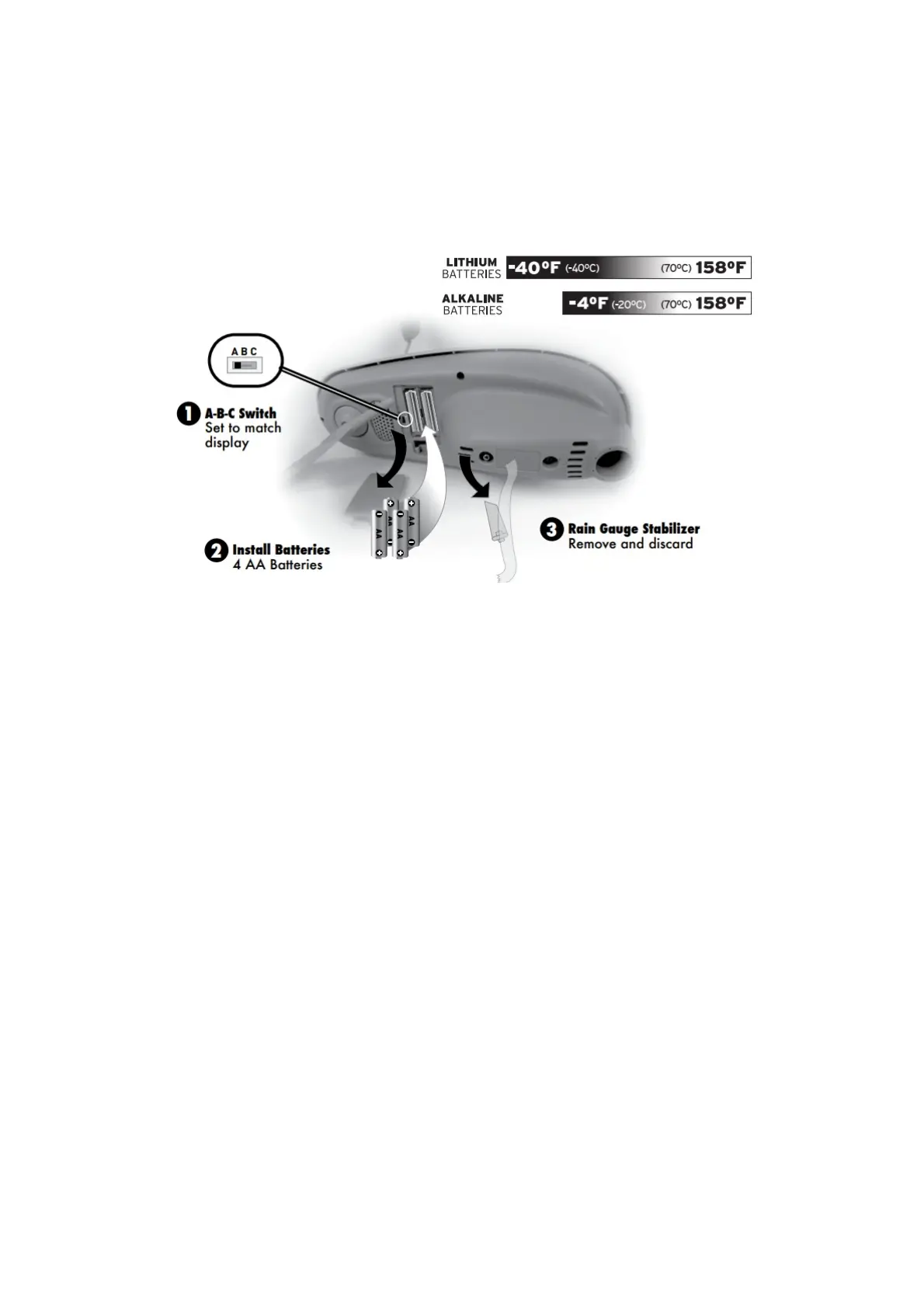
2. Insert 4 x AA batteries into the battery compartment, as shown. Follow the polarity (+/-) diagram in the
battery compartment.
3. Replace the battery cover.
3. Remove Rain Gauge Stabilizer
Locate and remove the rain gauge stabilizer (plastic tab) taped into the bottom of the sensor. The rain gauge
will not function until this is removed.
Display Setup
1. Set the A-B-C Switch
The A-B-C switch is located inside the battery compartment. It can be set to A, B or C. However, you must
select the same letter choices for both the sensor and the display in order for the units to synchronize.
2. Plug Power Adapter into Electric Outlet
3. Write Down the MAC ADDRESS
12 digit unique ID needed for online connectivity functions.
4. Install or Replace Backup Batteries (optional)
Insert 6 x AA alkaline batteries into the battery compartment, as shown. Follow the polarity (+/-) diagram in the
battery compartment.



 To Next Page