EasyManua.ls Logo

Adixen ASM 142 D - Change of Interface

Adixen ASM 142 D
336 pages
Print Icon
To Next Page IconTo Next Page
To Previous Page IconTo Previous Page
Loading...
C
440
Control panel with graphic
inter
face
3
/
14
G
GB 02669
-
Edition 03
- June
08
Change
of
inter
face
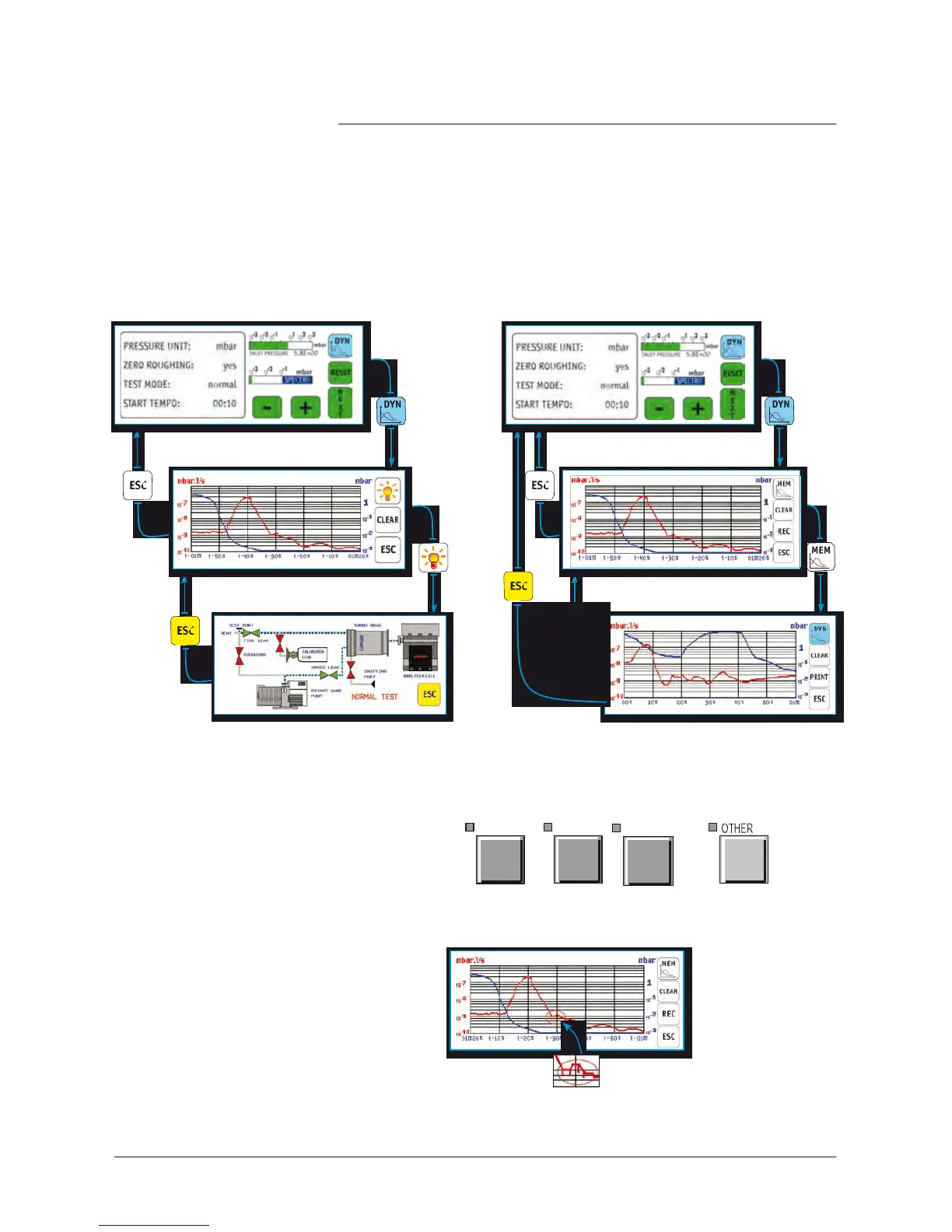
“Basic” mode
“Advanced” mode
Standard interface
Standard
inter
face
Graphic
interface:
dynamic graph
Graphic
interface:
dynamic
graph
Animated synoptic
raphic interface:
memorised
graph
Notes:
Any action on one of the following
keys switches
the display back
to standard.
SET POINTS
,
SPECTRO
,
MAINTENANCE
or
After repeated zooms or
measures
in a memorized graph, some
display
defects
could appear when you return to the dynamic
graph.
defect
example
These defects
are unpredictable and no
consequence.
If a graph is
recording,
these defects
will not be recorded.

Table of Contents

Other manuals for Adixen ASM 142 D

Related product manuals