EasyManua.ls Logo

Adixen ASM 142 D - Graphic Interface Setting; Menus Description

Adixen ASM 142 D
336 pages
Print Icon
To Next Page IconTo Next Page
To Previous Page IconTo Previous Page
Loading...
C
440
Control panel with graphic
inter
face
7
/
14
GB 02669
-
Edition 03
- June
08
Graphic
inter
face
setting
A simple
press
on the dynamic graph allows
access
to the setting
menu.
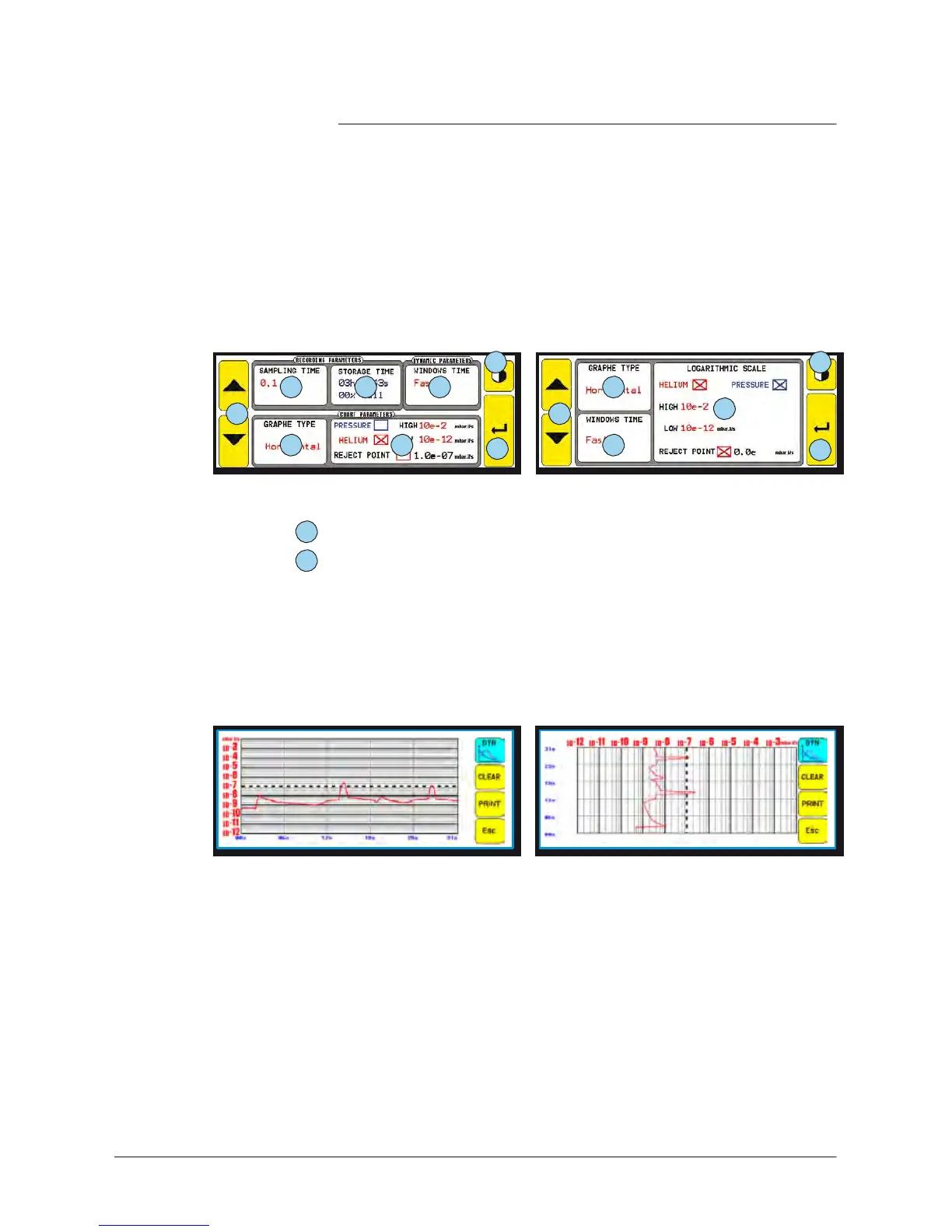
Menus description
8
8
5 6 7
2
1 1
3
2 3
4
7
4
“Advanced
mode
“Basic
mode
1
Selected
parameter modification
2
Graph type
selection
: vertical or horizontal
-
Time
precision required
>
horizontal
-
Measure precision and speed required >vertical
-
If we switch from a vertical graph to a horizontal graph, or
vice-versa,
all the dynamic graph points will be erased.
example: the same curve with both graph types.
Horizontal
V
er
tical

Table of Contents

Other manuals for Adixen ASM 142 D

Related product manuals