EasyManua.ls Logo

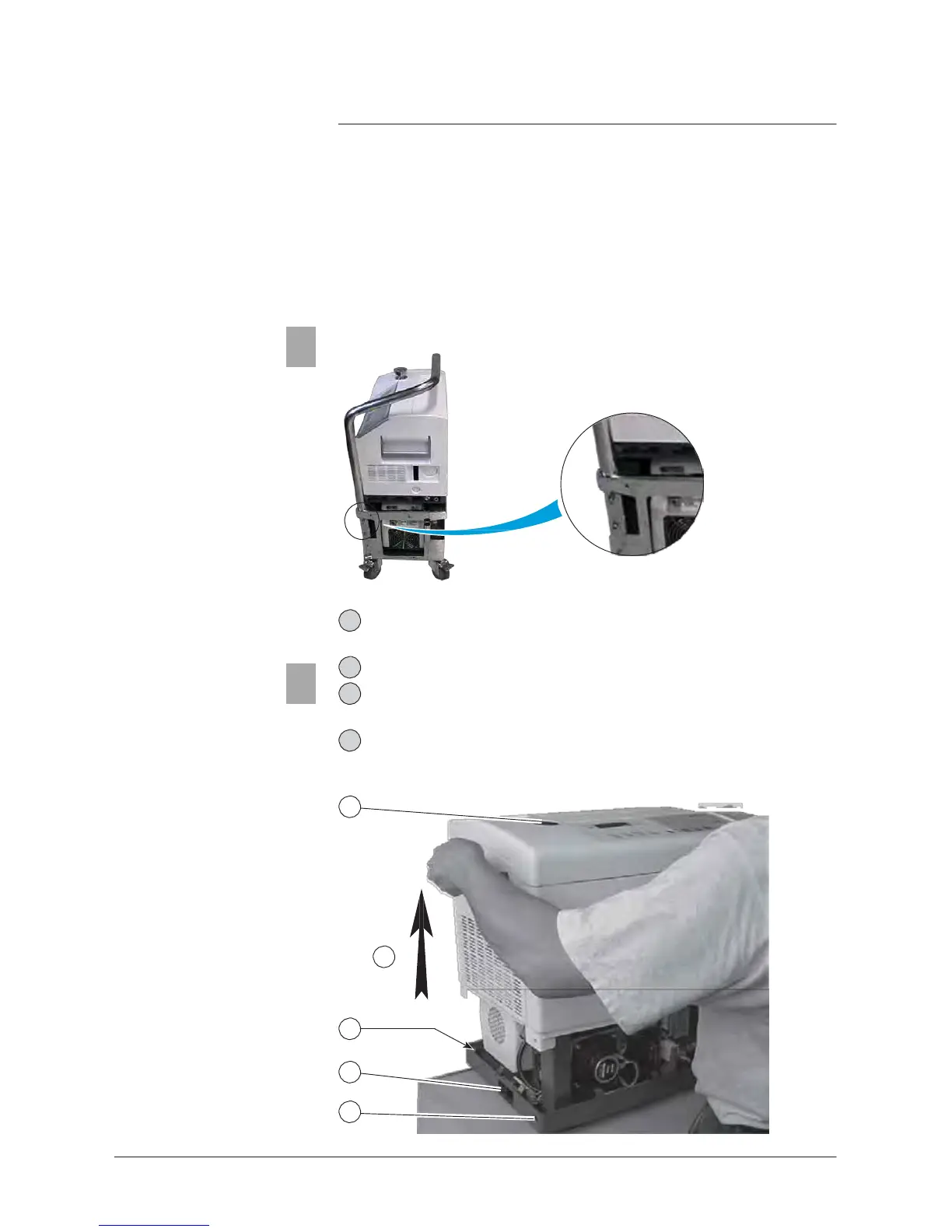
Adixen ASM 142 D - Cart Handle Removing; Remove the Inlet Port Clamp; Remove Upper the Cover. be Careful of the Front Panel Cable; Switch off the Machine by Setting the Main Switch to 0 and Disconnecting the Main Power

Adixen ASM 142 D
336 pages
Print Icon
To Next Page IconTo Next Page
To Previous Page IconTo Previous Page
Loading...
E
111
Access
to the internal
components
ASM 142 D - ASM Graph D+
GB 01490
-
Edition 03
- June
08
Access
level
1
Cart handle
removing
(only ASM Graph
D+)
5
Removable cover
5
Remove
the cart handle before removing the
detector
cover.
-
Unscrew
the handle fastening screw
- Free
the handle.
1 Switch off the machine by
setting
the main switch to «0» and
disconnecting
the main power
.
2
Remove
the inlet port clamp.
3
Unfasten
the 4
securing screws
and their
washers
using a 5 mm
Allen key.
Use
a 5mm Allen wrench.
4
Remove
upper the cover.
Be
careful of the front panel cable.
2
4
3
1
3
1/5

Table of Contents