EasyManua.ls Logo

Adixen ASM 142 D - Connecting the Detector Directly to a Printer or Another Device

Adixen ASM 142 D
336 pages
Print Icon
To Next Page IconTo Next Page
To Previous Page IconTo Previous Page
Loading...
B
320
Connecting the detector directly to
a
p
r
i
n
t
e
r
or
another
de
v
i
c
e
GB
00216
- Edition 02 - September
04
Purpose of the
printer
inter
face
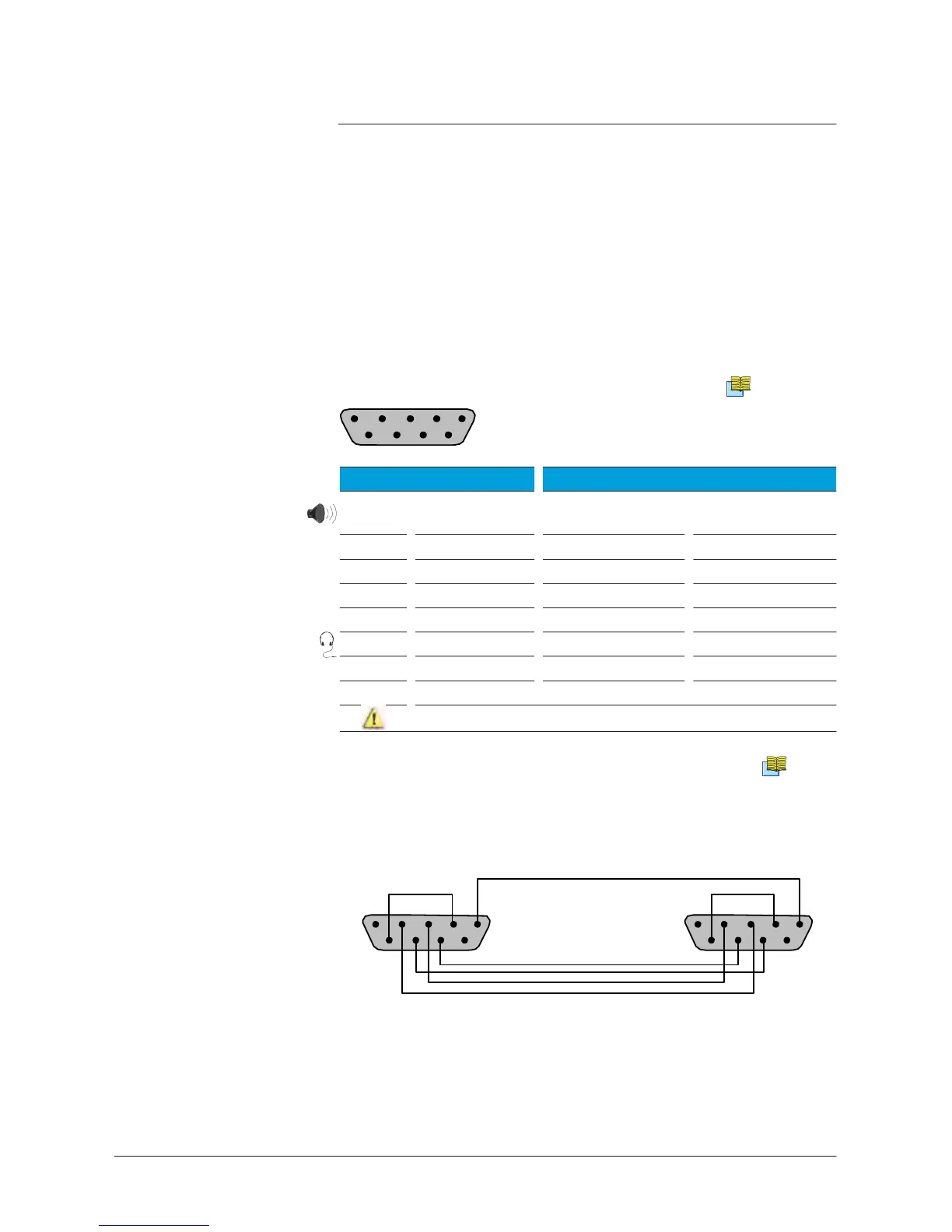
The Printer interface makes it possible to connect the leak detector
to
a
printer, an external
loudspeaker
or
a headphone.
Location of the
printer
inter
face
It
is
a
Sub D 9 pin Male
connector
.
B
210/211
1 2 3 4
5
6 7 8
9
Connector
description
Pin # Function Communication
protocol
1
Exter
nal
loudspeaker
Mode
Asynchronous
2 Rx Bauds
9600
3 Tx Bits
8
4 NA Parity
None
5 Ground Stop bit
1
6
Headphone
Parity control
None
7
R
TS
8 CTS
9
Internal use only. Don’t connect it
Communication
mode
description
Headphone
and
loudspeaker
C
410
Configuration tickets are sent
out.
Connection
to the printer
1 5 1
5
6 9 6
9
Leak detector
Printer serial
por
t
1
/5

Table of Contents

Other manuals for Adixen ASM 142 D

Related product manuals