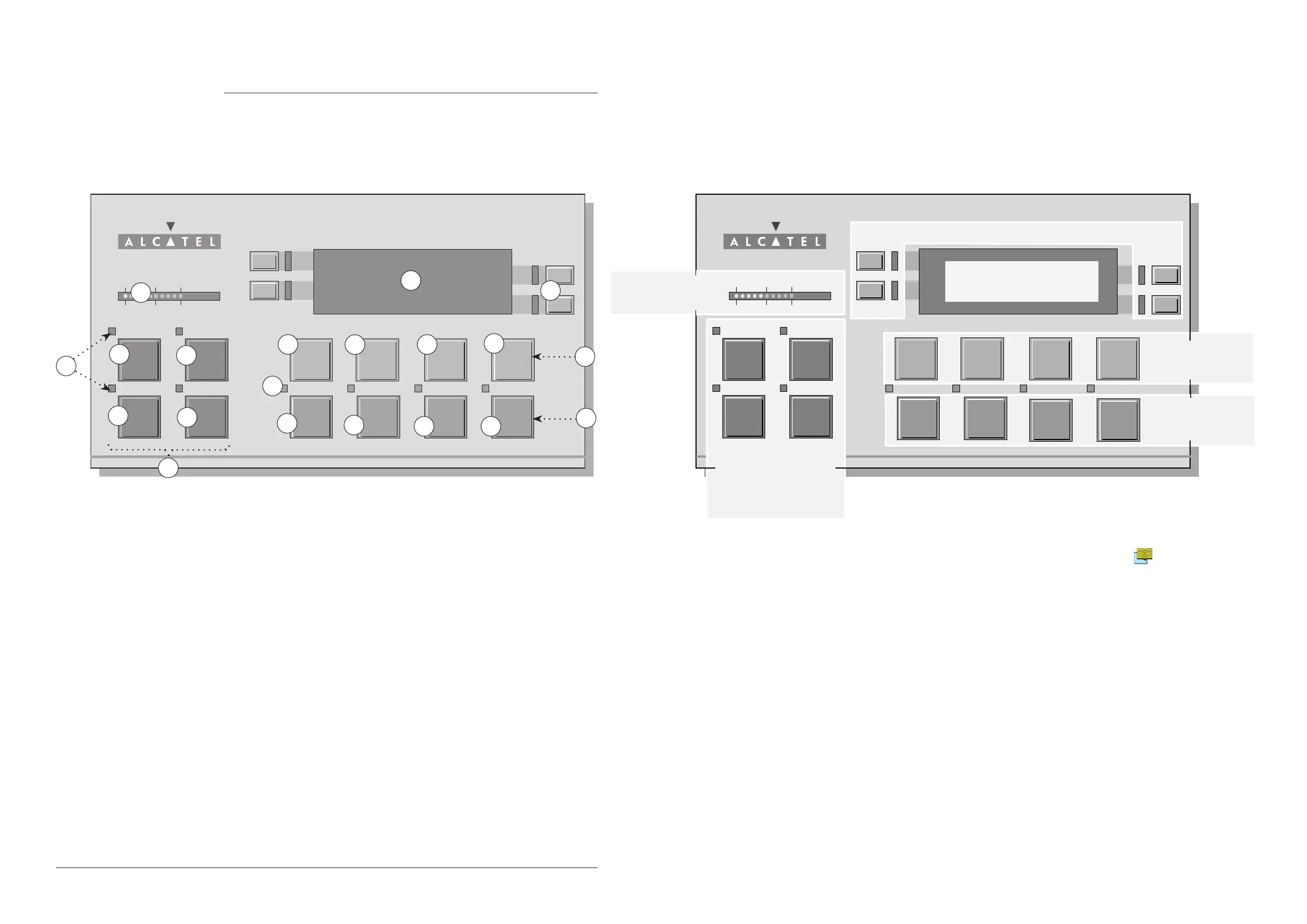
Spectro pressure status
indicator
Control keys (4 keys) and
control and menu selection
indicators
(ON when activated)
Modification
keyboard (4 keys)
Menu selection
access keys (4 keys)
Parameter function keys (1 key per display line)
Alphanumeric display
(4 lines x 20 characters)
Remote control interface C 400
1 Spectro pressure status indicator
2 Alphanumeric display (4 lines x 20 characters)
3 Parameter function keys (1 key per display line)
4 Modification keys (4 keys)
5 Menu selection access keys (4 keys)
6 Control keys (4 keys)
7 Cycle Start/Stop control key
8 Sniffing mode ON/OFF control key
9 Autocalibration Start/Abort control key
10 Mute: Audio signal ON/OFF control key
11 SET POINT menu selection key
12 SPECTRO calibration and analyzer cell configuration menu selection key
13 MAINTENANCE menu selection key
14 OTHER menus selection key (test mode selection, inlet VENT selection,
date / time )
15 NEXT: next display/parameter circular function
16 & 17 Plus or minus value adjustment, parameter selection, audio volume
adjustment keys
18 RESET of previously displayed values (cancels temporary inputs)
19 Control and menu selection indicators (ON when activated)



 To Next Page