Using Help | Contents | Index Back 398
Adobe Illustrator Help Macintosh Shortcuts
Using Help | Contents | Index Back 398
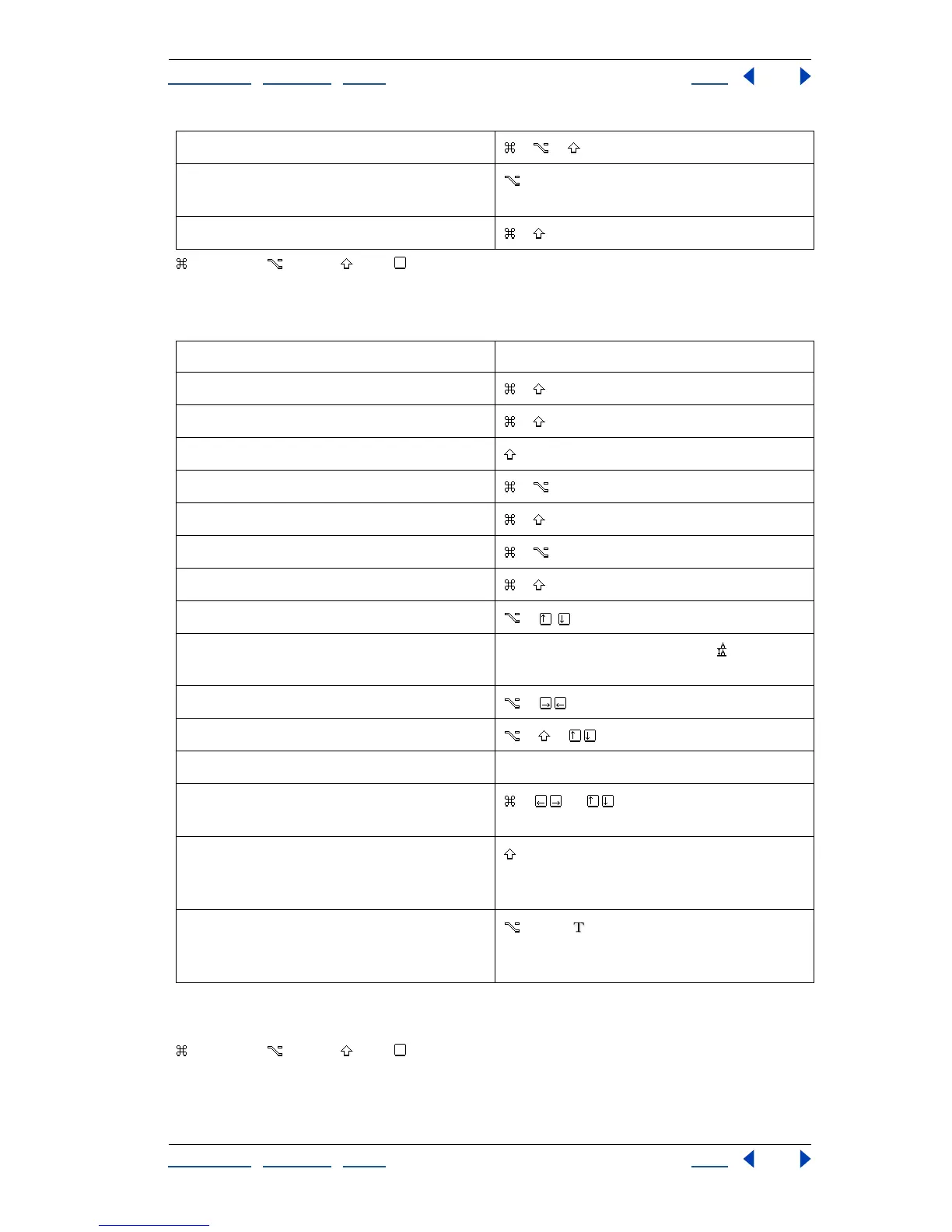
Command Option Shift Key
Ty pe
*Amount is set in Edit > Preferences > Type & Auto Tracing.
**Press Shift to select or extend existing selection.
Command Option Shift Key
Hides unselected artwork + + + 3
Converts between horizontal and vertical
guide
–drag guide
Releases guide + + –double-click guide
Result Action
Aligns left, right, or center + + L, R, or C
Justifies + + J
Inserts soft return + Return
Highlights kerning + + K
Resets horizontal scale to 100% + + X
Resets tracking/kerning to 0 + + Q
Increases/decreases point size* + + > or <
Increases/decreases leading* +
Sets leading to the font size Double-click the leading icon in the
Character palette
Increases/decreases kerning/tracking* +
Increases/decreases baseline shift* + +
Selects word, paragraph Double-click word, triple-click word
Moves pointer left/right one word or up/
down one paragraph
+ or **
Switches between type and vertical type,
area type and vertical area-type, and path
type and vertical path-type tools
Switches between area type and type,
path type and area type, and vertical path-
type and vertical area-type tools
+ click



 To Next Page