45
2. Level 2: This level pass code, when the pass code function is enabled, prevents the operator from
accessing settings screens that affect the operation of
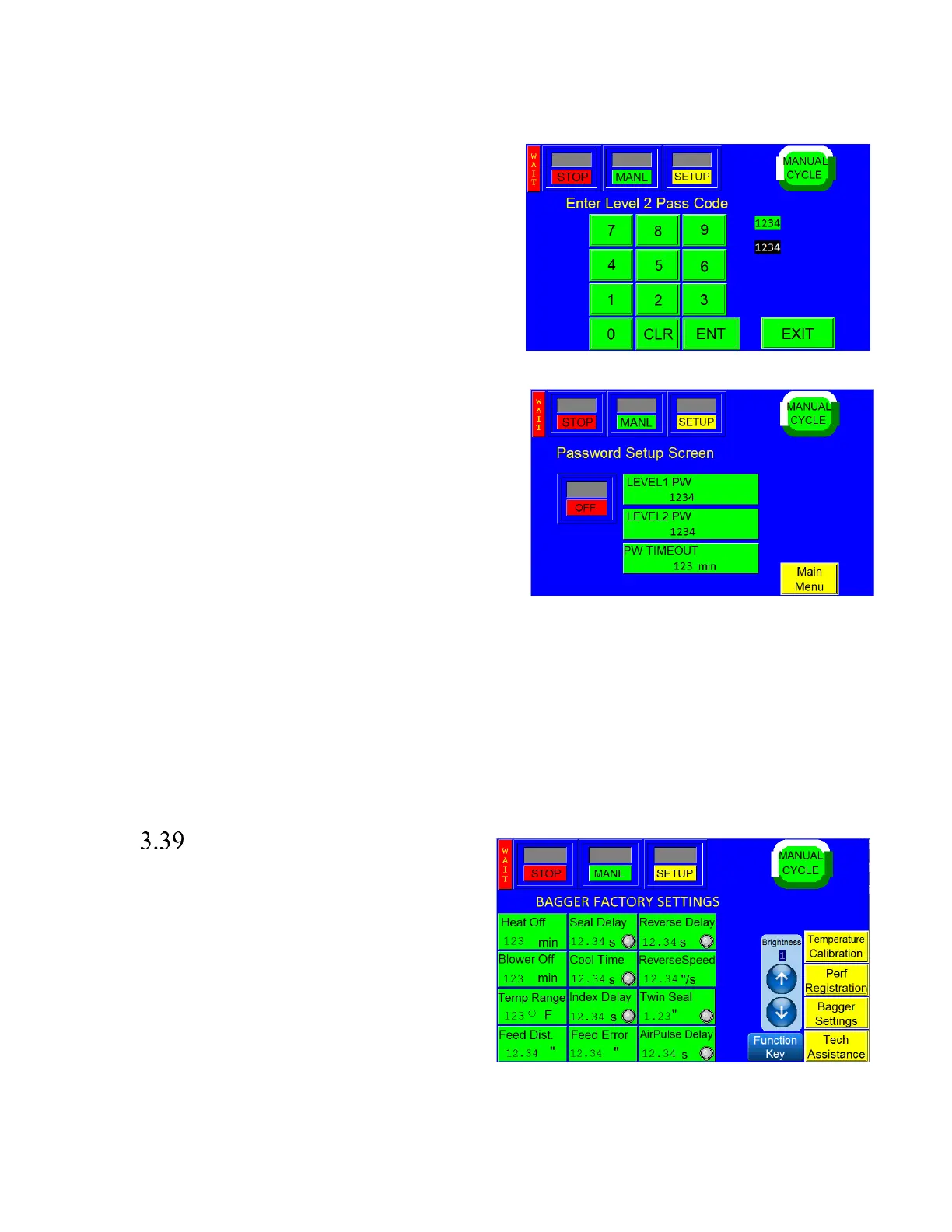
the equipment. See Figure 3 - 38.
Pass codes prevent unauthorized individuals from tampering
with settings. When equipment is shipped, APPI uses the
following codes which should be changed prior to putting the
T-1000 into operation. Factory Set Pass Codes:
1. Level 1 pass code: 1001
2. Level 2 pass code: 1002
To enable the pass code function, press the <Tech Assist>
button from the Main Menu. Type in the Level 1 pass code
(1001 by default from APPI). Press <Bagger PassCode> from
the Tech Assist screen, then press <ON> to toggle the pass
code function ON. See Figure 3 - 39. Once the pass code
function is enabled, the operator will have a programmed
amount of time (time-out time) to make changes. Once this
time has elapsed, the Operation Screen will automatically be
displayed. This time can be changed by accessing the Bagger
Password Setup Screen, pressing <PW Timeout> and entering
the new value on the green numeric keypad. Press <Enter> to
confirm, <CLR> to clear the value and <Exit> to cancel. To
Change the password Press either <Level 1 PW> or <Level 2
PW> depending on which code you would like to change.
This will access a green numeric keypad where the current pass code will be displayed in the box to the right.
Type in the new pass code and press <ENT> to confirm.
Note: If you change the pass codes, ensure that these codes are written down.
If you misplace or forget the pass codes, contact APPI Service Dept. for assistance. APPI will prove a “factory
code” so that the current pass codes can be displayed. Once you receive the factory code, put the bagger in
‘STOP’ mode, press 'MANUAL CYCLE' three times to open 'Password Setup' screen. From there, enter the
factory code and your current pass codes will be displayed.
Bagger Factory Settings
This screen can be accessed through the Tech Assist
screen and contains additional bagger settings, including
Brightness Control, that should only be set by qualified
technicians or by the factory. See Figure 3 - 40.
Heat Off: The amount of time, in minutes, the machine
can remain inactive before the heater bar will
automatically turn off. The machine will remain on even
if the heat is off. To adjust this setting, press the Heat Off
button on the Bagger Factory Settings screen, enter a
value on the numeric keypad, and press the <ENT>
button.



 To Next Page