ARK-3381 User Manual 36
4.4 Advanced BIOS Features
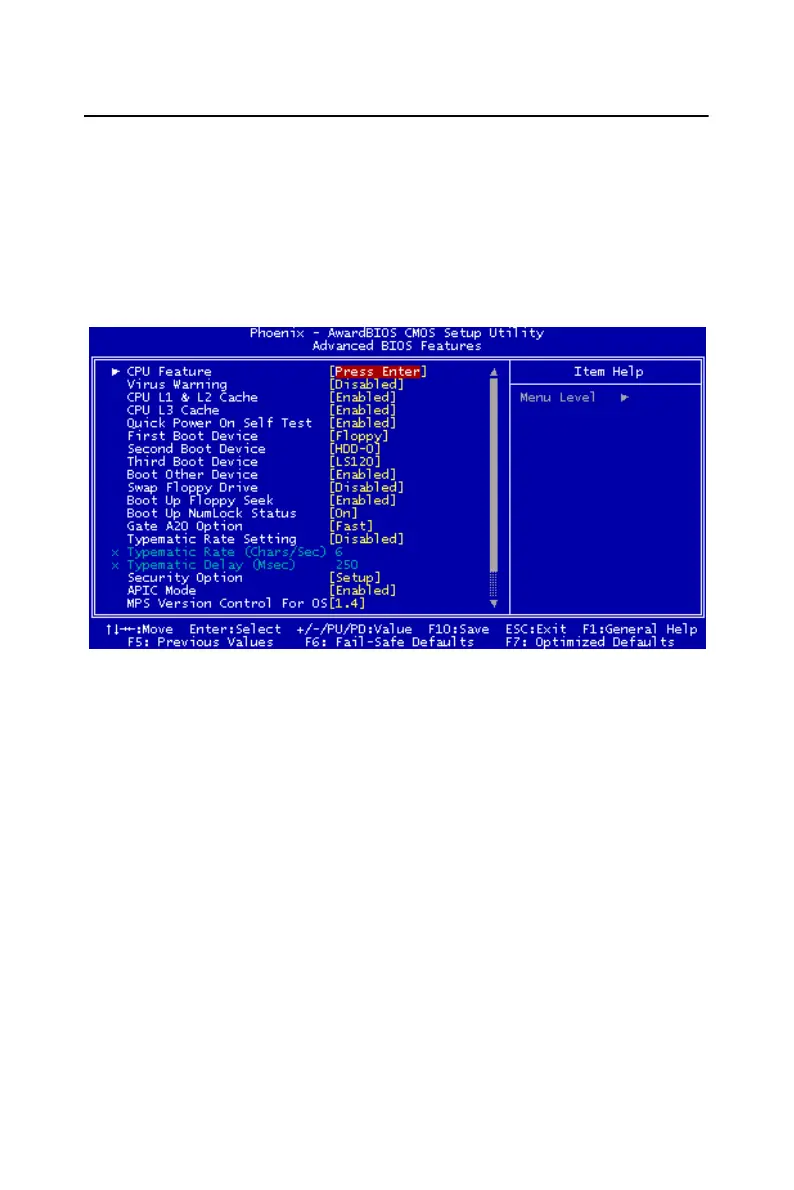
The "Advanced BIOS Features" screen appears when choosing the
"Advanced BIOS Features" item from the "Initial Setup Screen" menu. It
allows the user to configure the ARK-3389 according to his particular
requirements. Below are some major items that are provided in the
Advanced BIOS Features screen. A quick booting function is provided
for your convenience. Simply enable the Quick Booting item to save
yourself valuable time
Figure 4.3: Advanced BIOS features screen
4.4.1 CPU Feature
Press Enter to configure the settings relevant to CPU Feature.
4.4.2 Virus Warning
If enabled, a warning message and alarm beep activates if someone
attempts to write here. The commands are "Enabled" or "Disabled."
4.4.3 CPU L1 & L2 Cache
Enabling this feature speeds up memory access. The commands are
"Enabled" or "Disabled."














 To Next Page