ARK-3381 User Manual 42
4.5.18 Panel Number
These fields allow you to select the LCD Panel type. The default values
for these ports are:
640 x 480 18bit SC
800 x 600 18bit SC
1024 x 768 18bit SC
1280 x 1024 24bit SC
1400 x 1050 18bit SC
1024 x 768 24bit SC
1600 x 1200 24bit SC
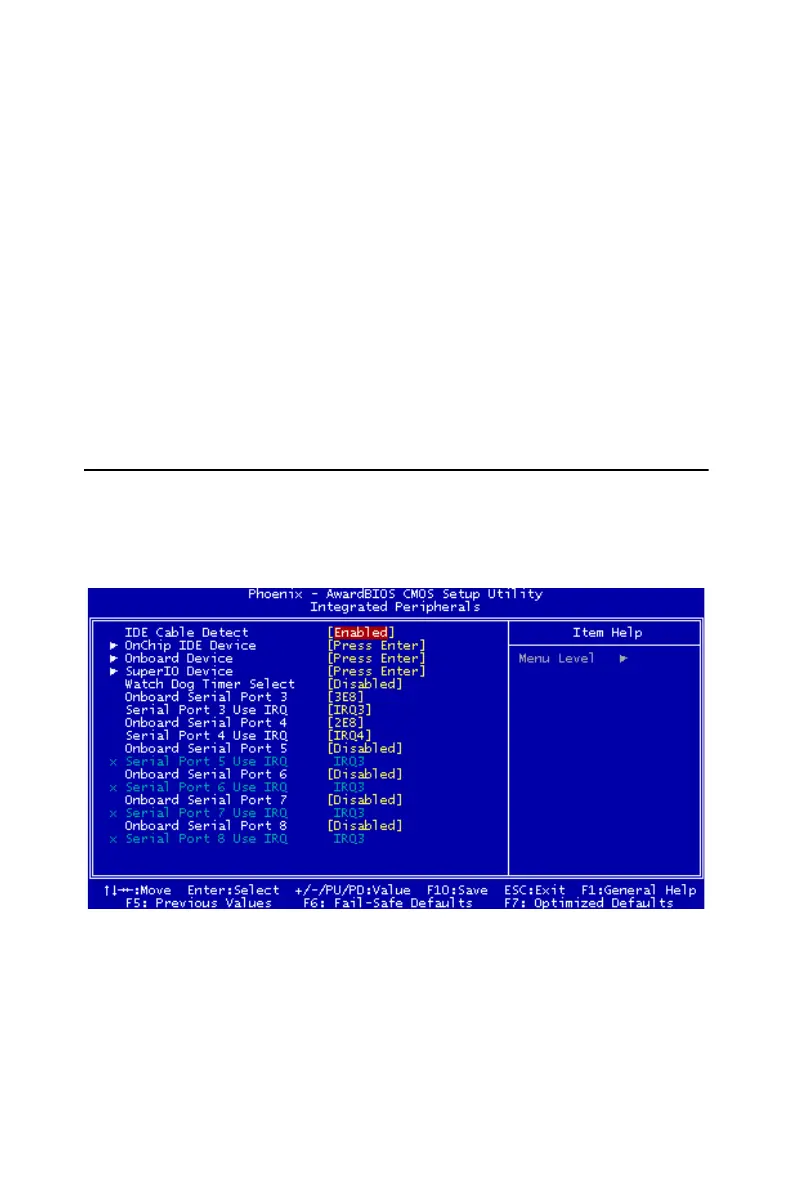
4.6 Integrated Peripherals
This section sets configurations for your hard disk and other integrated
peripherals. The first screen shows three main items for user to select.
Once an item selected, a submenu appears. Details follow.
Figure 4.5: Integrated Peripherals
4.6.1 IDE Cable Detect
Some UDMA cables use a hole in the ribbon cable as a cable detect
mechanism to determine if a UDMA IDE or standard IDE cable is
installed. The default setting is "Enabled".














 To Next Page