45 Chapter 4
4.6.17 Parallel Port Mode
This field allows you to set the operation mode of the parallel port. The
setting "Normal" allows normal speed operation, but in one direction
only. "EPP" allows bi-directional parallel port operation at maximum
speed. "ECP" allows the parallel port to operate in bi-directional mode
and at a speed faster than the maximum data transfer rate. "ECP + EPP"
allows normal speed operation in a two-way mode.
4.6.18 EPP Mode Select
This field allows you to select EPP port type 1.7 or 1.9. The choices:
EPP1.7, 1.9.
4.6.19 ECP Mode Use DMA
This selection is available only if you select "ECP" or "ECP + EPP" in the
Parallel Port Mode field. In ECP Mode Use DMA, you can select DMA
channel 1, DMA channel 3, or Disable. Leave this field on the default set-
ting.
4.7 Power Management Setup
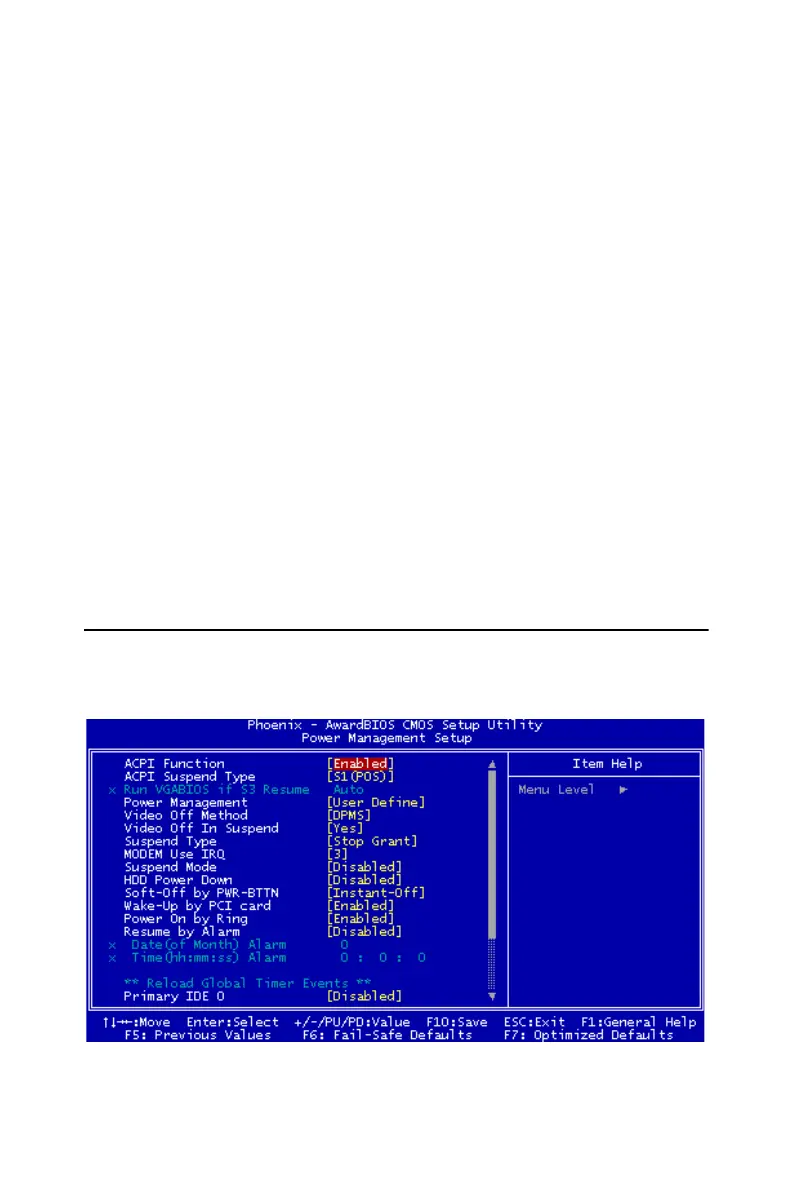
The power management setup controls the CPU card's "green" features to
save power. The following screen shows the manufacturer's defaults:
Figure 4.6: Power management setup screen














 To Next Page