54
Ground Resistance Tester Model 6471
4. Double-click on Setup.exe from the opened folder view to launch the Data-
View setup program.
NOTE: If installing onto a Vista based computer the User Account Control
dialog box will be displayed. Select the Allow option to proceed.
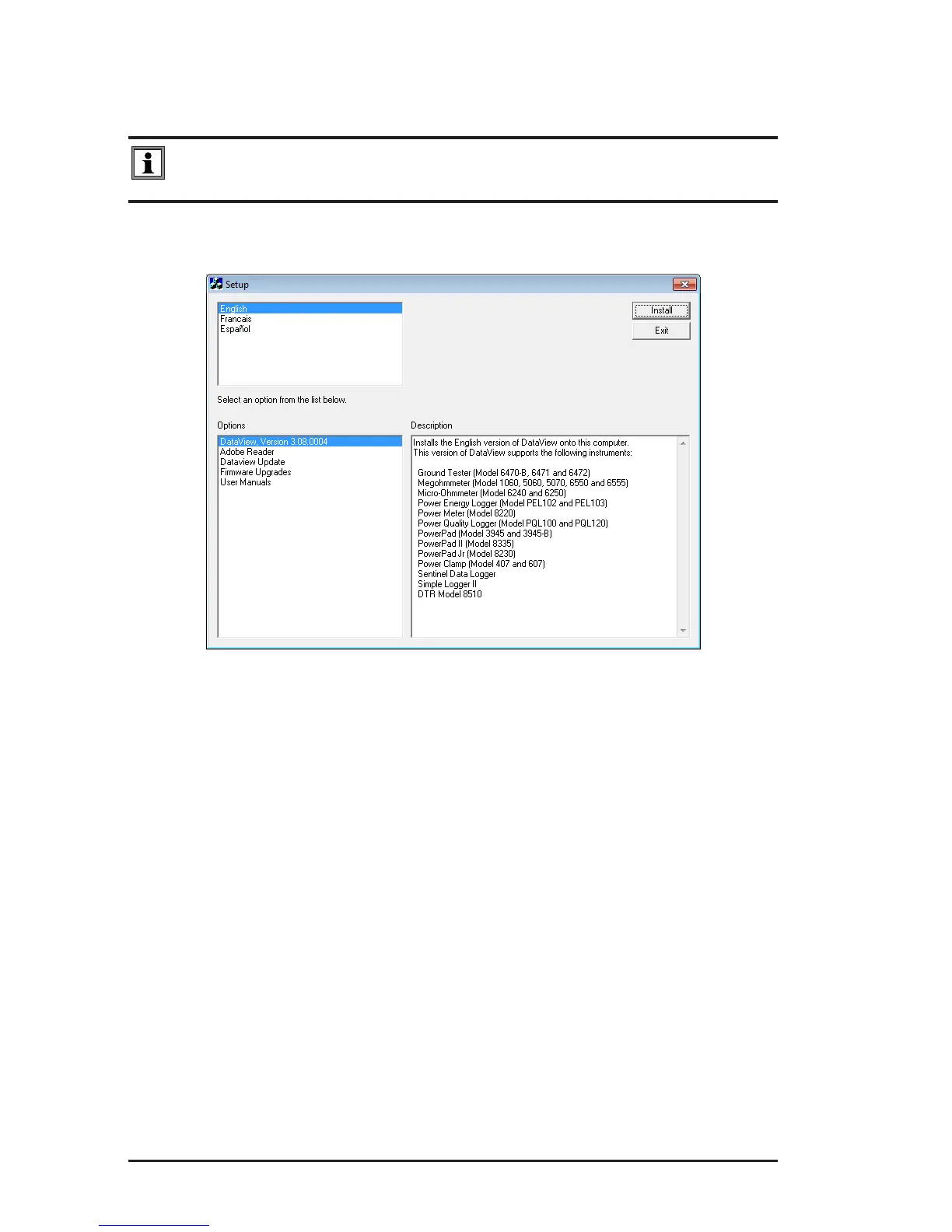
5. A Set-up window, similar to the one below, will appear.
Figure 8-1
There are several different options to choose from. Some options
(
*
)
require an
internet connection.
• DataView, Version x.xx.xxxx - Installs DataView
®
onto the PC.
• *Adobe Reader - Links to the Adobe
®
website to download the most recent
version of Adobe
®
Reader to the computer. Adobe
®
Reader is required for
viewing PDF documents supplied with DataView
®
.
• *DataView Updates - Links to the online DataView
®
software updates to
check for new software version releases.
• *Firmware Upgrades - Links to the online rmware updates to check for
new rmware version releases.
• Documents - Shows a list of instrument related documents that you can
view. Adobe
®
Reader is required for viewing PDF documents supplied with
DataView
®
.
6.
DataView, Version x.xx.xxxx option should be selected by default. Select
the desired language and then click on Install.
7.
The Installation Wizard window will appear. Click Next.
www.ShopAEMC.com
Shop for AEMC products online at:
1.888.610.7664



 To Next Page