7
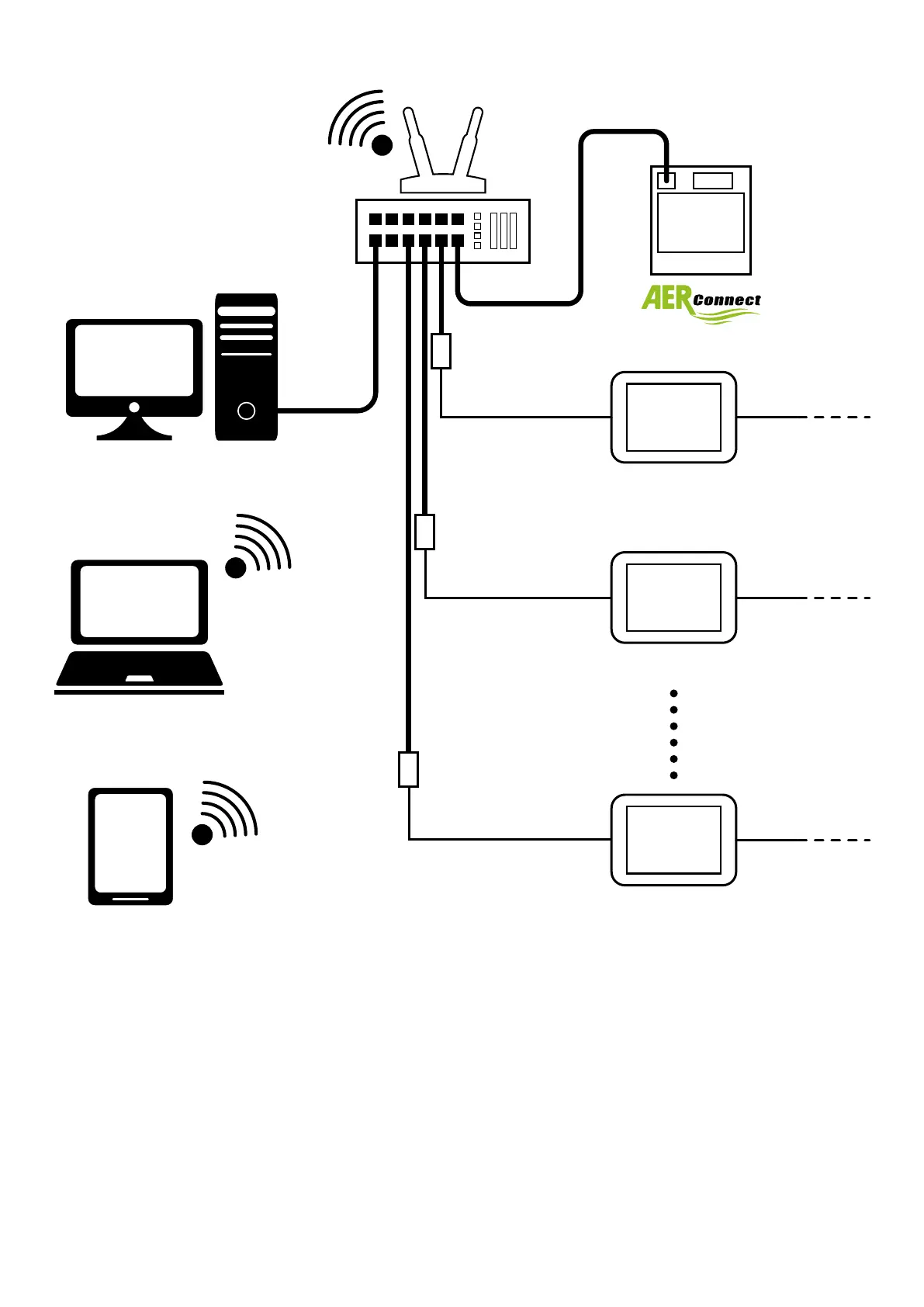
2.3 AERCONNECT AND MULTI ETHERNET-RS485
VMF-E6 (1)
RS485 (VMF)RS485 (BMS)
VMF-E6 (2)
RS485 (VMF)
RS485 (VMF)
RS485 (BMS)
RS485 (BMS)
Ethernet-RS485 (1)
Ethernet-RS485 (3)
Ethernet-RS485 (2)
Conguration for this type of connection:
1. Make all the electrical connections correctly (specied in chapter 2.5p.9);
2. Congure the parameters relating to the serial port (Modbus address, Baud rate) of the VMF-E6 panel;
3. Activate the recognition and conguration procedure of the Ethernet-RS485 expansion through the MGate-Manager software (3.1p.11);
4. Repeat the recognition procedure for all the remaining Ethernet-RS485 devices;
5. Activate the webserver recognition and conguration procedure using the “AerConnect Search for devices” (3.2p.17) software;
6. System is ready for use;


 To Next Page