11
3 SOFTWARE CONFIGURATIONS
3.1 CONFIGURATION OF THE MGATE MODULE
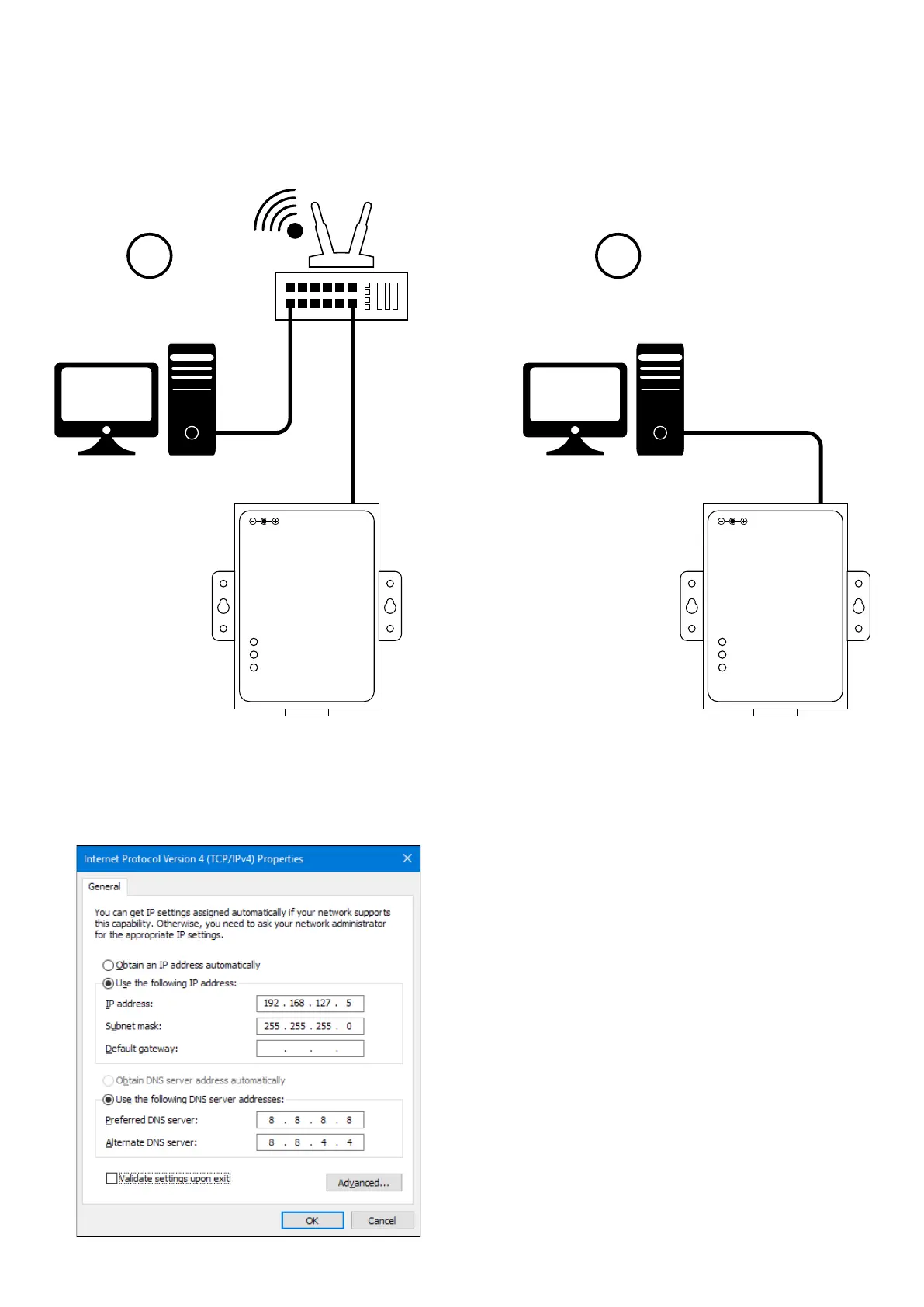
Before moving on to the MGate module conguration, analyse how the converter is connected to the PC which will be used for the following conguration steps.
Possible connections:
1
2
LAN connection P2P connection
If you are working in conguration 1 (LAN connection), you must make sure that the PC is connected to the LAN according to the settings required by the Ethernet network
(check that the parameters, DHCP, DNS, IP address and the other settings of the network are congured correctly – the details must be obtained from the router manual
found in the installation documents or, in the case of systems installed in large tertiary facilities or companies, these must be requested directly to the IT Manager, in charge
of network management).
ATTENTION: a cross cable must be used in a P2P connection.
If, on the other hand, you are working according to conguration 2 (P2P connection), a network card setting is required, as shown in the example below:


 To Next Page