EasyManua.ls Logo

AERMEC WRC - User Manual

AERMEC WRC
40 pages
Print Icon
To Next Page IconTo Next Page
Loading...
EN
5389591_01
USER MANUAL
WRC
Question and Answer IconNeed help?

Do you have a question about the AERMEC WRC and is the answer not in the manual?

Summary

Wired panel - MVA unit

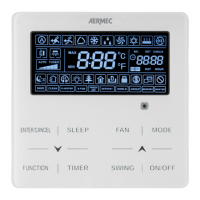
User interface (display)

Details the LCD display icons and user interaction elements on the wired panel.

Installing the wired panel

Dimensions of the wired panel

Provides the physical dimensions of the wired control panel in millimeters.

Serial connection

Describes the serial communication port and connection methods for the wired panel.

Examples of serial connection between wired panel and indoor unit

Illustrates different configurations for connecting wired panels to indoor units.

Wired panel installation procedure

Step-by-step guide for mounting and connecting the wired control panel.

Functions available from wired panel

User interface (buttons)

Explains the function of each button on the wired control panel for operation.

Switching the indoor unit ON and OFF

Instructions on how to turn the indoor unit on and off using the ON/OFF button.

Modifying the operating mode for the indoor unit

Details how to change the operating mode (Auto, Cool, Heat, etc.) via the MODE button.

Modifying the operating temperature

Explains how to adjust the target temperature using the up/down buttons.

Modifying fan speed

Guides on changing the fan speed settings using the FAN button.

Modifying the programmed ON;OFF timer (COUNTDOWN mode)

Procedure for setting timed ON/OFF operations using the countdown interval.

Set system time (only used in CLOCK mode)

How to set the current time on the system clock for CLOCK mode operation.

Modifying the programmed ON;OFF timer (CLOCK mode)

Instructions for setting timed ON/OFF operations using the system clock.

Set delivery fin SWING

How to activate and set the automatic swing function for air direction.

Set QUIET function (reduces the noise generated by the indoor unit)

Enables QUIET or AUTO QUIET modes to reduce fan noise.

Set Night-Time Comfort function

Activates the SLEEP function for comfort and low noise during the night.

Set the DISPLAY function on the indoor unit (led and two-figure display)

Controls the illumination of the indoor unit's display and LEDs.

Set the ENERGY SAVING function (active on indoor unit)

Activates energy saving mode for heat and cool operations.

Set indoor unit FILTER CLEANING alarm

Configures the filter cleaning reminder based on operating hours.

Set the X-FAN function on indoor unit

Dries the indoor unit coil after operation to prevent mould.

Set the ANTIFREEZE function on indoor unit

Maintains minimum room temperature in Heat mode to prevent freezing.

Set key LOCK on wired panel

Activates or deactivates the button lock feature on the wired panel.

Display indoor unit OPERATING PARAMETERS

Accesses the menu to view read-only operating parameters of the indoor unit.

List of operating parameters (read-only data)

Provides a detailed list and description of available read-only operating parameters.

Activation of indoor unit OPERATING PARAMETER modification menu

Enables access to modify system operating parameters with caution.

Display operating errors or system messages

Lists error codes and system messages displayed on the unit for troubleshooting.

Summary

Wired panel - MVA unit

User interface (display)

Details the LCD display icons and user interaction elements on the wired panel.

Installing the wired panel

Dimensions of the wired panel

Provides the physical dimensions of the wired control panel in millimeters.

Serial connection

Describes the serial communication port and connection methods for the wired panel.

Examples of serial connection between wired panel and indoor unit

Illustrates different configurations for connecting wired panels to indoor units.

Wired panel installation procedure

Step-by-step guide for mounting and connecting the wired control panel.

Functions available from wired panel

User interface (buttons)

Explains the function of each button on the wired control panel for operation.

Switching the indoor unit ON and OFF

Instructions on how to turn the indoor unit on and off using the ON/OFF button.

Modifying the operating mode for the indoor unit

Details how to change the operating mode (Auto, Cool, Heat, etc.) via the MODE button.

Modifying the operating temperature

Explains how to adjust the target temperature using the up/down buttons.

Modifying fan speed

Guides on changing the fan speed settings using the FAN button.

Modifying the programmed ON;OFF timer (COUNTDOWN mode)

Procedure for setting timed ON/OFF operations using the countdown interval.

Set system time (only used in CLOCK mode)

How to set the current time on the system clock for CLOCK mode operation.

Modifying the programmed ON;OFF timer (CLOCK mode)

Instructions for setting timed ON/OFF operations using the system clock.

Set delivery fin SWING

How to activate and set the automatic swing function for air direction.

Set QUIET function (reduces the noise generated by the indoor unit)

Enables QUIET or AUTO QUIET modes to reduce fan noise.

Set Night-Time Comfort function

Activates the SLEEP function for comfort and low noise during the night.

Set the DISPLAY function on the indoor unit (led and two-figure display)

Controls the illumination of the indoor unit's display and LEDs.

Set the ENERGY SAVING function (active on indoor unit)

Activates energy saving mode for heat and cool operations.

Set indoor unit FILTER CLEANING alarm

Configures the filter cleaning reminder based on operating hours.

Set the X-FAN function on indoor unit

Dries the indoor unit coil after operation to prevent mould.

Set the ANTIFREEZE function on indoor unit

Maintains minimum room temperature in Heat mode to prevent freezing.

Set key LOCK on wired panel

Activates or deactivates the button lock feature on the wired panel.

Display indoor unit OPERATING PARAMETERS

Accesses the menu to view read-only operating parameters of the indoor unit.

List of operating parameters (read-only data)

Provides a detailed list and description of available read-only operating parameters.

Activation of indoor unit OPERATING PARAMETER modification menu

Enables access to modify system operating parameters with caution.

Display operating errors or system messages

Lists error codes and system messages displayed on the unit for troubleshooting.

AERMEC WRC Specifications

General IconGeneral
BrandAERMEC
ModelWRC
CategoryAir Conditioner
LanguageEnglish

Related product manuals