22
6 SET THE INDOOR UNIT ADDRESS (CC2)
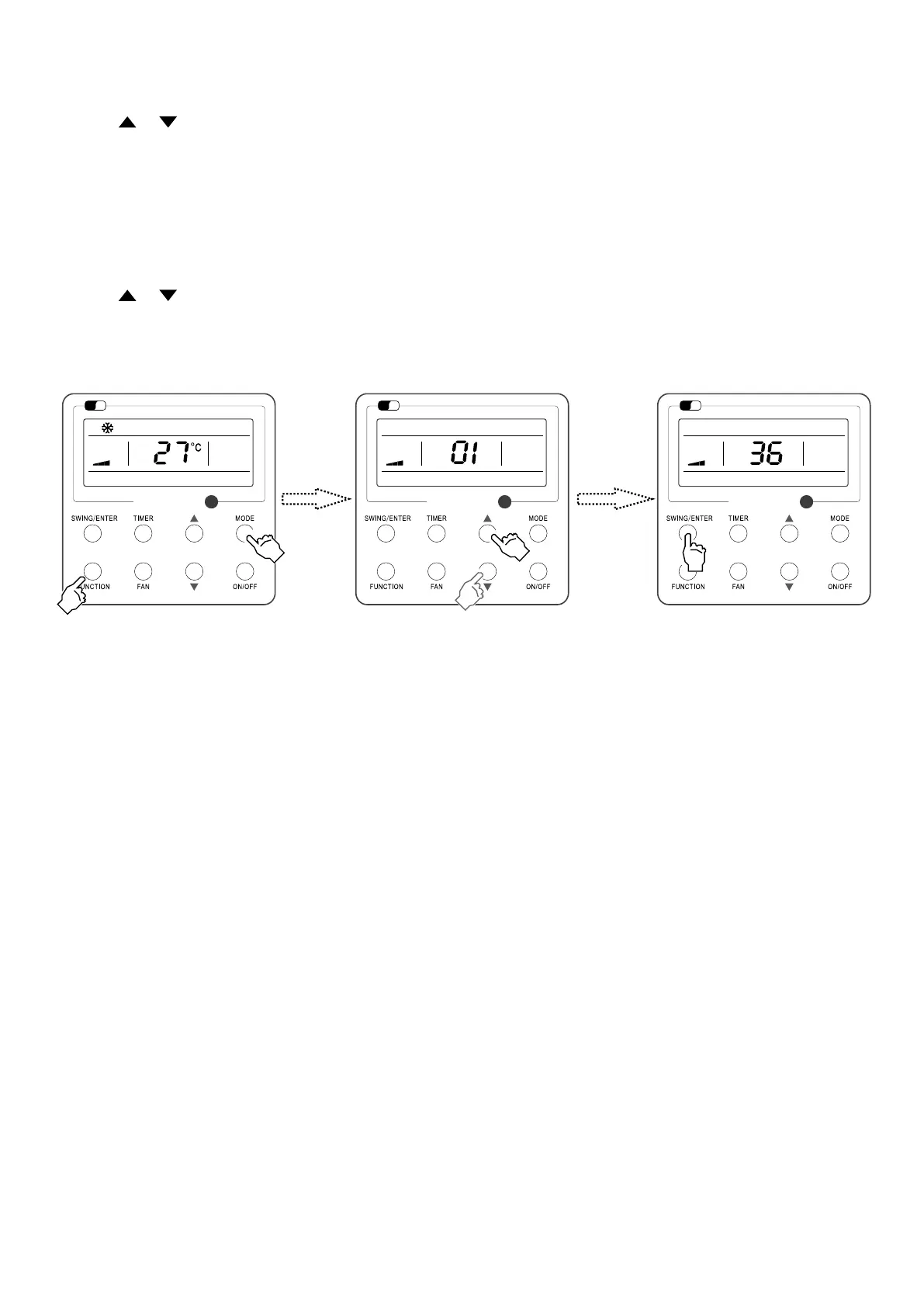
It is necessary to set the value of the serial address to the unit as follows:
— Press and hold the FUNCTION and MODE buttons simultaneously for 5 seconds;
— With keys
and select the value of the serial address to be given to the unit, in this case from 1 to 36;
— Conrm by pressing the button SWING/ENTER.
Note: After having congured the addresses of the indoor unit via the wired control panel, you can proceed with connection via the CC2 centralised control by referring to its user
manual.
7 SET THE INDOOR UNIT ADDRESS (BMS)
It is necessary to set the value of the serial address to the unit as follows:
— Press and hold the FUNCTION and MODE buttons simultaneously for 5 seconds;
— With keys and select the value of the serial address to be given to the unit, in this case from 1 to 255;
— Conrm by pressing the button SWING/ENTER.
Wi
Fi
Wi
Fi
Wi
Fi
Wi
Fi
Wi
Fi



 To Next Page