7
3 BUTTONS
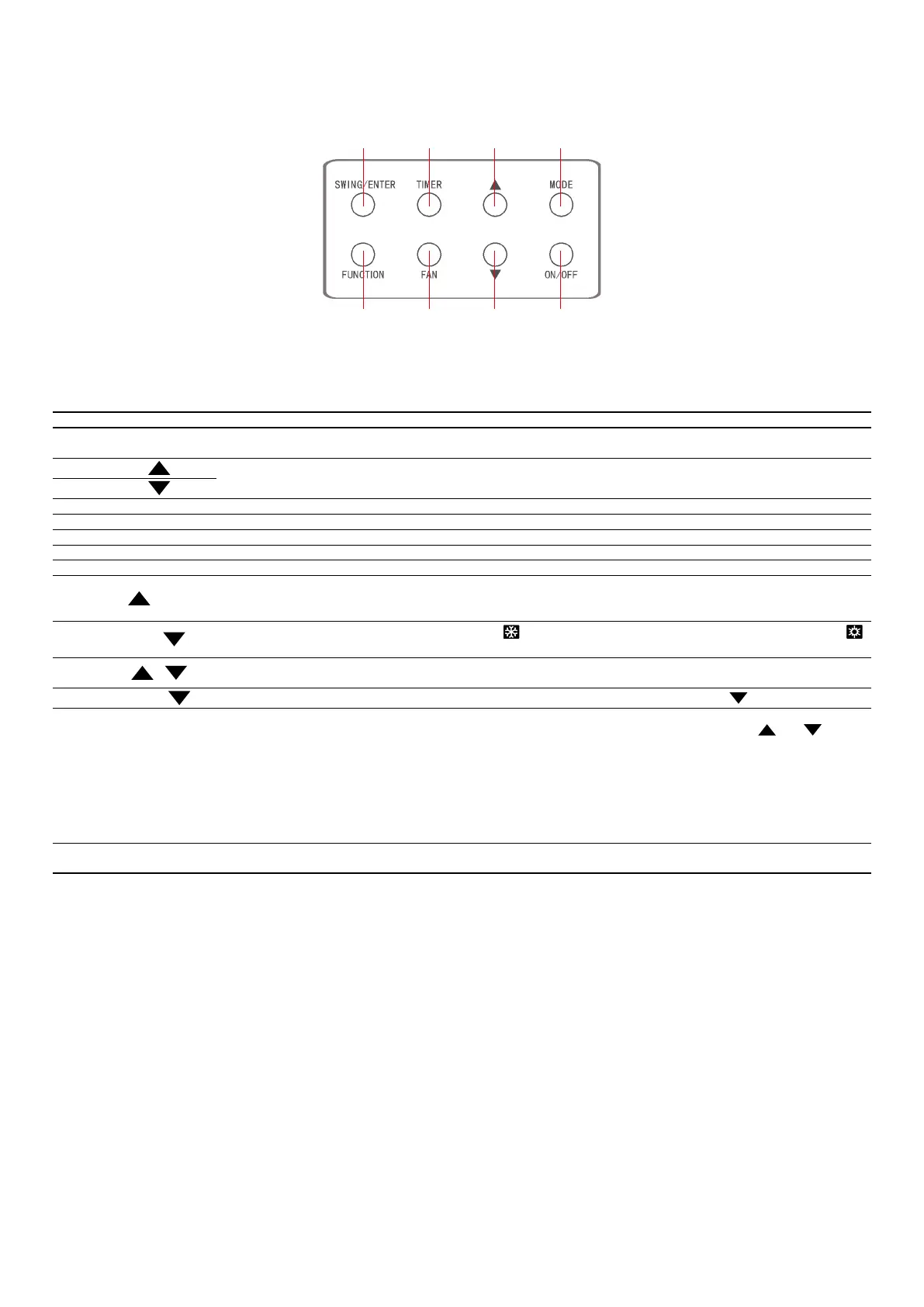
3.1 BUTTONS ON THE WIRED CONTROLLER
Fig. 3: Buttons on the Wired Controller
3.2 FUNCTION OF THE BUTTONS
N° Name Function
1 SWING/ENTER
1. Function selection and cancellation.
2. Setting of the up and down swing function.
3
1. Running temperature setting of the indoor unit, range:16~30°C(61~86°F).
2. Timer setting, range:0.5-24 hr.
7
6 FAN Setting of the auto/low/medium low/medium/medium high/ high fan speed.
4 MODE Setting of the Cooling/Heating/Fan/Dry/Auto mode of the indoor unit.
5 FUNCTION Switchover among the functions (Turbo / WiFi / X-FAN etc..)
2 TIMER Timer setting.
8 ON/OFF Turn on/o the indoor unit.
3+4
+ MODE
Press them for 5s under o state of the unit to Enter/Cancel the Memory function (If memory is set, indoor unit after power failure and then
power recovery will resume the original setting state. If not, the indoor unit is defaulted to be o after power recovery. Memory o is default
before delivery.).
6+7
FAN +
By pressing them at the same time under o state of the unit, will be displayed on the wired controller for the cooling only unit, while
will be displayed on the wired controller for the cooling and heating unit.
3+7
+
Upon startup of the unit without malfunction or under o state of the unit,press them at the same time for 5s to enter the lock state, in which
case, any other buttons won’t respond the press. Repress them for 5s to quit this state.
4+7
MODE +
Under OFF state, the Celsius and Fahrenheit scales can be switched by pressing "MODE" and "“ " for 5s.
2+5 TIMER + FUNCTION
Under OFF state, it is available to go to the commissioning status by pressing "FUNCTION" and "TIMER" for ve seconds, and let "00" displayed on
the temperature display area by pressing “MODE”, then adjust the options which is shown on the timer area by pressing “
” and “ ”. There are
totally four options, as follows:
1. Indoor ambient temperature is sensed by the return air temperature sensor (01 displayed on the timer area).
2. Indoor ambient temperature is sensed by the wired controller (02 displayed on the timer area).
3. The return air temperature sensor is selected under the cooling, dry, or fan mode; while the wired controller temperature sensor is selected
under the heating or auto mode. (03 is displayed on the timer area).
4. The wired controller temperature sensor is selected under the cooling, dry, or fan mode; while the return air temperature sensor is selected
under the heating mode. (04 is displayed on the timer display area).
5+6 FUNCTION + FAN
Reset the WiFi function: Under o status, press “FUNCTION” + “FAN” combination buttons on its wired controller for 5s. Once “oC” is displayed, this
indicates that reset was successful.



 To Next Page