EasyManua.ls Logo

AgfaPhoto OPTIMA 3 - Video Shooting Mode Display

AgfaPhoto OPTIMA 3
80 pages
Print Icon
To Next Page IconTo Next Page
To Previous Page IconTo Previous Page
Loading...
27
AgfaPhoto OPTIMA 3
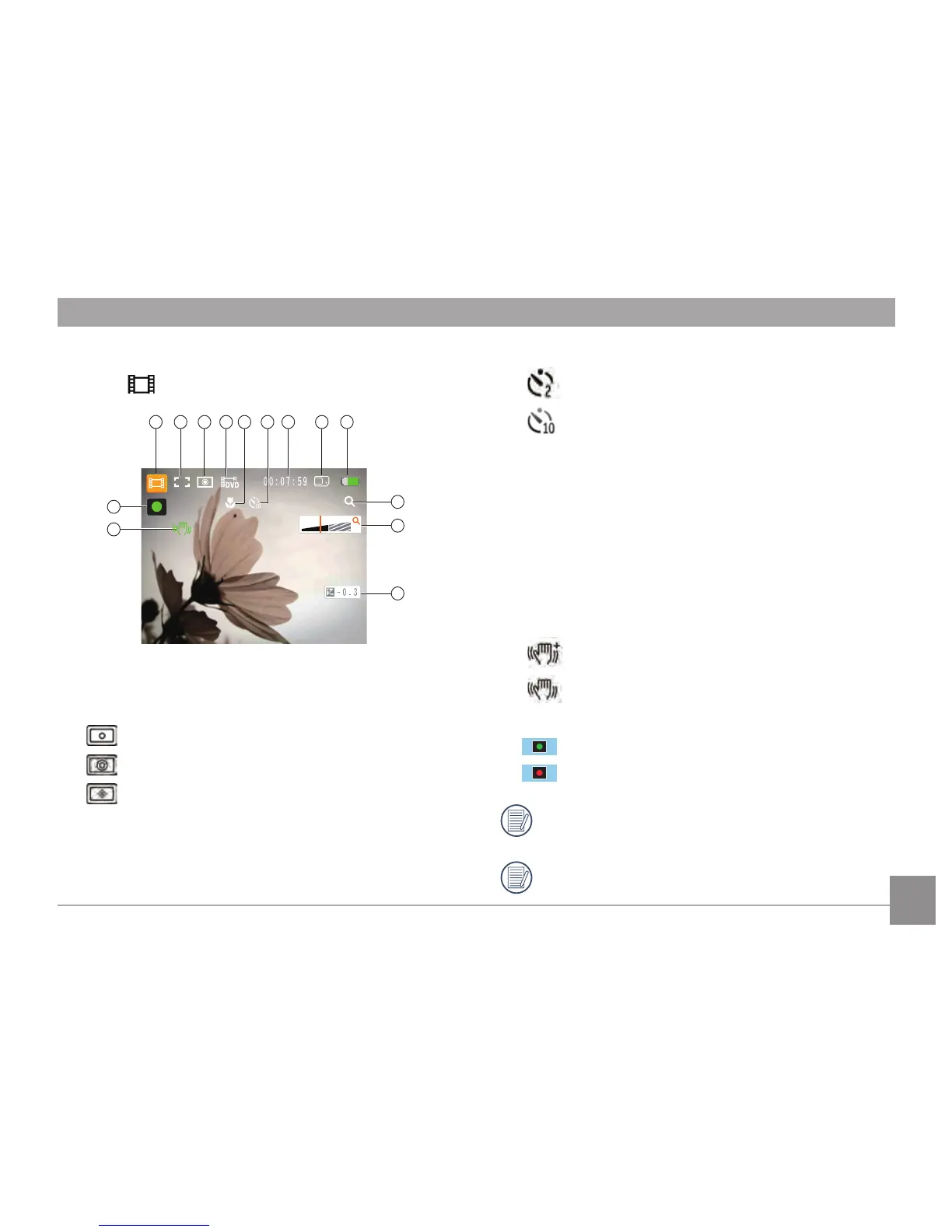
Video Shooting Mode Display
Mode :
10
11
12
14
13
1 2 3 4 7 8 95 6
1 Video Mode icon
2 Continuous AF
3 Metering
Spot
Center
AiAE
4
Image Size
5
Macro mode
6 Self-timer
Self-timer: 2 sec
Self-timer: 10 sec
7
Remaining Time for Video Recording
8 Memory Card/Built-in Memory
9 Battery Status
10 WT Ratio (Displayed only when zoom is
activated)
11 Zoom
12
Exposure
13 OIS
Continuous ON
In shooting
14
Recording Status Icon
Recording standby
Recording
In order to shoot video, it is recommended
that an SD card be used.
When shooting video, the optical zoom is
disabled.

Table of Contents

Other manuals for AgfaPhoto OPTIMA 3

Related product manuals