
 Need help?
Do you have a question about the Aim SC808 and is the answer not in the manual?
Describes compliance with FCC and CE radiation standards for the audio device.
Details statements regarding interference, user caution, and regulatory compliance.
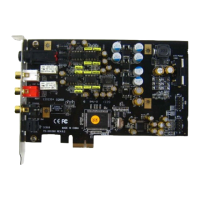
General description of the SC808 sound card's features and technology.
Lists all items included in the SC808 package for user convenience.
Describes the connectors and their functions on the SC808 main board.
Describes the connectors and their functions on the SC808 daughter board.
Explains how to manually select between phone and line output from the software.
Step-by-step instructions for installing the SC808 PCI-e sound card into a system.
Details different connection setups for audio output modes like stereo and multi-channel.
Guide for replacing operational amplifiers to customize audio performance.
Step-by-step instructions for installing the Xear Audio Center software.
Instructions on how to remove the Xear Audio Center software from the system.
Covers the software's introduction, tray icon, and interface displays for different configurations.
How to open the Xear Audio Center software from the Windows Control Panel.
Steps to ensure the Xear Audio Center icon is displayed in the system tray.
Setting the default playback (speaker) and recording (microphone) devices.
Adjusting the master volume and muting audio for all output devices.
How to open context menus for various audio functions within the software.
How to access specific function settings pages from the pop-up menus.
Description of the 3D audio enhancement technology for immersive sound.
Explains ASIO support for low-latency audio applications and recommended players.
Details the equalizer interface for speakers, including bands, presets, and manual adjustments.
Describes the status indicators for playback, capture, and effects in the software interface.
Explains the indicators for input effects displayed in the audio status panel.
Describes how to manage and create custom sound effect profiles.
General introduction to the features and functions of speaker output.
Details volume adjustment, mute options, and channel locking for speaker output.
Explains speaker setup options, channel swapping, and testing sound output.
Configuration of sample rate and bit depth for optimal speaker audio quality.
Details the equalizer bands, presets, and manual adjustments for speaker sound.
Explains room emulations and size adjustments for speaker environment effects.
Adjusting virtual speaker positions and distance for immersive surround sound.
Adjusting bass levels and cut-off frequency for enhanced bass response.
Key shifting and vocal fading features for karaoke applications.
Simulating multi-speaker home theater surround sound experience.
Restoring clarity and detail in compressed audio for speakers.
Increasing bass reproduction capability of small speaker drivers.
Normalizing sound levels for consistent playback across different content.
Enhancing voice clarity and reducing background noise during communication.
Expanding stereo audio content to multiple output channels for an 8-speaker effect.
General introduction to the features and functions of headphone output.
Details volume adjustment, mute options, and channel locking for headphone output.
Explains headphone settings and how to play test sounds for verification.
Configuration of sample rate and bit depth for optimal headphone audio quality.
Details equalizer bands, presets, and manual adjustments for headphone sound.
Explains room emulations and size adjustments for headphone environment effects.
Key shifting and vocal fading features for karaoke applications with headphones.
Simulating home theater surround sound experience for headphones.
Restoring clarity and detail in compressed audio for headphones.
Increasing bass reproduction capability for headphone drivers.
Normalizing sound levels for consistent headphone playback.
Enhancing voice clarity and reducing noise for headphone communication.
General introduction to the features and functions of SPDIF-Out.
Details volume adjustment, mute options, and channel locking for SPDIF-Out.
Configuration of sample rate and bit depth for SPDIF-Out audio quality.
General introduction to the features and functions of microphone input.
Details volume adjustment, mute options, and channel locking for microphone input.
Configuration of sample rate and bit depth for microphone input.
Microphone echo and magic voice effects for voice modification.
Attenuating background noise for clearer microphone input.
Lists driver details, versions, and technology trademarks.
Mentions ASIO technology providers and legal references.
Describes the context menu options available from the Xear Audio Center tray icon.
How to open Windows Media Player and Sound Recorder from the tray icon menu.
Adjusting sample rate and bit depth for speakers in Windows OS settings.
Adjusting sample rate and bit depth for microphone in Windows OS settings.
Settings for UI transparency, language selection, and startup messages.
How to close the tray icon and exit the Xear Audio Center application.
Lists all supported languages for the SC808 audio driver.
Addresses issues with the system detecting the board after reboot, focusing on ATX power.
Guidance on obtaining high-quality audio playback by setting sample rate and bit depth.
Explains the necessity of drivers and UAA compliance for software features.
Information on ASIO support and recommended music players for optimal performance.
Troubleshooting front panel headset connectivity problems, including pin configurations.
 General
| Brand | Aim |
|---|---|
| Model | SC808 |
| Category | Sound Card |
| Language | English |

 To Next Page