17
Introduction
4.2.3 Add a station
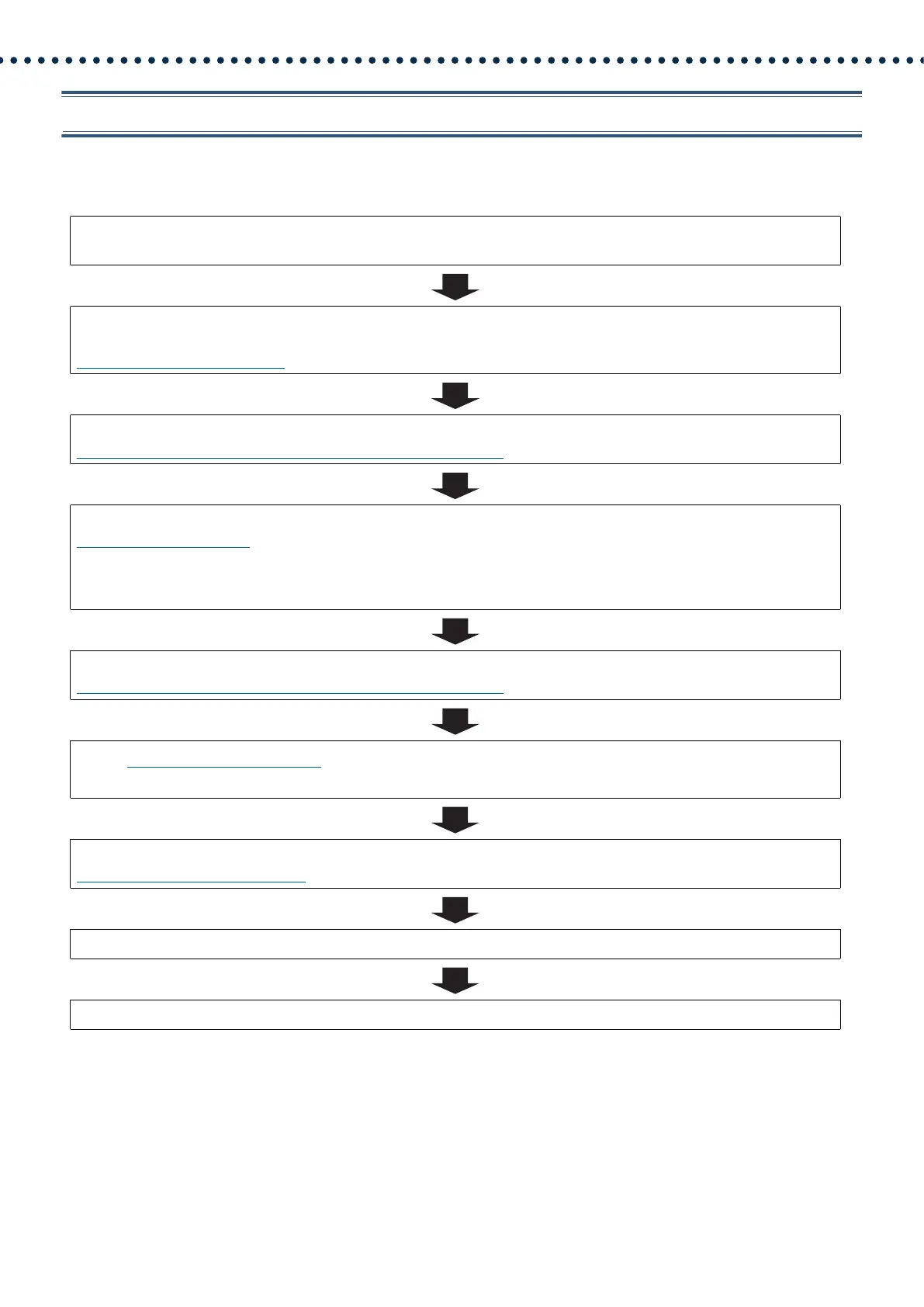
Use this flowchart to add a station.
1. Configure the DHCP server to assign a static IP address.
For how to set up the DHCP server, refer to its manual.
2. Connect PC to the station to be added.
Connect stations one at a time to avoid IP address conflict.
“Connecting to a PC (→page 41)”
3. Log in to the web server of the station.
“Log in to the Web server of the station to be configured (→page 42)”
4. Set "Static / DHCP" to "IPv4 DHCP."
“Static / DHCP (→page 58)”
The station is restarted and the IP address assigned by the DHCP server beforehand will be assigned. If an IP address
cannot be assigned, it will default to "192.168.1.160." If this happens, cycle power to the station, and then the IP address
will be assigned again.
5. Log in to the web server of the station with the assigned IP address.
“Log in to the Web server of the station to be configured (→page 42)”
6. Set “Language (→page 54)”.
Click [Update] to update the settings.
7. Configure the station.
“Configuring the Station (→page 51)”
8. Add settings data to existing stations if required.
9. Complete.





 To Next Page