EasyManua.ls Logo

Alcatel 100 - Customizing Your Telephone; Settings and Personalization

Alcatel 100
84 pages
Print Icon
To Next Page IconTo Next Page
To Previous Page IconTo Previous Page
Loading...
32
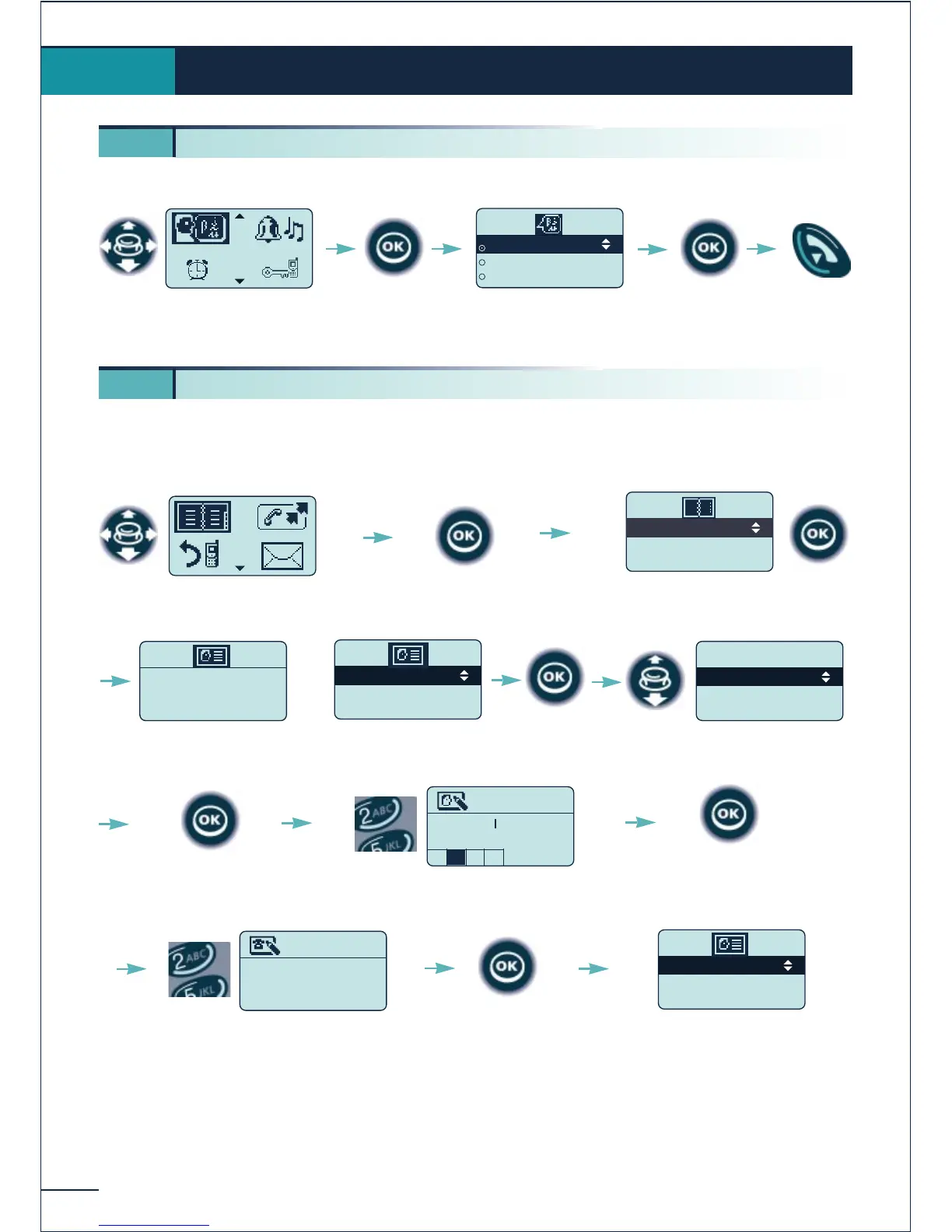
You chan choose the language of the display and voice guides.
Creating an entry in your personal directory
Your personal directory can contain up to 12 numbers.
(*) To enter the name: the keys of the numerical keypad have letters that can be displayed
by pressing the key the appropriate number of times in succession. A grid at the
bottom of the display indicates the character selected.
Example: press "8" two times in succession to display the letter "U".
Customizing and adjusting your telephone
5.
5 1. Choosing the language
Select the "Directories"
function
Confirm

Personal Dir
Phone Book
Confirm access to the
"Personal Dir"
Empty directory
Add an entry ?
SMITH JOHN
Name?
N
O 6M
Confirm
Select the
"Create" option
Confirm
Enter the name (*)
(14 characters max.)
Confirm
Select the "Language"
function
Confirm
French
English
German
Select the language of
your choice
Return to
idle
Confirm
5 2. Programming your personal directory
Create
Back
Options
0123456789
Number ?
Enter the number
(30 figures max.)
Confirm
SMITH JOHN------
OR
MARTIN JACK
SMITH JOHN
BELLER YVES

Table of Contents

Related product manuals